
 Tel:
Tel:  Email:
  WhatsApp:
 Description
Key Technical Specifications
| Parameter | Specification |
|---|---|
| Input Configuration | 8-Channel Differential (Configurable) |
| Signal Compatibility | RTD, Thermocouple (TC), 4-20 mA |
| Communication | RS-485 (Modbus RTU) |
| Isolation Voltage | 1500 V AC (1 minute) |
| Power Supply | 18-36 V DC (Redundant Input) |
| Operating Temperature | -40°C to 85°C |
| Safety Rating | SIL 2 Capable |
| Protocol Support | HART 7.0 |
Product Introduction
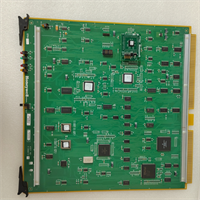
The Honeywell CC-PUIO01 (part number 51454205-175) acts as a critical interface within the Experion PKS and TDC 3000 architectures. It handles the conversion of field signals—such as temperature readings from thermocouples or current loops from transmitters—into digital data for the control processor. This module is essential for maintaining precise closed-loop control in demanding environments like refineries and power generation facilities.Field data indicates that the module’s 16-bit ADC architecture provides a measurement accuracy of ±0.05% of full scale. This precision minimizes data variance, allowing control algorithms to react faster to process changes. The unit features redundant power inputs, ensuring that a single power rail failure does not interrupt the monitoring of critical safety parameters.

Installation & Configuration Guide
Phase 1: Preparation (10 min)
- Verify the backplane slot is free of debris and the locking levers are open.
- Check the DIP switches on the front faceplate against the system configuration file.
- Critical: Ensure your wrist strap is grounded. Static discharge can damage the input circuitry instantly.
Phase 2: Removal of Old Unit (5–10 min)
- If replacing a live unit, ensure the I/O link is bypassed or the system is in a safe state.
- Disconnect the field wiring harness from the terminal block (do not pull on the wires).
- Unscrew the mounting retention screws and slide the module out.
Phase 3: Installation (10 min)
- Slide the CC-PUIO01 into the slot until the backplane connector seats firmly.
- Tighten the retention screws to secure the module against vibration.
- Reconnect the field wiring harness. Verify polarity on the 24V DC power terminals.
Phase 4: Power-On & Test (10 min)
- Apply power to the rack.
- Observe the status LEDs. The “COM” light should flash, indicating communication with the controller.
- Run a loop check from the operator station to verify channel integrity.
Troubleshooting Quick Reference
| Symptom | Probable Cause | Corrective Action |
|---|---|---|
| Status LED is Red | Internal hardware fault or watchdog timeout. | Cycle power. If persistent, replace module. |
| No Communication | Backplane connector not seated or baud rate mismatch. | Reseat module. Check DIP switch settings against manual. |
| erratic Readings | Ground loop or loose terminal connection. | Check shielding/grounding. Tighten terminal block screws. |
| Channel Error | Sensor wiring fault (open/short). | Measure resistance at the terminal block with power off. |
Dimensions, Mounting & Wiring Notes
- Form Factor: Standard 3U Eurocard format (height and depth vary by specific rack housing).
- Mounting: DIN rail or Panel mount (via specific carrier assembly).
- Wiring: Uses pluggable terminal blocks.
- Note: Use 18-22 AWG wire for field connections.
- Torque: Terminal screws should be torqued to 0.5 Nm to prevent loosening due to thermal cycling.
FAQ
Q: Is the CC-PUIO01 compatible with older TDC 3000 racks?
A: Generally, yes. However, you must verify the firmware revision. Older racks may require a specific PROM version to recognize the UIO module correctly. Check the “Hardware Compatibility Matrix” in your system manual.Q: What does the “51454205-175” number mean?
A: That is the specific Honeywell part number (PN) for this module revision. When ordering replacements, matching this number ensures you get the exact hardware version your system expects.Q: Can I hot-swap this module?
A: The hardware supports hot-swapping, but you should only do this if your system configuration allows it. Removing a live module without bypassing the logic in the controller will cause a “Bad PV” alarm and could trip the process.Q: I see a “TC-CCR” label on the box, is this the same thing?
A: Be careful. “TC” usually denotes a different series (often related to specific communication or termination boards). Ensure the label explicitly says “CC-PUIO01” or lists 51454205-175 as the content.Q: Does this come with the terminal block?
A: Usually, the module is sold as the card itself. The removable terminal block (the green plug where wires connect) is often sold separately or reused from your old card. Check the listing description carefully.Q: What is the lead time for this?
A: Since this is a mature product, new factory orders can take weeks. We stock surplus units that ship within 24 hours, allowing you to fix the downtime immediately.