 Tel:
 Email:
 WhatsApp:
Description
Key Technical Specifications
| Parameter | Specification |
|---|---|
| Part Number | D20 EME / D20-EME |
| Variant | D20 EME 10BASE-T (Ethernet/memory module) |
| Brand | GE / GE Vernova |
| Module Type | Communication / memory board |
| Ethernet Interface | 10BASE-T (10 Mbps Ethernet) |
| Typical Application | GE Mark VIe turbine control, D20-series industrial control |
| Related Part Number | IS215WETAH1A (listed for D20 EME2 10BASE-T variant) |
| Operating Temperature | -40°C to +85°C (vendor-claimed; verify on nameplate) |
| Storage Temperature | -40°C to +85°C (vendor-claimed) |
| Humidity | 5% to 95% non-condensing (vendor-claimed) |
| Installation | Module/board installed in GE Mark VIe or D20-series chassis |
| Supply Status | Legacy/obsolete module; verify revision and firmware before purchase |
Product Introduction
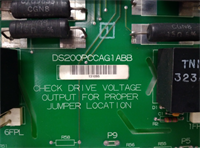
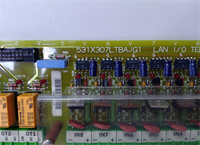
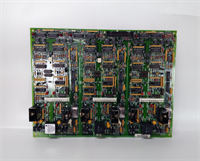
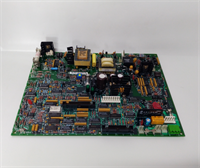
The GE D20 EME is one of those legacy boards that keeps showing up in Mark VIe turbine racks and older GE D20 control cabinets. It is not a generic Ethernet switch. In the field, it usually acts as the Ethernet/memory communication board that lets the controller talk to the rest of the network — HMI, SCADA, peer controllers, or turbine subsystems.What makes this board worth tracking down is simple: if the original D20 EME fails, you cannot just drop in a random GE communication card. The chassis, firmware, and network configuration must line up. With 10BASE-T Ethernet and integration into GE Mark VIe/D20 platforms, it still holds its place in plants that have not migrated to newer IEDs or PACs. That said, vendor datasheets are inconsistent. I would never power one up without checking the board revision, firmware label, and chassis compatibility first.
Quality SOP & Tech Pitfalls
The Lab Report (SOP)
- Visual and counterfeit check: nameplate, revision label, solder joints, connector pins, corrosion, burn marks.
- Live test on a compatible GE test rack: power-up, module recognition, Ethernet link detection.
- Electrical checks: supply voltage verification, insulation resistance, connector continuity with a Fluke-style multimeter.
- Firmware/revision logging: record board revision, firmware version, and any jumpers or configuration labels.
- Anti-static sealing: ESD bag, foam padding, rigid carton, with test record attached. Test video or report available on request.
The Engineer’s Warning (Pitfalls)
- Revision mismatch is the silent killer. D20 EME boards appear under several labels — D20-EME, D20 EME 10BASE-T, D20 EME2 10BASE-T. Same base name does not mean drop-in compatible.
- Firmware must match the chassis. A board that powers up fine can still fail to communicate if the firmware revision does not match the rest of the Mark VIe or D20 station.
- Do not trust vendor specs blindly. Some listings assign 32 DI/32 DO, others call it a power module, others list 1.5 W or 143 W power consumption. Those numbers conflict. Treat them as vendor-claimed until the nameplate confirms them.
- ESD damage is invisible. These communication boards do not announce when they take a static hit. Handle them with a wrist strap and proper ESD packaging.
Installation & Configuration Guide
- Pre-Installation
- ⚠️ Perform a proper safety shutdown and lockout/tagout on the control rack.
- ⚠️ Wait for capacitors to discharge before removing any board.
- Photograph the existing module: nameplate, revision, firmware label, Ethernet cabling, slot position, and LED status.
- Removal
- Label Ethernet cables and any auxiliary wiring.
- Release retaining screws or card guides carefully.
- Pull the board straight out; do not bend the backplane connector.
- Installation
- Confirm board revision and firmware match the original. This prevents most communication failures.
- Seat the module firmly into the correct chassis slot.
- Reconnect Ethernet cables and verify link LEDs.
- Power-On & Testing
- Verify chassis power and supply voltage before energizing.
- Power up and check the LED boot sequence.
- Confirm module recognition in the GE configuration tool.
- Verify Ethernet communication, SCADA/HMI connectivity, and network timestamps.
- Run a short functional test before returning the turbine or process to full operation.
Compatible Replacement Models
| Compatibility Tier | Model | Notes |
|---|---|---|
| ✅ Drop-in Replacement | GE D20 EME / D20-EME, same revision | Board revision, firmware, and slot assignment must match. |
| ⚠️ Software/Firmware Compatible | GE D20 EME different revision | May require firmware alignment, chassis compatibility check, and network reconfiguration. |
| ⚠️ System Upgrade | GE Mark VIe / Mark VIeS migration | Requires engineering review, firmware compatibility check, and possible I/O remapping. |
| ❌ Not Compatible | Unrelated GE FBM/PLC/DCS modules | Different product families cannot be substituted by part-number guessing. |
Frequently Asked Questions (FAQ)
Q: Is the GE D20 EME a communication module or a power supply?
It is primarily an Ethernet/memory communication module in the GE D20/Mark VIe family. Some vendor listings call it a power module, but those descriptions are inconsistent and should be verified against the actual nameplate.Q: Can I use any D20 EME board as a replacement?
No. The revision, firmware, and chassis type must match. D20 EME, D20-EME, and D20 EME2 10BASE-T are not automatically interchangeable.Q: Can I hot-swap this module?
Only if the specific GE chassis and configuration explicitly support hot swap. Otherwise, replace it during a planned maintenance window.Q: Are the published specs reliable?
Treat them as vendor-claimed. Public listings conflict on power, I/O count, and function. Always verify against the physical board and OEM documentation.Q: Do you supply new original units?
New original stock is rare for this legacy series. Most available units are New Surplus or tested used stock. Request nameplate photos and test records before purchase.Q: What warranty should I expect?
Obsolete modules typically carry a shorter warranty than new products. Confirm the exact period with the supplier and keep the test report.Q: How do I confirm compatibility before ordering?
Send the original board nameplate, revision label, firmware version, chassis model, and slot position. That is the only reliable way to avoid a mismatch.