 Tel:
 Email:
 WhatsApp:
Description
Key Technical Specifications
| Parameter | Specification |
|---|---|
| Base Model | IS220UCSAH1A (suffix AK denotes revision/batch) |
| Board Type | UCS Embedded Controller / Processor Module |
| System Platform | GE Speedtronic Mark VIe |
| Processor | Freescale PowerPC 8349 class embedded CPU |
| Operating System | QNX Neutrino RTOS |
| Ethernet Ports | Multiple 10/100/1000 Mbps Ethernet ports (front panel) |
| Serial / USB | USB port on front panel; serial interface support varies by configuration |
| Power Input | Nominal 24 V DC (verify exact range against OEM label) |
| Redundancy Support | Simplex and TMR (Triple Modular Redundant) |
| Hazardous Location | Suitable for Class I, Div. 2 / Zone 2 applications |
| Cooling | Convection-cooled; no internal fan required |
| Mounting | DIN-rail / backplane-mounted controller pack |
Product Introduction
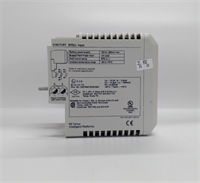
When a turbine trips because a controller lost its network heartbeat, nobody cares about marketing specs. They care about whether the replacement boots, syncs, and takes control without dragging the unit offline. The IS220UCSAH1AK is a GE Speedtronic Mark VIe UCS controller module. It runs the real-time control logic, communicates with I/O packs over the control network, and participates in redundancy voting when deployed in a TMR configuration.14Engineers keep this board on the shelf because it is not something you order the day before a forced outage. It handles Ethernet-based control communications, supports QNX-based deterministic execution, and integrates directly with Mark VIe I/O packs and CIMPLICITY HMI stations.57 One caution: the AK suffix is a revision variant of the IS220UCSAH1A base model. Do not assume the firmware, boot loader, or network configuration is identical. I have seen a “compatible” controller sit in Boot mode for hours because the application image did not match the rest of the TMR trio.
Quality SOP & Tech Pitfalls
The Lab Report (SOP):
- Visual/Counterfeit Check: Inspect GE part label, PCB revision, connector condition, and conformal coating.
- Power-On Test: Apply rated DC supply and verify LED sequence: Power, Boot, Online, Diag.
- Ethernet Port Check: Verify link/activity on each front-panel Ethernet port.
- Boot Mode Verification: Confirm the controller reaches Online state without persistent Diag faults.
- Application/Firmware Logging: Record firmware version, boot loader version, and application image ID. Compare against the existing TMR members.
- Insulation and Connector Check: Verify front-panel connectors and power terminals for corrosion, bent pins, or loose contacts.
- ESD Packaging: Seal in anti-static bag with test record and photo of nameplate.
The Engineer’s Warning (Pitfalls):
- Firmware and application mismatch will kill a TMR system. If the replacement controller has a different application image, it may boot but refuse to go Online. In a TMR rack, that forces the system into degraded mode. I have seen crews swap a UCS controller, assume “same part number” meant “ready to run,” and lose hours while the new node stayed in Boot or Fault.
- Do not ignore the network configuration. Mark VIe controllers rely on correct IP addressing, network role assignment, and TMR synchronization settings. A controller with factory-default or stale network settings will not rejoin a live control network cleanly.
- Avoid hot-insertion unless the OEM procedure explicitly allows it. Pulling or inserting a UCS controller while the rack is energized can corrupt the boot sequence or damage backplane contacts.
Installation & Configuration Guide
Phase 1 — Pre-Installation ⚠️
- Follow plant LOTO and turbine safety procedures.
- Confirm the control system is in a safe state for controller replacement.
- Photograph the existing controller nameplate, LED status, Ethernet cable labels, and TMR configuration.
- Record the firmware version, application image, and IP/network settings from the working controllers.
Phase 2 — Removal
- Label all Ethernet and serial cables before disconnecting.
- If the system supports controlled removal, take the affected controller offline through the HMI first.
- Release the mounting hardware and slide the controller out carefully.
Phase 3 — Installation
- Verify firmware, application image, and network settings before inserting the new controller. This prevents most startup failures.
- Seat the controller firmly in the rack or mounting position.
- Reconnect Ethernet cables to the correct ports. Mark VIe networks are not always interchangeable; a maintenance port is not always the same as a control network port.
- Restore power only after all connections are verified.
Phase 4 — Power-On & Testing
- Observe the LED boot sequence: Power → Boot → Online.
- Confirm the controller synchronizes with the rest of the TMR group, if applicable.
- Verify I/O communications, network health, and alarm status on the HMI.
- Do not return the turbine to full automatic control until all redundancy statuses are confirmed healthy.
Compatible Replacement Models
| Tier | Model | Notes |
|---|---|---|
| ✅ Drop-in Replacement | IS220UCSAH1AK | Same revision family. Still requires firmware, application image, and network verification. |
| ⚠️ Software Compatible | IS220UCSAH1A | Same base controller. May require firmware flash, application download, and TMR resynchronization. |
| ❌ Hardware Mod Required | IS200UCxx Mark V controllers | Different platform, different backplane, different software. Not a direct replacement. |
| ❌ Not Compatible | Mark VIeS or non-UCS I/O packs | Different architecture. Cannot replace a UCS controller with an I/O or terminal board. |
Frequently Asked Questions (FAQ)
Can I hot-swap this controller safely?
Only if the OEM procedure and your plant standards allow it. In a TMR system, removing one controller may be acceptable, but inserting a new one without the correct application image can force the rack into degraded mode. Treat it as a controlled outage unless you have confirmed redundancy health.Is IS220UCSAH1AK the same as IS220UCSAH1A?
It is a revision variant of the same base controller. The hardware platform is similar, but firmware, boot loader, and application compatibility must be verified. Never assume the suffix is cosmetic.Will this controller work in a Mark V system?
No. Mark V and Mark VIe use different controller families, software, and backplane architectures. This board belongs to the Mark VIe platform.14What happens if the firmware does not match the other TMR controllers?
The new controller may boot but fail to synchronize. In the worst case, it stays in Boot or Fault, and the TMR group loses majority voting capability. That is not a minor alarm; it is a serious reliability risk.Does this board include the control application?
Not necessarily. Surplus or replacement controllers often ship without a site-specific application image. You must confirm whether the board is blank, factory-loaded, or pre-loaded with a previous customer’s configuration.How do I confirm it is genuine?
Check the GE nameplate, revision label, connector quality, and LED behavior during power-up. Request a power-on test report and photos of the actual unit. Boards with missing labels or inconsistent revision codes should be rejected.Does it come with a warranty?
That depends on the supplier. Reputable industrial surplus distributors usually provide a warranty on new or tested surplus stock. Get the warranty terms in writing before payment.