
 Tel:
 Email:
 WhatsApp:
Description
Key Technical Specifications
| Parameter | Specification |
|---|---|
| Product Type | Unmanaged industrial Ethernet / IONet switch |
| Model | IS420ESWBH2A |
| System Platform | GE Speedtronic Mark VIe / Mark VIeS |
| Copper Ports | Multiple 10/100Base-TX RJ-45, HP-MDIX auto-sense |
| Fiber Ports | Multimode 100Base-FX, LC connector |
| Network Standards | IEEE 802.3, 802.3u, 802.3x |
| Duplex Mode | Full/half duplex auto-negotiation |
| Power Input | VDC, redundant input, reverse polarity protection |
| Inrush Current | Soft-start, limited to approximately double normal operating current |
| MAC Address Table | Multiple entries |
| Buffer Memory | Minimum multiple hundred KB |
| Mounting | DIN-rail or panel mount |
| Operating Temperature | Wide industrial temperature range |
| Environmental | Non-condensing humidity, G3 corrosion resistance |
| Hazardous Area | Class I Division 2 / ATEX-rated variants |
| Diagnostics | Front-panel LEDs for power, link, activity, duplex, and speed |
Product Introduction
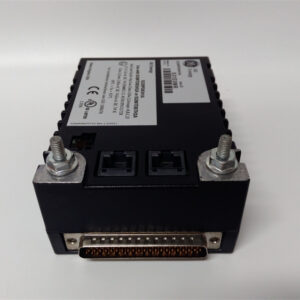
The IS420ESWBH2A is not a generic rack switch. It is a GE Mark VIe / Mark VIeS unmanaged IONet switch built to sit inside turbine control networks where electromagnetic noise, vibration, and temperature swings are normal. The H2A revision stands out because it carries multiple copper ports and multimode fiber uplinks, which makes it useful when you need to keep local I/O on copper and push backbone traffic over fiber.Engineers pick this unit because it does not need complex configuration and it survives conditions that kill office-grade switches. The redundant VDC power, soft-start inrush limiting, G3 corrosion compliance, and wide temperature range are what matter during a trip investigation or a rainy commissioning night. I have seen sites replace a commercial switch with this unit and stop chasing intermittent packet loss caused by ground loops and long copper runs. The fiber ports are the real reason to specify H2A over copper-only ESWB variants.
Quality SOP & Tech Pitfalls
The Lab Report (SOP)
- Visual and counterfeit check: full model IS420ESWBH2A, label data, housing condition, port damage, power terminal integrity.
- Port inspection: RJ-45 pins for bent contacts; LC fiber ports for contamination or physical damage.
- Power check: verify VDC input terminals, polarity protection, and redundant power wiring.
- Basic live test: apply rated DC power, confirm LED status, verify link on copper and fiber ports.
- Throughput sanity check: confirm link negotiation, packet forwarding, and broadcast/multicast handling.
- Documentation: record serial number, revision, port map, and photos before anti-static packing.
The Engineer’s Warning (Pitfalls)
- Do not confuse IS420ESWBH2A with IS420ESWBH1A or other ESWB variants. The H2A has fiber ports; other versions may have fewer or none. Wrong port count breaks your backbone design.
- This is an unmanaged switch. You cannot configure VLANs, port mirroring, or SNMP diagnostics. If your network plan assumes managed features, this unit will not deliver them.
- Fiber polarity and patch type matter. A swapped TX/RX pair or wrong fiber type will look like a dead switch when it is actually a bad patch.
- Treat the RJ-45 ports with respect. They are rated for repeated mating, but industrial dust and oil contamination cause more failures than the connector itself.
Installation & Configuration Guide
1. Pre-Installation ️
- Follow plant safety procedures and obtain clearance before modifying control network hardware.
- Photograph existing switch wiring, fiber patches, port assignments, and LED status.
- Verify power supply voltage, polarity, and redundant feed availability.
- Confirm the replacement has the correct port layout: multiple RJ-45 and LC fiber ports.
2. Removal
- Disconnect copper cables and label each port.
- Remove fiber patches and cap both ends immediately.
- Remove DC power leads.
- Release DIN-rail mounting and remove the switch.
3. Installation
- Mount the replacement switch securely on the DIN rail.
- Reconnect DC power with correct polarity.
- Reinstall copper cables per the original port map.
- Reconnect fiber patches carefully; verify TX/RX orientation.
- Confirm redundant power wiring if the original installation used it.
4. Power-On & Testing
- Apply power and check LED indicators.
- Verify link on each active copper port.
- Verify fiber uplink status and end-to-end communication.
- Confirm controller, I/O pack, and HMI communication through the switch.
- Document port usage, fiber patch IDs, and any changes to the network layout.
Compatible Replacement Models
| Compatibility | Model | Notes |
|---|---|---|
| Drop-in Replacement | IS420ESWBH2A | Same Mark VIe/VIeS unmanaged switch with copper and fiber ports. Verify revision and power rating. |
| ️ Software/Configuration Compatible | IS420ESWBH1A or other ESWB variants | May fit mechanically and electrically, but fiber port count and network topology may differ. Requires engineering review. |
| Hardware Mod Required | Managed third-party switches | Not a direct Mark VIe IONet replacement. Migration requires network redesign, testing, and OEM validation. |
Frequently Asked Questions (FAQ)
Q: Is the IS420ESWBH2A a managed switch?
No. It is an unmanaged industrial Ethernet / IONet switch. It does not support VLANs, SNMP, or port-level configuration.Q: Can I use it outside a GE turbine control system?
Electrically it can switch standard Ethernet traffic, but it is engineered for Mark VIe/VIeS IONet applications. If you need managed features, this is not the right device.Q: What is the main difference between IS420ESWBH2A and IS420ESWBH1A?
The H2A includes multimode fiber ports. Other ESWB variants have different fiber port counts. Check the OEM datasheet before substituting.Q: Does it support redundant power?
Yes. It accepts VDC with redundant input and reverse polarity protection.Q: Can I hot-swap it in a live Mark VIe network?
Physically yes, but only if your network architecture and plant procedures allow it. Removing an active switch can interrupt controller-to-I/O communication. Plan the swap during a maintenance window.Q: What causes fiber link failures after replacement?
Most often dirty LC connectors, swapped TX/RX pairs, wrong fiber type, or excessive bend radius. Clean the connectors and verify polarity before blaming the switch.