 Tel:
 Email:
 WhatsApp:
Description
Key Technical Specifications
| Parameter | Specification |
|---|---|
| Module Type | DeviceNet Master Communication Module |
| Compatible Platform | GE Fanuc Series 90-30; PACSystems RX3i main rack only |
| Slot Requirement | Any Series 90-30 slot except Slot 0 and Slot 1 |
| Network Protocol | DeviceNet |
| Baud Rates | 125K, 250K, 500K |
| Max Slave Nodes | 63 DeviceNet slaves |
| Max I/O Connections | 126 I/O connections |
| Per-Slave Data | Up to 255 input bytes and 255 output bytes |
| Total Master Data | Up to 3,972 input bytes and 3,972 output bytes |
| Module Supply Voltage | 12–24 V DC, positive logic |
| Backplane Current | 5 V DC, 450 mA |
| Service Port | RS-232, 9-pin D-sub female |
| Data Connections | Poll, Strobe, Cyclic, Change-of-State |
| Messaging | Explicit messaging, UCMM, 1 proxy connection per slave |
| Operating Temperature | 0 to 60 °C |
| Storage Temperature | -40 to 85 °C |
Product Introduction
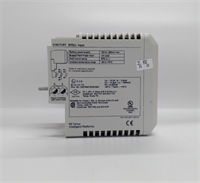
If your plant still runs a Series 90-30 rack with DeviceNet drives, scanners, or valve islands, the IC693DNM200-BD is usually the module keeping that network alive. It sits in a Series 90-30 main rack, takes 12–24 V DC, and talks DeviceNet at 125K, 250K, or 500K to as many as 63 slaves. I’ve seen these on packaging lines and material-handling systems where replacing the whole PLC family is not an option this quarter.Engineers keep this module because it is a known quantity. It supports poll, strobe, cyclic, and COS connections, handles explicit messaging, and can run in dual master/slave mode when the network topology demands it. The RS-232 service port is still useful for firmware updates and diagnostics. Just don’t treat it like a modern Ethernet switch. DeviceNet termination, node addressing, and baud-rate consistency still matter, and sloppy wiring will beat this module faster than any firmware bug.
Quality SOP & Tech Pitfalls
The Lab Report (SOP)
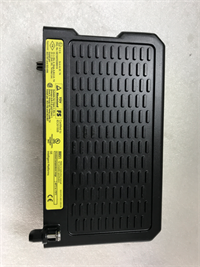
- Visual and counterfeit check: inspect housing, label revision, connector pins, and PCB date codes.
- Live test on a Series 90-30 test rack: verify backplane registration, LED status, and RS-232 service port response.
- Electrical checks: confirm 12–24 V DC supply draw and 5 V backplane current near the 450 mA spec using a Fluke 115 or equivalent.
- Network smoke test: connect to a DeviceNet test stub, verify node scan, and confirm poll/COS traffic.
- Firmware logging: record firmware revision via RS-232 before sealing.
- ESD-safe packaging: anti-static bag, foam support, and moisture barrier if stored long-term.
The Engineer’s Warning (Pitfalls)Firmware mismatch is the quiet killer here. A replacement IC693DNM200-BD with an older revision can boot fine but fail to talk to certain slaves, or it can change timeout behavior just enough to create intermittent faults. I once watched a weekend swap turn into a Monday morning crisis because nobody checked the firmware revision; the module looked identical, but the network would not stabilize until the correct image was loaded through the RS-232 port.The second common mistake is ignoring DeviceNet physical layer rules. Wrong termination, missing bias, duplicate node IDs, or mixing baud rates will make this master look guilty when the real problem is the cable plant. Photograph the old module, the DIP switches if present on attached devices, and the network map before touching anything.
Installation & Configuration Guide
1. Pre-Installation
- Shut down the PLC rack and verify zero energy.
- Wait for capacitors to discharge.
- Photograph the existing module label, firmware revision, slot position, and network wiring.
- Record DeviceNet baud rate, node address, termination settings, and slave map.
2. Removal
- Label all DeviceNet and power connections.
- Release DIN or rack mounting hardware carefully.
- Remove the module without forcing the backplane connector.
- Inspect the backplane pins for bent contacts.
3. Installation
- Copy all configuration data from the old module before removal. This prevents most startup failures.
- Install the IC693DNM200-BD into an allowed Series 90-30 main rack slot, not Slot 0 or Slot 1.
- Seat the module firmly on the backplane.
- Reconnect DeviceNet wiring with correct polarity, termination, and baud-rate settings.
4. Power-On & Testing
- Apply 12–24 V DC and verify normal module LED behavior.
- Power the rack and confirm the CPU recognizes the module.
- Download or verify the DeviceNet configuration.
- Scan the network and confirm each slave reaches Run mode.
- Monitor for explicit message timeouts and COS update stability before returning to production.
Compatible Replacement Models
- IC693DNM200 (non-BD revision): Likely drop-in for many Series 90-30 applications, but firmware revision and connector style must be verified against the existing unit.
- ️ IC694DNM200: DeviceNet master for RX3i and some Series 90-30 CPUs with Firmware 8.0 or later, Firmware 10 recommended. Not a simple mechanical drop-in for every 90-30 rack; verify CPU compatibility and slot rules before planning the swap.
- Ethernet/IP or Profibus modules: Require network redesign, new slave devices, and PLC logic changes. Do not use as a direct replacement unless you are already executing a full communication migration.
Frequently Asked Questions (FAQ)
Can I hot-swap the IC693DNM200-BD?
Not unless the rack, CPU, and power system explicitly support hot insertion for that slot. Most Series 90-30 swaps should be done with the rack powered down. Assume no hot-swap unless your OEM documentation confirms it.Will this module work in any 90-30 slot?
No. It fits Series 90-30 main rack slots, but not Slot 0 or Slot 1. It is not intended for remote or expansion racks.Can I use it on PACSystems RX3i?
It can operate in an RX3i main rack, but CPU compatibility and firmware requirements must be checked first. For newer RX3i builds, the IC694DNM200 is often the cleaner path.What baud rate should I use?
Match the existing network: 125K, 250K, or 500K. Do not raise the baud rate to “improve performance” without verifying cable length, termination, and every slave device rating.How many slaves can it handle?
Up to 63 DeviceNet slaves, with a maximum of 126 I/O connections. Each slave can use up to 255 input bytes and 255 output bytes, and the master supports up to 3,972 bytes in each direction.Is this module obsolete?
Series 90-30 is a mature legacy platform, and availability depends on stock condition. Verify whether the unit is new original, new surplus, or refurbished before purchase.What causes intermittent DeviceNet faults after replacement?
Usually firmware mismatch, incorrect baud rate, bad termination, duplicate node IDs, or a configuration that was not fully copied from the old module. Check the physical layer first, then the firmware revision.