 Tel:
Tel:  Email:
  WhatsApp:
 Description
Key Technical Specifications
| Parameter | Specification |
|---|---|
| Model | P0928AY |
| Brand | Foxboro (Invensys / Schneider Electric) |
| Product Family | I/A Series Fieldbus Module (FBM) |
| Module Type | Fieldbus Communication Module |
| Fieldbus Speed | 2 Mbps |
| System Compatibility | Foxboro I/A Series DCS |
| Typical Processor Pairing | CP30 / CP40 / CP60 control processors |
| Fieldbus Architecture | Redundant serial fieldbus (I/A Series standard) |
| Mounting | I/A Series fieldbus module slot |
| Condition | New surplus / tested used |
Product Introduction
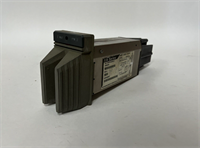
The P0928AY is one of those Foxboro I/A Series fieldbus modules that does not look impressive on a desk but matters a lot when the rack is live. It sits on the 2 Mbps fieldbus side of the I/A Series architecture and links control processors such as the CP30, CP40, or CP60 to the fieldbus-mounted FBM I/O components. If this module loses communication, you do not get a gentle warning. You get missing I/O quality flags, degraded control loops, and an operator screen full of bad tags.Engineers keep this module in service because Foxboro I/A Series plants are still running in power, chemical, and oil and gas facilities, and the fieldbus layer is not something you replace casually. The 2 Mbps fieldbus speed was solid for its time, and the redundant fieldbus design means a single module failure should not take down the entire I/O segment — provided the rest of the rack is healthy. This specific revision is straightforward in concept, but it is picky about slot assignment, firmware alignment, and fieldbus termination. I have seen a perfectly good P0928AY blamed for a communication fault when the real problem was a loose fieldbus connector or a mislabeled slot.
Quality SOP & Tech Pitfalls
The Lab Report (SOP)
- Visual and Counterfeit Check: Inspect the housing, connectors, label format, and revision marking. Verify “FOXBORO P0928AY” and look for corrosion, cracked connectors, or bent pins.
- Connector and Backplane Inspection: Check the fieldbus and backplane connectors for oxidation or damaged pins. A single bad pin can create intermittent fieldbus loss.
- Live Test on I/A Series Test Rack: Install in a known-good I/A Series chassis with verified power and processor. Confirm the module initializes without communication fault.
- Fieldbus Communication Check: Verify 2 Mbps fieldbus communication with connected FBM components. Confirm no persistent loss-of-communication alarms.
- Redundancy Verification: If the system supports redundant fieldbus, confirm failover behavior per OEM procedure.
- Firmware and Revision Logging: Record the module revision and any firmware or configuration data visible through the I/A Series diagnostics.
- Insulation and Continuity Check: Verify connector continuity and isolation per standard industrial module practice.
- ESD Packaging: Anti-static bag, foam, rigid carton. Test report available on request.
The Engineer’s Warning (Pitfalls)Two mistakes that waste shifts:
- Swapping it without photographing the slot map and fieldbus wiring. The P0928AY is not a generic communication card. It belongs to a specific fieldbus segment. If you pull it and lose the wiring record, you may restore power but still lose I/O quality.
- Assuming any Foxboro fieldbus module is interchangeable. P0928AY is listed as a 2 Mbps fieldbus module, but I/A Series has multiple FBM and communication variants. Wrong revision, wrong slot, or wrong fieldbus address can keep the module from talking even if it powers up.
Installation & Configuration Guide
30-Minute Swap Procedure
- Pre-Installation ⚠️
- Obtain work permit and notify operations. This is a live DCS fieldbus module.
- Open the I/A Series diagnostics and record the current module status, slot position, and fieldbus segment health.
- Photograph the entire rack: slot positions, fieldbus connectors, cable labels, and LED indicators.
- Confirm the replacement P0928AY matches the original revision and function.
- Removal
- If online replacement is supported and approved, confirm the redundant path is healthy.
- Label all fieldbus cables and connectors before disconnection.
- Release the module retainers and remove the module straight out. Do not force the connector.
- Installation
- Verify the slot position matches the original configuration. This is critical.
- Seat the P0928AY firmly into the correct slot.
- Reconnect fieldbus cables exactly as photographed.
- Tighten retainers to OEM specification.
- Power-On & Testing
- Verify the module powers up and communicates with the control processor.
- Check I/A Series diagnostics for fieldbus status, module health, and FBM communication.
- Confirm no loss-of-communication alarms on the affected fieldbus segment.
- Spot-check key I/O tags for valid quality and reasonable values.
- Document the module serial number, revision, slot position, and test results.

Compatible Replacement Models
| Tier | Model | Compatibility | Notes |
|---|---|---|---|
| ✅ Drop-in | FOXBORO P0928AY (same revision) | 100% match | Same model and revision. Verify fieldbus configuration. |
| ⚠️ Software/Config Compatible | FOXBORO P0928A-series fieldbus module | May require revision check | Only substitute if OEM documentation confirms functional equivalence. |
| ⚠️ System Upgrade | Foxboro Evo / AVEVA DCS migration | New platform | Requires full engineering migration. Not a module swap. |
| ❌ Not Compatible | FOXBORO FBM01–FBM27 I/O modules | Different function | These are field I/O components, not fieldbus communication modules. |
| ❌ Not Compatible | FOXBORO CP30/CP40/CP60 | Different function | These are control processors, not fieldbus interface modules. |
Frequently Asked Questions (FAQ)
Q: What does the P0928AY actually do?
It is a Foxboro I/A Series fieldbus communication module rated for 2 Mbps fieldbus communication. It links control processors to fieldbus-mounted FBM I/O components.Q: Can I hot-swap this module?
Only if the I/A Series configuration and plant procedure allow it. The I/A Series fieldbus can be redundant, but you still need operations approval and a rollback plan. Never pull a fieldbus module during a critical process upset.Q: Is P0928AY the same as an FBM01 or FBM203?
No. FBM01, FBM203, and similar modules are field I/O components. P0928AY is a fieldbus communication module. They are not interchangeable.Q: Will any Foxboro fieldbus module work as a replacement?
No. I/A Series fieldbus modules must match the system revision, slot assignment, and fieldbus configuration. Using the wrong variant can cause communication faults even if the module powers up.Q: Is this module still available new from Foxboro or Schneider?
The Foxboro I/A Series is a mature legacy platform. Some support remains, but P0928AY units in the market are typically new surplus or tested used stock. Always request photos, revision data, and test records.Q: What warranty do you offer?
Standard 12-month warranty on tested units. New surplus may carry remaining OEM warranty where applicable. A test report can be provided on request.Q: What should I check first if the fieldbus segment goes bad after replacement?
Check slot position, fieldbus cable connections, termination, module revision, and I/A Series diagnostic alarms. Most fieldbus faults after a swap come from wiring or configuration, not from the module itself.