
 Tel:
Tel:  Email:
  WhatsApp:
 Description
Key Technical Specifications
| Parameter | Specification |
|---|---|
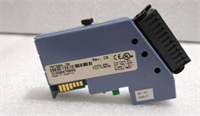
| Product Model | HCMCO3MC-1A |
| Product Type | Temperature Controller Module |
| System Platform | B&R Temperature Control System |
| Channel Configuration | 4 channels (input/output) |
| Max Expansion | Up to 31 modules via side connector (124 channels total) |
| Sampling Rate | 50 ms / 100 ms high-speed sampling |
| Control Mode | Heating and cooling simultaneous control supported |
| Communication | RS485 output; USB dedicated cable for PC parameter setting |
| Configuration Software | Free PC parameter-setting software provided via USB |
| Connector Type | Side connector for inter-module communication and power (no additional wiring required) |
| Power Supply | Powered via module side connector; verify voltage per OEM manual |
| Operating Temperature | Verify against official B&R datasheet for this revision |
| Condition | Surplus / tested stock unless otherwise stated |
Product Introduction
If you are looking at an HCMCO3MC-1A, you are most likely maintaining a B&R-based temperature control system — possibly in plastics processing, packaging, extrusion, or thermal testing equipment. This module does not sit in a DCS rack. It lives in a dedicated B&R temperature control assembly, daisy-chained to neighboring modules through its side connector, reading thermocouples or RTDs and driving heaters or coolers with PID precision.Its practical advantage is the modular architecture. Up to 31 units can be linked without running individual power or communication cables between them, which keeps panel wiring clean and reduces failure points. The USB-based configuration tool means you can pull parameters off a running module or push a known-good configuration into a replacement without rebuilding from scratch. That said, this is a legacy product. B&R has moved forward with newer temperature control platforms, so verify compatibility with your existing assembly before ordering.

Quality SOP & Tech Pitfalls
The Lab Report (SOP):
- Visual / counterfeit check: Verify B&R marking, HCMCO3MC-1A model number, and serial number. Look for re-labeled modules.
- Connector inspection: Check the side connector pins, sensor input terminals, and output terminals for corrosion, bent pins, or heat damage.
- Bench power test: Power the module via the side connector or dedicated power terminals per OEM procedure.
- LED / status check: Confirm power and channel status indicators behave per B&R expectations.
- Channel injection test: Apply a calibrated thermocouple/RTD simulator to each channel. Verify readings through the PC configuration software.
- Output verification: Confirm heating/cooling outputs respond correctly to setpoint changes.
- Inter-module communication test: If possible, link with another HCMCO3MC module and verify daisy-chain communication.
- Parameter backup/restore test: Confirm the module accepts configuration upload/download via USB.
- ESD packing: Seal in anti-static packaging with desiccant. Provide test report if requested.
The Engineer’s Warning (Pitfalls):
- Side connector damage is the silent killer. These modules rely on the side connector for both power and inter-module communication. A bent or oxidized pin on the side connector will make a good module appear dead. Inspect it before installation.
- Configuration mismatch causes false failures. A replacement module with default parameters will not behave like the one it replaced. Always back up the original configuration via USB before removal, then restore it to the replacement.
- Sensor type must match channel configuration. If the original module was configured for Type K thermocouples and the replacement is set to PT100, the readings will be wildly wrong even though the module appears healthy.
- Field story: A plastics plant replaced an HCMCO3MC module and immediately saw temperature spikes on two channels. The module was fine — the previous technician had swapped sensor wires during removal, and the new module’s configuration did not match the old one. Always photograph the wiring and export the configuration before touching anything.
Installation & Configuration Guide
1. Pre-Installation (⚠️ Safety First)
- Obtain work permit and confirm whether the affected temperature loops control critical processes (heaters, extruders, molds, etc.).
- Back up the module configuration via USB before removal.
- Photograph the existing module label, side connector orientation, sensor wiring, and output connections.
- Confirm the replacement HCMCO3MC-1A matches the original model number.
2. Removal
- Power down the module assembly if procedure allows, or follow the OEM hot-swap guidance for your specific system.
- Label all sensor input and output wires.
- Disconnect the side connector carefully — do not force it.
- Withdraw the module straight out.
- Inspect the neighboring module’s side connector for damage.
3. Installation
- Inspect the side connector on both the replacement module and the adjacent module. This prevents most startup failures.
- Align the module and engage the side connector firmly.
- Reconnect sensor inputs and outputs with correct polarity.
- Verify the module is seated properly in the assembly.
4. Power-On & Testing
- Apply power to the module assembly.
- Check LED indicators for normal operation.
- Connect via USB and verify the module is recognized by the configuration software.
- Restore the backed-up configuration to the replacement module.
- Verify all channels report correct temperature values.
- Confirm heating/cooling outputs respond to setpoint changes.
- Monitor for at least one full control cycle before closing the work permit.

Compatible Replacement Models
| Compatibility Tier | Model | Notes |
|---|---|---|
| ✅ Drop-in Replacement | B&R HCMCO3MC-1A (same revision) | Best option. Match model number and restore original configuration. |
| ⚠️ Engineering Review Required | Other B&R HCMCO3MC series modules | Same product family but may differ in channel count or input type. Requires configuration review. |
| ⚠️ System Migration | Newer B&R temperature control platforms (e.g., X20 / APROL-based TC modules) | Requires full migration, new engineering, and planned outage. |
| ❌ Not Compatible | Generic PID controllers, non-B&R temperature modules | Different architecture, communication, and mounting. Not a direct swap. |
Frequently Asked Questions (FAQ)
Can I hot-swap an HCMCO3MC-1A?
B&R temperature control modules support modular replacement in some configurations, but this depends on the specific assembly and whether the system is running critical thermal processes. I would not pull a live module controlling an active heater without confirming the process is safe and obtaining authorization.How do I back up the configuration?
Connect the module to a PC using the dedicated USB cable and the B&R configuration software. Export the parameter set before removing the module. This is the single most important step — without it, you are guessing at channel settings.Why does the module power up but show wrong temperatures?
Most common causes: wrong sensor type configured, swapped sensor wires, damaged side connector, or a configuration mismatch. Start with the USB configuration software and verify each channel’s sensor type and calibration.Can I mix HCMCO3MC-1A with other HCMCO3MC variants?
Potentially, but verify compatibility in the B&R documentation. Different variants may have different channel counts or input types, and the system firmware may enforce consistency across the daisy chain.What is the maximum number of channels?
Up to 31 modules can be linked via the side connector, supporting up to 124 channels total (4 channels × 31 modules).Do you offer warranty?
Typically 12 months on tested surplus, depending on condition and test documentation. For legacy temperature control modules, bench-test the replacement with your configuration software before installing it in the production assembly.