
 Tel:
Tel:  Email:
  WhatsApp:
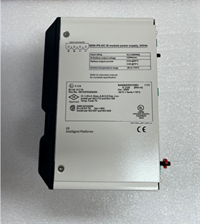
 Description
Key Technical Specifications
| Parameter | Specification |
|---|---|
| Manufacturer | GE Fanuc / GE Intelligent Platforms (Emerson) |
| Module Type | PACSystems RX7i System Power Supply |
| Installation Slot | Slot 0 (leftmost slot of RX7i chassis) |
| Input Voltage (AC) | 85–264 VAC, 47–63 Hz (nominal 120/240 VAC) |
| Input Voltage (DC) | 100–150 VDC (nominal 125 VDC) |
| Total Output Power | 100W (at 0–60 °C ambient) |
| Output: +5 VDC | Up to 20A (nominal 5.1 VDC, range ~4.875–5.25 V) |
| Output: +12 VDC | Up to 2A (range ~11.64–12.6 V) |
| Output: -12 VDC | Up to 1A (range ~-11.64 to -12.6 V) |
| Ride-Through / Hold-Up | ≥15 ms ride-through, ≥5 ms hold-up |
| Isolation | 1500 VDC |
| Power Factor | ≥0.99 (PFC corrected) |
| Protection | Overvoltage, overcurrent, overtemperature, fan failure diagnostics |
| Redundancy | N+1 parallel redundant configuration with load sharing and seamless failover |
| Hot-Swap | Supported |
| Operating Temperature | 0 °C to 60 °C |
| Hazardous Location | Class I, Division 2, Groups A–B–C–D, T4 |
| Front Panel | ON/OFF logic switch, LED indicators (AC OK, DC OK, overtemp) |
| Wiring | Screw terminals; AC input AWG #16, ground AWG #12, 75 °C copper |
Product Introduction
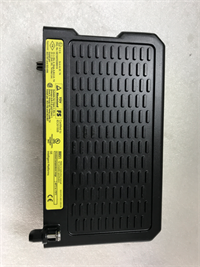
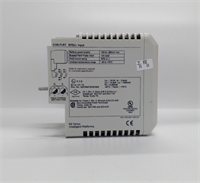
The IC698PSA100E is the power foundation of an RX7i rack. It sits in Slot 0 and feeds the entire backplane — CPU, Ethernet modules, I/O, everything. I’ve replaced these in refineries and power plants where a single failed PSU took down an entire rack because the redundant pair was never commissioned properly. That’s the trap with this module: it supports redundancy, but redundancy doesn’t happen automatically. You need two PSUs, proper parallel wiring, and the backplane configured to recognize both.The “E” revision is the successor to the IC698PSA100D. Electrically they are very similar — same 100W output, same three voltage rails, same Slot 0 requirement. The E revision typically carries updated firmware and diagnostic reporting through Proficy Machine Edition, including real-time output voltage, temperature, and fan speed for predictive maintenance. If your rack is running D revisions, dropping in an E unit is generally fine, but mixing revisions in a redundant pair should be verified against the current RX7i hardware manual.One thing that catches engineers off guard: the front-panel ON/OFF switch is a logic-level switch. It enables or disables the DC output channels without interrupting AC input. That means hazardous voltage is still present on the terminals even when the switch is off. Always verify with a meter before touching terminals.

Quality SOP & Tech Pitfalls
The Lab Report (SOP):
- Visual and counterfeit inspection: PCB condition, edge connector, screw terminal integrity, nameplate revision marking, fan assembly.
- Live test on an RX7i test rack: module recognized in Slot 0, backplane communication established.
- Output verification: +5 VDC, +12 VDC, and -12 VDC measured under load, within specified tolerances.
- Redundancy test (if two units available): parallel operation verified, load sharing confirmed, failover tested by removing one unit.
- Protection check: overtemperature and overcurrent alarms verified via LED indicators and Proficy diagnostics.
- Revision and serial logging: full part number, revision, serial, and date code photographed and recorded.
- Packaging: anti-static bag, shock-absorbing packing, test record included.
The Engineer’s Warning (Pitfalls):
- Redundancy is not automatic. Two PSUs in one rack do not equal redundancy. The parallel bus must be wired correctly, and both units must be healthy. I’ve seen a “redundant” rack go dark because the second PSU had a failed fan and was silently degraded.
- Slot 0 only. This module must be in Slot 0. Placing it in any other slot will not work. The RX7i chassis expects the power supply in the leftmost position.
- Revision mixing in redundant pairs. While D and E revisions are generally compatible, mixing them in a redundant configuration should be verified against the current RX7i hardware manual. Mismatched firmware can cause uneven load sharing or diagnostic reporting errors.
- Wiring gauge matters. Using undersized AC input wiring (below AWG #16) or inadequate grounding (below AWG #12) can cause voltage drop, noise, and intermittent faults. I’ve traced a phantom rack reset to a loose ground wire.
- Total load budgeting. 100W sounds like a lot until you add up CPU, multiple Ethernet modules, and a full rack of I/O. Calculate the backplane load before assuming one PSU is sufficient. For heavy racks, redundancy is not optional — it’s mandatory.
Installation & Configuration Guide
1. Pre-Installation ⚠️
- Obtain work permit and notify operations. This is a system power supply — removing it will de-energize the entire rack unless a redundant pair is active.
- Photograph the existing module: part number, revision, serial number, LED states, and all wiring connections.
- Calculate the total backplane load to confirm the 100W budget is not exceeded.
2. Removal
- If redundant, verify the second PSU is carrying the full load before removing the first.
- Disconnect AC input wiring. Label each conductor.
- Release the module retention hardware and slide the PSU out of Slot 0.
- Place the removed module in an anti-static bag.
3. Installation
- Verify the replacement part number and revision. IC698PSA100E is the target; IC698PSA100D is generally an acceptable substitute if E is unavailable.
- Seat the module firmly in Slot 0. Ensure the edge connector is fully engaged with the backplane.
- Reconnect AC input wiring using AWG #16 copper (75 °C). Connect ground using AWG #12 copper (75 °C).
- If configuring redundancy, connect the parallel bus between both PSUs per the RX7i hardware manual.
4. Power-On & Testing
- Apply AC power. Observe LED indicators: AC OK should illuminate, followed by DC OK.
- Verify output voltages: +5 VDC, +12 VDC, -12 VDC within specification.
- If redundant, test failover by removing one PSU and confirming the rack remains operational.
- Document the new module serial number and revision in the plant’s control system records.
Compatible Replacement Models
| Model | Compatibility | Notes |
|---|---|---|
| GE IC698PSA100E | ✅ Drop-in | Same revision. Preferred replacement. |
| GE IC698PSA100D | ✅ Drop-in | Predecessor revision. Same electrical specs. Widely available. |
| GE IC698PSA100 | ⚠️ Verify | Base model number. Confirm exact revision (D, E, etc.) before purchase. |
| GE IC698PSA300 | ❌ Not compatible | Different series (RX3i). Different form factor and output. |
Frequently Asked Questions (FAQ)
Can I hot-swap a failed IC698PSA100E?
Yes, but only if a redundant pair is properly configured and the second unit is carrying the full load. Removing the only PSU in a rack will shut it down completely.What’s the difference between IC698PSA100D and IC698PSA100E?
Electrically they are nearly identical — same 100W output, same voltage rails, same Slot 0 requirement. The E revision typically has updated firmware and improved diagnostic reporting through Proficy Machine Edition.Can I use this in an RX3i chassis?
No. The IC698PSA100E is designed for the RX7i VME64 chassis. RX3i uses a different power supply family (e.g., IC695PSA040).How do I know if my PSU is actually bad?
Check the LED indicators first. No AC OK light means no input power or a failed input stage. AC OK but no DC OK means the output stage has failed. Test with a multimeter on the output terminals. A significant number of “failed” PSUs turn out to be tripped breakers or loose AC wiring.Is this module new or surplus?
Market supply is primarily new surplus and removed-from-service units. Always request nameplate photos and a pre-shipment test record.What’s the warranty?
12 months against functional defects consistent with delivered condition. Damage from incorrect wiring, power surges, moisture, or improper installation is excluded.Does it support 24 VDC input?
No. The DC input range is 100–150 VDC. It does not accept 24 VDC. If your plant runs on 24 VDC, you need a different power supply solution.