

 Tel:
Tel:  Email:
  WhatsApp:
 Description
Key Technical Specifications
| Parameter | Specification |
|---|---|
| Product Model | FBM216 |
| Order Number | P0922VV |
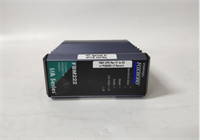
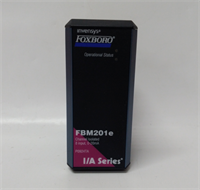
| Product Type | Redundant-Ready HART Analog Input Module |
| System Platform | Foxboro I/A Series DCS |
| Channel Count | 8 analog input channels |
| Input Signal | 0-20 mA / 4-20 mA |
| HART Support | Yes — HART communication on analog input channels |
| Redundancy | Redundant-ready (supports redundant configuration per I/A Series node design) |
| Mounting | Installs in Foxboro I/A Series fieldbus node / FBM carrier |
| Termination | Requires matching Foxboro termination assembly / cable set |
| Diagnostics | Module status and channel diagnostics via I/A Series system software |
| Condition | Surplus / tested stock unless otherwise stated |
Product Introduction
When a Foxboro I/A Series node starts reporting bad analog values on a critical transmitter, the first question is never about firmware features. It is whether the replacement card will read the loop correctly and stay online. The FBM216 P0922VV exists for exactly that job: eight analog inputs with HART, built for a system that still runs plenty of refineries, chemical units, and power plants.Its value is not that it is new. It is that it is predictable. Eight channels, HART diagnostics, and redundant-ready operation mean you can replace a failed input module without rewriting the entire node configuration — provided the termination assembly and firmware level match. I have seen plants keep I/A Series racks running for decades because the FBM hardware did its job quietly. Just do not assume every P0922VV behaves identically across revisions. Check the label, check the node software version, and check the termination assembly before you commit.

Quality SOP & Tech Pitfalls
The Lab Report (SOP):
- Visual / counterfeit check: Verify FBM216 marking, P0922VV order number, hardware revision, and serial number. Look for re-labeled modules.
- Connector inspection: Check the fieldbus connector, termination interface, and mounting hardware for corrosion or damage.
- Node seat test: Install into a known-good Foxboro I/A Series node with proper power.
- LED / status check: Confirm the module is recognized by the node and shows no persistent fault.
- Channel injection test: Apply a calibrated 4 mA, 12 mA, and 20 mA source to each configured channel. Read back values through the I/A Series engineering workstation.
- HART communication check: Verify HART device communication on at least one configured channel if HART is enabled in the project.
- Redundancy verification: If configured redundant, confirm both primary and secondary paths report consistent values.
- ESD packing: Seal in anti-static packaging with desiccant. Provide test report or video if requested.
The Engineer’s Warning (Pitfalls):
- Wrong termination assembly is the most common failure. The FBM216 does not take field wiring directly on the module face. If the termination assembly, cable, or connector set does not match, the channels will fault or read incorrectly.
- Redundant-ready does not mean automatically redundant. The module must be configured redundant in the I/A Series node software. Dropping a P0922VV into a non-redundant slot will not create redundancy by itself.
- Field story: A plant replaced a failed FBM216 with what looked like an identical P0922VV. The module seated fine. The HART channels did not respond. The problem was not the card — it was a mismatched termination cable from an older node revision. Always photograph the old module, cable part numbers, and slot position before removal.
Installation & Configuration Guide
1. Pre-Installation (⚠️ Safety First)
- Obtain work permit and confirm whether the affected loops are tied to alarms, interlocks, or safety functions.
- Back up the I/A Series node configuration before any swap.
- Photograph the existing module label, slot position, termination assembly, and cable connections.
- Confirm the replacement FBM216 P0922VV matches the original order number and revision.
2. Removal
- Identify the faulty module using node diagnostics and front-panel indicators.
- Label all cables and note the slot position.
- Release the module locking mechanism and withdraw the card straight out.
- Inspect the node connector for bent pins or debris.
3. Installation
- Verify the termination assembly and cable set match the FBM216. This prevents most startup failures.
- Seat the module firmly into the correct slot.
- Reconnect all cables with correct orientation.
- Verify the locking mechanism is engaged.
4. Power-On & Testing
- Confirm stable node power.
- Check module status through the I/A Series engineering workstation.
- Verify all eight channels report expected values.
- If HART is configured, confirm HART communication on enabled channels.
- If redundant, confirm primary/secondary consistency.
- Clear latched alarms only after confirming stable readings.

Compatible Replacement Models
| Compatibility Tier | Model | Notes |
|---|---|---|
| ✅ Drop-in Replacement | FOXBORO FBM216 P0922VV (same revision) | Best option. Match label, termination assembly, and node configuration. |
| ⚠️ Engineering Review Required | FOXBORO FBM214 / FBM215 / FBM218 | Same I/A Series FBM family but different function: FBM214 is RTD/HART input, FBM215 is HART output, FBM218 is redundant HART output. Not direct swaps. |
| ⚠️ Engineering Review Required | FOXBORO FBM237 P0914XS | Redundant 8-channel 0-20 mA input but without the same HART input role as FBM216. Requires configuration review. |
| ❌ Not Compatible | Foxboro CP60 / FCP270 / non-FBM controllers | These are controllers or processors, not FBM216 replacements. |
Frequently Asked Questions (FAQ)
Can I hot-swap an FBM216 P0922VV?
Foxboro I/A Series FBMs are designed for node-based replacement, but “hot-swap” depends on the node type, redundancy configuration, and site procedure. If the module carries critical analog inputs, do not pull it without confirming redundancy or obtaining a bypass.Is P0922VV always the same hardware?
No. The order number identifies the base product, but hardware revision, firmware, and termination requirements can vary. Always compare the replacement label with the installed module and the node engineering documentation.Why do the channels show bad value after replacement?
Most common causes: wrong termination assembly, loose cable, incorrect channel configuration, or a module revision mismatch. Start with the termination assembly and cable set.Does FBM216 support HART on all eight channels?
It is an 8-channel HART analog input module, but actual HART availability depends on how the channels are configured in the I/A Series node. Verify in the engineering workstation before assuming every channel is HART-active.Can I use FBM216 in a Foxboro Evo or AVEVA system?
Only if the node hardware and software still support legacy I/A Series FBMs. Newer Foxboro Evo platforms use different I/O architectures. Do not assume backward compatibility.What is the difference between FBM216 and FBM218?
FBM216 P0922VV is a redundant-ready HART analog input module. FBM218 P0922VW is a redundant-ready HART analog output module. They are not interchangeable.Do you offer warranty?
Typically 12 months on tested surplus, depending on condition and test documentation. For legacy FBMs, test the replacement in your node before relying on it during a shutdown.