
 Tel:
Tel:  Email:
  WhatsApp:
 Description
Key Technical Specifications
| Parameter | Specification |
|---|---|
| Part Number | 5X00875G01 |
| System Platform | Ovation Distributed Control System (DCS) |
| Processor Type | High-Performance CPU (Proprietary Architecture) |
| Programming Languages | Ladder Diagram, Logic Diagram, Statement List |
| Operating Temperature | -10°C to +55°C (Storage: -40°C to +70°C) |
| Communication Interfaces | Serial, Ethernet (Port types vary by revision) |
| Protection Features | Overcurrent Protection, Thermal Shutdown |
| Mounting Style | DIN Rail / Rack Mount (Slot specific) |
| Expansion Capability | Supports modular stacking/extension |
Product Introduction
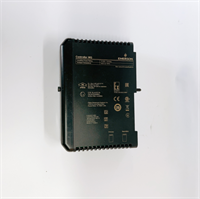
In the world of power generation and heavy industrial control, you don’t have time for “maybe.” The EMERSON 5X00875G01 is the workhorse that keeps the Ovation DCS running. I’ve seen these modules sitting in racks controlling hydrogen-based shaft furnaces and boiler systems where a split-second hesitation means a trip. It’s not just a piece of silicon; it’s the decision-maker.What makes this specific revision stand out is its flexibility with programming. Whether you are running complex statement lists or standard ladder logic, this CPU handles the scan time efficiently. While the specs say it operates up to 55°C, I wouldn’t push it that high without serious airflow. In my experience, keeping this unit below 45°C ensures longevity, especially since electrolytic capacitors inside these older units tend to dry out if they bake too long. It’s built tough—industrial grade all the way—but treat it with respect.

Quality SOP & Tech Pitfalls (The Reality Check)
The Lab Report (SOP):
Before we ship a 5X00875G01, we don’t just wipe the dust off and box it up. That’s a recipe for a return call at 2 AM.
- Visual Inspection: We check the PCB for any signs of thermal stress or capacitor leakage. The connectors get a magnified look for bent pins—a common issue with rough handling.
- Live Test: The module goes onto our test rack. We verify the boot sequence. If the status LEDs don’t cycle through the self-test properly, it fails.
- Comm Check: We establish a handshake with the engineering station. If it can’t hold a connection or throws parity errors, it gets scrapped.
- Final Seal: Once it passes, it goes into an anti-static bag. No exceptions.
The Engineer’s Warning (Pitfalls):
Here is the trap: Firmware Revision Mismatch.
I once watched a junior tech install a “new” 5X00875G01 into a live system, only to watch the entire node drop offline. Why? The firmware version on the replacement was two generations ahead of the existing network. The Ovation system is strict about compatibility. Before you swap this CPU, you need to know exactly what revision is currently running in the chassis. Don’t assume “newer is better”—in DCS, newer often means “incompatible.” Also, check your battery backup on the old unit before pulling it; you don’t want to lose your retentive memory image during the swap.
Installation & Configuration Guide
Swapping a CPU isn’t like changing a lightbulb. One wrong move and you corrupt the application logic. Follow this strictly.
- Pre-Installation Safety
- ⚠️ Backup Everything: Connect your laptop and pull a full image of the current logic and configuration. Do not rely on the cloud or “what someone else saved last week.”
- Ensure the rack power is stable. If you are doing a hot-swap (if supported by your specific redundant setup), ensure the secondary controller is synced. If not, kill the power.
- Removal
- Label your comms cables. Seriously, use tape. Unplugging Ethernet and serial lines blindly leads to hours of tracing later.
- Release the locking mechanism carefully. Pull the module straight out. Do not wiggle it side-to-side; you will damage the backplane pins.
- Configuration (The Critical Step)
- DIP Switches/Jumpers: Look at the old module. Copy the switch positions exactly to the new 5X00875G01. Usually, this involves setting the Node Address or Termination resistors. If you miss this, the CPU won’t talk to the network.
- Install the battery (if separate) to preserve RAM.
- Power-Up & Verification
- Slide the module in until it seats firmly against the backplane. Lock it down.
- Apply power. Watch the LED indicators. You should see a “Run” or “OK” light after the boot cycle.
- Go online with the controller. Verify the “Last Scan Time” is within normal limits (usually <50ms depending on logic size).
Compatible Replacement Models
Emerson part numbers can be tricky. Here is how the 5X00875G01 fits into the ecosystem.表格
| Compatibility Tier | Model Number | Notes |
|---|---|---|
| ✅ Drop-in Replacement | 5X00875G01 | Exact match. Verify date codes to ensure manufacturing consistency. |
| ⚠️ Software Compatible | 5X00875G02 | Hardware is identical, but firmware load might differ. Requires checking compatibility matrix. |
| ❌ Hardware Mod Required | Ovation 3.0 Controllers | Newer generation controllers require different chassis and cabling. Not a direct swap. |

Frequently Asked Questions (FAQ)
Q: Can I hot-swap this 5X00875G01 while the plant is running?
A: Only if you are in a fully redundant (Primary/Secondary) configuration and the system is healthy. If this is a simplex (single) controller, pulling it will stop the process. Plan for a shutdown.Q: The “Fault” LED is flashing red. What does that mean?
A: It could be anything from a bad battery to a logic error. You need to hook up the engineering workstation and read the diagnostic buffer. Don’t guess; the manual has the blink-code definitions.Q: Does this come with the battery installed?
A: Usually not, or if it does, the battery might be dead from sitting on a shelf. Always install a fresh industrial-grade battery before putting this into service to save your logic retention.Q: Is the 5X00875G01 compatible with the old Westinghouse systems?
A: Yes, essentially. This is part of the lineage that transitioned from Westinghouse to Emerson. However, check your背板 (backplane) revision. The physical fit is usually fine, but the electrical signaling needs to match.Q: How do I clear the memory before loading new logic?
A: You do this via the software interface (Online mode). There is usually a “Clear Memory” or “Reset to Factory” command. Make sure the DIP switches allow for write access first.