Tel:
Tel:  Email:
  WhatsApp:
 Description
Key Technical Specifications
| Parameter | Specification |
|---|---|
| System Compatibility | GE Series Six / Series Five PLCs |
| Communication Protocol | Genius LAN (Local Area Network) |
| Max Supported Devices | 32 Genius Blocks (Global Data) |
| Baud Rate | Selectable: 9600, 19.2K, 38.4K, 76.8K, 153.6K |
| Network Topology | Bus or Star (via Genius Bus Controller) |
| Backplane Interface | Series Six Memory Mapped I/O |
| Power Consumption | ~3.5 Watts (Typical from Backplane) |
| Operating Temp | 0°C to 60°C (32°F to 140°F) |
| LED Indicators | RUN, FAULT, COMM, POWER |
| Physical Dimensions | Standard Series Six Single Slot Width |
👷 Product Introduction
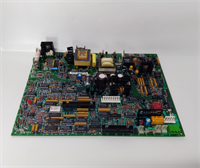
If you are keeping a Series Six PLC alive in 2026, you know the pain of finding these cards. The IC086SLN042-A isn’t “modern,” but it is arguably one of the toughest communication interfaces GE ever bolted into a rack. I’ve seen these modules sitting in unheated compressor sheds in North Dakota, covered in frost, and they still handshake perfectly once the temp rises.Engineers stick with this specific revision because it handles the heavy lifting for the Genius LAN without bogging down the main CPU. It offloads the scanning of up to 32 blocks—pumps, valves, analog sensors—so your main processor can focus on logic. The “A” revision is generally stable, provided you don’t mix it with incompatible firmware versions on the CPU side. It’s not fast by today’s Ethernet/IP standards, but for deterministic control where timing matters more than bandwidth, it works.
🛠️ Quality SOP & Tech Pitfalls
The Lab Report (SOP)
Before we ship a unit, we don’t just look at it. We run a strict protocol:
- Visual Inspection: Check for burnt traces near the voltage regulators and verify the date code matches the revision.
- Live Rack Test: Install in a Series Six chassis. Verify the module claims its memory address correctly.
- Loopback Test: Connect a Genius Block (like an IC697BEM731) and force a toggle. We check for CRC errors on the bus. If the error count hits >0 after 100 cycles, the board is rejected.
- Thermal Soak: Run at full load for 4 hours. If the chip temperature exceeds 70°C, it fails.
The Engineer’s Warning (Pitfalls)
- The Ground Loop Trap: This module is notoriously sensitive to ground potential differences between the PLC rack and the remote Genius drops. If you don’t use an isolated power supply for the Genius bus, you will get intermittent “Loss of Block” faults that will drive you crazy.
- DIP Switch Amnesia: There are configuration switches on the faceplate (or internal jumpers depending on sub-rev). Take a picture. I had a junior tech swap a bad card last year, forgot to copy the switch settings from the old unit, and spent four hours wondering why the PLC wouldn’t talk to the HMI. Don’t be that guy.
🔌 Installation & Configuration Guide
Phase 1: Pre-Installation
- Safety First: Power down the PLC rack. Wait 30 seconds for capacitors to discharge.
- Document Settings: Look at the existing IC086SLN042-A. Write down the position of every DIP switch. This sets your baud rate and station address.
- ESD Protection: Touch the metal chassis before handling the new card. Static kills these older CMOS chips instantly.
Phase 2: Removal
- Disconnect the Genius coax cable (BNC connector). Be gentle; the center pins bend easily.
- Unscrew the mounting hardware (top and bottom).
- Pull the module straight out. Do not wiggle it excessively; you might damage the backplane connector fingers.
Phase 3: Installation
- Insert the new IC086SLN042-A into the slot. Ensure it seats flush against the backplane.
- CRITICAL: Set the DIP switches to match your notes exactly.
- Tighten the mounting screws to ensure proper grounding contact.
- Reconnect the Genius coax. Ensure the termination resistor is active if this is the end of the line.
Phase 4: Power-On & Testing
- Apply power. Watch the LEDs.
- PWR should be steady green.
- RUN should flash or stay solid (depending on CPU state).
- FAULT must be OFF. If it blinks, check your switch settings or replace the battery backup.
✅ Compatible Replacement Models
| Model | Compatibility Tier | Notes |
|---|---|---|
| IC086SLN042-B | ✅ Drop-in Replacement | Newer revision. Generally backward compatible, but verify firmware. |
| IC697BEM713 | ❌ Hardware Mod Required | This is for the 90-70/90-30 series. Different form factor. Will not fit Series Six. |
| IC660BBA020 | ⚠️ Software Compatible | Analog block, not a controller. Not a replacement for the SLN module. |
❓ Frequently Asked Questions (FAQ)
Q: Can I hot-swap this module while the PLC is running?
A: No. The Series Six backplane is not designed for hot-swapping communication masters. If you pull this card while the system is live, you risk shorting the 5VDC rail or corrupting the CPU memory image. Always kill the power.Q: My “COMM” LED is flashing red. Is the card dead?
A: Not necessarily. A flashing red COMM light usually means the module is physically fine but can’t talk to the Genius blocks. Check your coax cable shielding. If the shield is corroded or loose, the noise floor spikes, and the module drops packets. Also, verify the termination resistors on the far end of the bus.Q: What is the difference between the SLN042 and the SLN041?
A: The 042 generally has improved processing speed and handles higher baud rates more reliably than the 041. They look identical, but the 042 is the preferred upgrade if you are experiencing scan time bottlenecks.Q: Does this come with the battery holder?
A: Usually, yes, but sometimes the battery clip is missing on refurbished units. Since this module uses SRAM to hold configuration, you need a battery (typically a 3.6V Lithium) installed, or it will lose its setup every time you power cycle.Q: How do I configure the baud rate?
A: It’s set via the rotary or DIP switches on the front panel. You have to calculate the correct setting based on your total cable length and number of drops. Slower baud rates (9600) travel further; faster rates (153.6K) are for shorter runs. Refer to the GE Series Six installation manual, page 4-12.