

 Tel:
Tel:  Email:
  WhatsApp:
 Description
Key Technical Specifications
| Parameter | Specification | Notes |
|---|---|---|
| Bus Interface | 32-bit PCI | Standard 5V PCI slot compatibility |
| Network Protocol | SynqNet | Real-time deterministic Ethernet-based network |
| Axis Capacity | Up to 32 Axes | Per single card (via daisy-chain topology) |
| Architecture | FPGA Core | Handles real-time tasks independently of Windows OS |
| Processor Integration | Host-based Control | Offloads trajectory generation from PC CPU |
| Topology Support | Daisy Chain / Star | Flexible cabling for industrial environments |
| Update Rate | High-Speed Loop Closure | Microsecond-level cycle times |
| Mounting | Full-height Bracket | Standard PCIe/PCI chassis fitment |
| Application Scope | Multi-axis Coordination | Ideal for complex wave generators or robotics |
Product Introduction
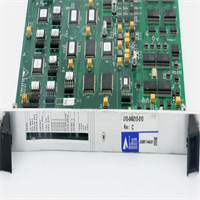
If you are trying to synchronize more than four axes using standard analog cards, you know the pain of cable clutter and signal noise. The DANAHER ZMP-SYNQNET-PCI was the answer to that headache before EtherCAT took over the world. It’s a beast of a card designed to turn a standard industrial PC into a heavy-duty motion controller. Unlike older cards that just generated analog voltages, this thing runs the SynqNet protocol—a deterministic network that handles the timing so your PC doesn’t have to.The magic here is the FPGA core. In the old days, if your Windows OS decided to run a background update, your motion profile would stutter. This card offloads the trajectory generation and loop closure to its own hardware. I’ve seen these used in massive ocean engineering projects—specifically for multi-directional wave generators where you need 10+ actuators moving in perfect sync. If one lags, the physics break. This card keeps them locked tight. However, be warned: it is strictly a PCI card. You won’t be plugging this into a modern motherboard with only PCIe slots without an adapter, and even then, latency can be a nightmare.
Quality SOP & Tech Pitfalls (The Reality Check)
The Lab Report (SOP)
We treat these like sensitive electronics, not scrap metal.
- Visual Inspection: We check the PCB for “green rot” (dendritic growth) on the solder joints, especially around the heavy connectors. These cards often sit in humid labs or factory floors.
- Connector Integrity: The SynqNet ports (usually RJ45 or similar industrial connectors) are checked for bent pins. A loose connection here causes intermittent “following error” alarms that will drive you crazy during调试 (commissioning).
- FPGA Verification: We load the card into a test rig and verify it enumerates correctly in the device manager. We check that the FPGA configuration bitstream loads without timeout errors.
- Anti-Static Packaging: Since the edge connectors are gold-plated and sensitive, we seal it in anti-static foam immediately after testing.
The Engineer’s Warning (Pitfalls)
Here is the trap: BIOS and IRQ Conflicts.
This card is picky. It demands specific PCI bus mastering capabilities.
- The Trap: You plug it into a random Dell office PC, boot up, and get a “Resource Conflict” or the card simply isn’t found. It’s not broken; your BIOS is set to “Plug and Play OS = Yes,” which lets Windows hog the IRQs.
- Field Disaster: I watched a technician spend three days swapping cables on a wave generator because the system kept dropping nodes. Turned out the ZMP card wasn’t seated fully in the PCI slot—the metal bracket was slightly bent. He thought it was a network issue, but it was just physical force. Always use the retention screw.
Installation & Configuration Guide
- Pre-Installation Safety
⚠️ Power Down: Disconnect the mains power to the PC. Hold the power button for 10 seconds to drain residual charge from the capacitors.
⚠️ ESD Protection: Wear a grounded wrist strap. The FPGA and memory chips on this card are sensitive to static discharge. - Physical Installation
- Open the PC chassis. Locate an available 32-bit PCI slot (usually white, shorter than the AGP/PCIe x16 slot).
- Remove the slot cover. Insert the ZMP-SYNQNET-PCI firmly until the gold fingers disappear.
- Secure the bracket with the mounting screw. Do not overtighten, or you will warp the PCB.
- Network Wiring (SynqNet)
- Connect the SynqNet cable to the port labeled “Out” or “Port 1”.
- Daisy Chain: Run the cable from the first node (drive) to the next. Ensure the termination resistor (if required by your specific node count) is enabled at the last node.
- ⚠️ Warning: Do not mix SynqNet cables with standard Ethernet traffic unless you have a specific bridge setup. They look similar but speak different languages.
- Driver & Software Setup
- Boot the PC. Install the Danaher Motion Coordinator (DMC) or compatible software.
- Go to Device Manager. Verify the card appears without a yellow exclamation mark.
- IRQ Check: Ensure the card has a unique IRQ that isn’t shared with a USB controller or video card. Shared IRQs cause jitter.
Compatible Replacement Models
| Compatibility Tier | Model Number | Notes |
|---|---|---|
| ✅ Drop-in Replacement | ZMP-SYNQNET-PCI Rev 2C | Exact match. Ensure the revision number matches your existing firmware expectations. |
| ⚠️ Software Compatible | ZMP-PCI (Non-SynqNet) | Older version. Uses analog outputs instead of digital network. Requires rewiring drives and rewriting logic. |
| ❌ Incompatible | ZMP-USB | Different interface entirely. Won’t fit in the PCI slot. |
Frequently Asked Questions (FAQ)
Q: Will this work in a Windows 10 or Windows 11 machine?
A: It’s risky. This card was born in the Windows XP/2000 era. While it might technically install on Win10, driver signing issues often block it. Stick to Windows 7 Embedded or XP if you want stability.Q: How many axes can I control with one card?
A: Theoretically, up to 32 nodes on the SynqNet ring. But in practice, if you push the cycle time too low (high speed), you might want to limit it to 16 to ensure deterministic performance.Q: My card has a part number ending in “REV 2”. Is that different from “REV 2C”?
A: Usually, the “C” indicates a minor component change or a fix for a known bug. They are generally backward compatible, but check the silk screen on the FPGA chip. If the dates don’t match, you might need to reload the firmware.Q: Can I use standard Cat5 Ethernet cables for the SynqNet connection?
A: Physically, yes, they fit. But electrically? It depends. SynqNet uses standard Ethernet PHY layers, but for high-noise industrial environments, shielded cables (STP) are mandatory. Unshielded cables will pick up VFD noise and crash your motion.Q: The LED on the card is blinking red. What does that mean?
A: It usually means a “Node Loss” or “Sync Error.” Check your cabling. One bad connector in the daisy chain breaks the whole ring. Start checking from the last node backward.