
 Tel:
Tel:  Email:
  WhatsApp:
 Description
Key Technical Specifications
| Parameter | Value |
|---|---|
| Component Type | VME P2 Backplane Assembly |
| Power Capacity | 60K rating |
| Module Connection | Slots/connectors for processors, memory, I/O |
| Signal Transmission | High-speed data exchange pathways |
| Power Distribution | Integrated management circuits |
| Management Functions | Clock allocation, system monitoring, fault detection |
| Equipment Applicability | AKT Series CVD Equipment |
| Scalability | Modular addition/replacement capability |
| Operating Environment | Semiconductor manufacturing cleanroom |
| Warranty Period | 180 Days |
| Lead Time | 1–3 Working Days |
| Revision Tracking | Rev 02 (verify with OEM datasheet) |

Product Introduction
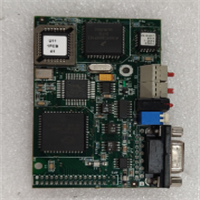
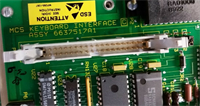
The AMAT 0100-71275 is a VME P2 backplane assembly engineered specifically for Applied Materials chemical vapor deposition (CVD) equipment. It serves as the central communication hub and power distribution network within the chamber control system, linking critical processing modules together.Semiconductor fabrication relies heavily on signal integrity during thin-film deposition processes. With a 60K power capacity and dedicated interlock status routing, this backplane ensures stable voltage delivery and rapid fault diagnostics to prevent costly wafer scrap or chamber downtime.
Installation & Configuration Guide
Preparation (10 min)
Review the AMAT maintenance manual before opening the chassis. Verify all upstream power supplies are locked out and tagged out (LOTO). Gather ESD-safe tools and anti-static wrist straps.Removal (5–10 min)
Disconnect all ribbon cables and power harnesses from the existing backplane. Remove the retaining screws securing the board to the chassis frame. Carefully extract the old 0100-71275 unit, noting the exact orientation of each connector block.Installation (10 min)
Align the replacement backplane into the designated mounting rails. Secure the faceplate screws to spec torque. Reconnect all P1/P2 bus connectors and peripheral wiring harnesses. (Always double-check the interlock cable routing here; miswired safety loops will prevent the RF generator from arming.)Power-On & Test (10 min)
Restore primary power and initiate the chamber controller POST sequence. Verify that the system monitor reports normal clock allocation. Trigger a simulated interlock condition to confirm the fault detection circuitry responds correctly within the specified tolerance window.
Troubleshooting Quick Reference
| Symptom | Probable Cause | Immediate Action |
|---|---|---|
| Intermittent module dropouts | Backplane P2 connector oxidation | Reseat card; inspect pins for corrosion |
| Uneven power distribution | Failed power management circuit | Measure rail voltages; replace backplane |
| Phantom interlock faults | Broken trace in status routing | Check continuity across interlock bus |
| No communication handshake | Improper seating or bent pins | Extract and reseat; verify mechanical alignment |
| Excessive heat at slot | Overloaded power channel | Audit connected module power draw |
Dimensions, Mounting & Wiring Notes
- Dimensions: Standard VME Eurocard form factor (exact H×W×D varies by specific CVD chassis revision; consult AMAT mechanical drawings).
- Mounting Method: Front-panel retention screws combined with rear P1/P2 backplane mating connectors.
- Terminal Notes: Supports multiple functional modules including LED assemblies and slit valve controls. Wire routing must strictly follow OEM grounding schematics to prevent electromagnetic interference in the high-RF environment.
FAQ
Can I use a generic VME backplane instead of this AMAT-specific part?
No. While it follows the VME standard, the 0100-71275 includes proprietary AKT power management circuits and custom interlock routing. Generic boards will lack these critical safety integrations. Always stick to the OEM-specified part number.I’m getting random fault codes after swapping the backplane. What gives?
This usually points to a poorly seated P2 connector or a damaged pin during installation. Pull the board and inspect the backplane receptacle under magnification. Even one slightly recessed pin can cause intermittent communication failures.Is this unit brand new or refurbished?
Original production has ended. Current stock consists of thoroughly tested refurbished units. We document exact revision levels and jumper settings before shipment to ensure compatibility with your specific chamber configuration.Do you offer volume pricing for multi-chamber retrofits?
Yes. Tiered discounts apply based on quantity. Contact sales directly for a formal quote if you need more than three units. Lead times remain consistent regardless of order size.What happens if my system firmware doesn’t match this backplane revision?
Firmware mismatches can cause unpredictable behavior in clock allocation or fault reporting. Always verify the required Rev level against your AMAT software release notes before ordering. We photograph and record DIP/jumper configurations prior to shipping.Are replacement parts still available from Applied Materials?
Applied Materials no longer manufactures this specific legacy backplane. Authorized refurbishers and surplus distributors are currently the only viable source. Verify supplier testing protocols to avoid dead-on-arrival units in your fab.