 Tel:
Tel:  Email:
  WhatsApp:
 Description
Key Technical Specifications
- Channel Count: 16 Input Channels
- Signal Types: Voltage (-10V to +10V), Current (0-20mA), Thermocouple, RTD
- Resolution: 16-bit A/D Converter
- Isolation: Point-to-point isolation (Signal 1000V, Power 2000V)
- Communication: Standard (Note: Use AAI143-H50 for HART protocol support)
- Operating Temp: -20°C to 70°C (with G3 option)
- Weight: 0.3 kg
Product Introduction
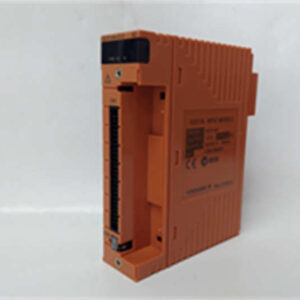
When your distributed control system needs to listen to the heartbeat of the plant, the Yokogawa AAI143-S50 is the ear you can trust. This 16-channel analog input module is a workhorse in Yokogawa’s CS3000 and related DCS platforms, designed to pull in everything from 4-20mA process signals to temperature readings from RTDs and thermocouples.What makes this module stand out is its 16-bit resolution and point-to-point isolation. In a noisy industrial environment, that isolation barrier (rated up to 1000V on the signal side) keeps your sensitive data clean and protects the backplane from field spikes. It also features built-in self-diagnostics and smart conditioning, meaning you can configure the signal types and ranges via software without needing to calibrate it with a screwdriver. It’s plug-and-play reliability for critical process control.
Quality SOP & Tech Pitfalls (The Reality Check)
The Lab Report
Before this module leaves the facility, it undergoes a rigorous validation. We verify the 16-bit A/D conversion accuracy across all 16 channels using a calibrated precision source. We also test the isolation barrier to ensure no leakage current crosses between channels. Finally, we confirm the self-diagnostic registers report “healthy” status and check the backplane connector pins for any signs of arcing or wear.The Engineer’s Warning
Do not confuse the AAI143-S50 with the AAI143-H50. The “-S” denotes a standard analog input, while the “-H” includes HART communication capabilities. If your field transmitters require HART polling, this module will not work. Also, pay close attention to the suffix codes like /K4A00 or /A4D00. These indicate the specific terminal board adapter or pressure-clamp terminals required for wiring. Buying the bare module without the correct mating terminal board will leave you stranded during installation.
Installation & Configuration Guide
Phase 1: Pre-Installation
- ⚠️ Lockout/Tagout: Ensure the DCS node is powered down or safely isolated.
- Verify Hardware: Check the exact model number, including the suffix code (e.g., AAI143-S50/A4D00), against your BOM.
- Ground: Wear an ESD wrist strap; 16-bit ADCs are highly sensitive to static.
Phase 2: Removal
- Label: Tag all field wires and note their channel assignments.
- Disconnect: Remove the terminal board first, then release the module from the backplane.
- Extract: Pull straight out. Never use excessive force on the backplane connectors.
Phase 3: Installation
- Seat: Slide the new AAI143-S50 onto the backplane. Push firmly until the retention clips engage.
- Terminate: Attach the correct terminal board (e.g., ATA4D-00 for dual pressure-clamp terminals) and reconnect field wiring.
- Torque: Ensure terminal screws are properly tightened to prevent intermittent signals.
Phase 4: Power-On & Configuration
- Boot: Power up the DCS node and monitor the module status LEDs.
- Configure: Open the system configuration software. Set the channel types (Voltage, Current, RTD, etc.) and engineering units.
- Test: Apply a known signal to a channel and verify the HMI/engineering station reads the correct value.
Compatible & Cross-Reference Models
| Model Variant | Compatibility Tier | Notes |
|---|---|---|
| AAI143-H50 | ⚠️ Functional Upgrade | Adds HART communication. Drop-in hardware replacement. |
| AAI143-S53 | ✅ Direct Equivalent | Same module, different temperature/ISA G3 option suffix. |
| AAI141-S50 | ❌ Not Compatible | AAI141 is non-isolated. Do not substitute unless isolation is not required. |
| AAI543-S50 | ❌ Wrong Direction | This is an Analog Output module, not input. |
Frequently Asked Questions (FAQ)
Can I mix standard and HART modules in the same node?
Yes. Yokogawa DCS nodes are designed to support mixed I/O configurations. You can use AAI143-S50 for standard analog points and AAI143-H50 for smart transmitters in the same chassis.Does this module support hot-swapping?
Yokogawa I/O modules are generally designed for online maintenance, but you must verify your specific DCS node’s hot-swap capability in the hardware manual before attempting it. Always follow the OEM’s exact procedure to avoid backplane faults.Why is my module reporting a diagnostic fault?
The AAI143-S50 has built-in self-diagnostics. A fault usually indicates an open circuit, a short, or an out-of-range signal on one of the 16 channels. Check the DCS diagnostic screen to identify the exact channel, then inspect the field wiring and sensor.Do I need a specific terminal board for this module?
Yes. The base module (AAI143-S50) requires a mating terminal adapter. Common options include the /K4A00 (KS cable interface) or /A4D00 (dual pressure-clamp terminal block). Ensure you order the correct adapter for your field wiring style.What is the typical lead time for this module?
Availability varies. As a critical spare, we recommend keeping at least one AAI143-S50 on-site if your process cannot tolerate downtime. Contact our sales team for current stock levels and lead times.