
 Tel:
Tel:  Email:
  WhatsApp:
 Description
Key Technical Specifications
| Parameter | Specification |
|---|---|
| Supply Voltage | 24 VDC (18V – 36V range) |
| Control Modes | Position, Velocity, Pressure/Force |
| Command Input | Analog ±10 V |
| Actual Value Input | Analog ±10 V or SSI / Incremental |
| Control Output | Analog ±10 V (differential) |
| Interface | RS232 / Local CAN |
| Dimensions | 71 x 155 x 204 mm |
| Operating Temp | 0°C to +50°C |
| Protection Class | IP20 |
Product Introduction
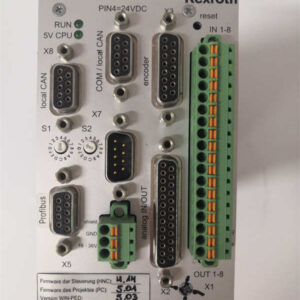
The Rexroth VT-HNC100-1-22/W-08-C-0 serves as a digital axis controller designed specifically for hydraulic applications. It manages the closed-loop control of position, velocity, and pressure for single-axis hydraulic systems. This unit replaces older analog cards, offering digital precision and easier parameterization via PC software.Unlike standard PLC-based controls, this module operates with a dedicated high-speed CPU cycle. It handles the complex dynamics of hydraulic oil flow independently. Field data indicates it can achieve a control cycle time significantly faster than standard machine cycles, ensuring stability even when oil viscosity changes due to temperature fluctuations.
Installation & Configuration Guide
Preparation (10 min)
Verify the supply voltage is strictly 24VDC. Check the label for the “W-08” designation, which confirms the specific firmware version and connector coding. Ensure you have the mating connector (X1) and shield clamps ready.Removal (5–10 min)
Disconnect the main power. Unplug the CAN bus and RS232 cables first to avoid strain. Unscrew the mounting clips at the top and bottom of the module. Slide the unit out of the rack or DIN rail carefully.Installation (10 min)
Mount the controller on a conductive mounting plate or DIN rail. Connect the shield of the encoder cable to the designated grounding point on the module housing—this is critical for noise reduction. Tighten the terminal blocks for the valve output (X4) and actual value input (X3).Power-On & Test (10 min)
Apply 24VDC. The “Ready” LED should light up green. Connect a PC via RS232 (usually COM port). Open the Rexroth configuration software (IndraWorks or legacy HNC software). Verify that the controller recognizes the connected SSI encoder.
Troubleshooting Quick Reference
| Symptom | Probable Cause | Action |
|---|---|---|
| Red LED “Error” | Supply voltage < 18V | Measure input at X1; check power supply capacity. |
| Axis Drifts | Deadband not set | Check valve characteristic curve in software parameters. |
| No Communication | Baud rate mismatch | Verify RS232 settings (usually 19200 or 38400 baud). |
| Oscillation | PID gains too high | Reduce P gain; check hydraulic oil temperature. |
Dimensions, Mounting & Wiring Notes
- Dimensions: 71 mm (W) x 155 mm (H) x 204 mm (D).
- Mounting: Designed for DIN rail (TS35) or flat panel mounting.
- Wiring Note: The analog inputs are differential. Ensure the signal ground (0V) is connected correctly to avoid “ghost” voltage readings. The SSI interface uses a standard 5V TTL level; do not connect 24V encoder signals directly without a converter.

FAQ (5–7 questions)
Q: What is the difference between the VT-HNC100 and the VT-5010?
A: The VT-5010 is a purely analog amplifier (voltage in, voltage out). The VT-HNC100 contains a digital processor. It accepts digital encoder feedback (SSI) and performs the PID calculation internally, whereas the VT-5010 relies on external logic or simpler analog feedback.Q: Can I use this for a motor drive instead of a hydraulic cylinder?
A: Technically yes, but it is optimized for hydraulics. It has specific functions for “pressure override” and hydraulic deadband compensation. For pure electric motors, the Rexroth HNC100-S (Servo) version is more appropriate.Q: I lost the original software disk. How do I configure it?
A: You need the IndraWorks software from Bosch Rexroth. The older “HNC100 Tool” might work for legacy firmware, but IndraWorks is the current standard. You will need a USB-to-RS232 adapter if your laptop lacks a serial port.Q: Why is the axis moving slowly even with 100% command?
A: Check the “Ramp” settings in the software. The acceleration and deceleration ramps might be set to a high value (e.g., 10 seconds), limiting the speed. Also, verify the maximum output voltage is actually reaching the valve.Q: Is this unit compatible with PROFINET?
A: No. This specific model (W-08-C-0) uses RS232 and a proprietary Local CAN interface. It does not have an Ethernet port. If you need PROFINET, you would need a newer generation controller like the HNC100-22 with specific communication cards.