 Tel:
Tel:  Email:
  WhatsApp:
 Description
Key Technical Specifications
| Parameter | Value |
|---|---|
| Manufacturer | Honeywell |
| Model Number | FS-QPP-0002 |
| Product Type | Enhanced Performance Quad Processor Pack |
| Processor | 1.2 GHz Quad-Core ARM Cortex-A7 |
| Memory (RAM) | 1 GB |
| Storage | 8 GB eMMC |
| Power Input | 24 VDC (±20%) |
| Operating Temp | -20°C to +70°C |
| Storage Temp | -40°C to +85°C |
| Dimensions | 110 x 110 x 40 mm |
| Interfaces | Ethernet, RS232, RS485, USB |
Product Introduction
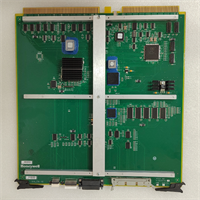
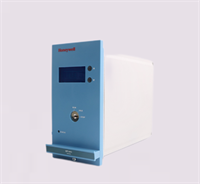
The Honeywell FS-QPP-0002 is a high-performance Quad Processor Pack designed for the Safety Manager system. It serves as the central processing unit, executing complex control logic and managing safety-critical tasks in industrial automation environments. This module is engineered to handle high-density data processing required for modern safety instrumented systems (SIS).This unit features a 1.2 GHz quad-core ARM Cortex-A7 processor, providing significant computational power for fast logic solving. With 1 GB of RAM and 8 GB of internal storage, it ensures efficient data handling and logging. The module operates on a standard 24 VDC supply and includes versatile communication ports, including Ethernet and serial interfaces, allowing for seamless integration into existing control architectures.
Installation & Configuration Guide
Preparation
- Verify the model number FS-QPP-0002 matches the system requirement.
- Ensure the control rack is powered down and locked out.
- Check that the backplane connectors are free of debris and bent pins.
Removal
- Disconnect any external cables (Ethernet, USB) attached to the faceplate.
- Release the locking mechanism or unscrew the mounting hardware securing the module.
- Slide the processor pack out of the chassis slot carefully.
Installation
- Align the FS-QPP-0002 with the chassis slot.
- Insert the module firmly, ensuring the backplane connectors mate correctly.
- Secure the locking mechanism to prevent the module from loosening due to vibration.
Power-On & Test
- Restore 24VDC power to the system.
- Observe the LED status indicators on the front panel.
- Verify communication via the Ethernet port using the configuration software.
- Check system logs for any “Module Mismatch” or communication errors.
Troubleshooting Quick Reference
| Symptom | Probable Cause | Action |
|---|---|---|
| No Power / LEDs Off | 24VDC supply failure or loose connection | Measure voltage at the power input terminals; check fuses. |
| Communication Timeout | IP address mismatch or cable fault | Verify Ethernet cable integrity and IP configuration. |
| System Fault LED | Internal processor error or firmware mismatch | Check firmware version compatibility; review system diagnostic logs. |
| Overheating | Ambient temperature >70°C or blocked airflow | Verify cabinet cooling fans are operational; check air filters. |
Dimensions, Mounting & Wiring Notes
- Dimensions: 110 mm (W) x 110 mm (H) x 40 mm (D).
- Mounting: Designed to slide into a standard Safety Manager or FSC chassis slot.
- Wiring: Power is typically supplied via the backplane, but verify specific rack requirements. External connections (Ethernet/Serial) are made via the front faceplate ports.
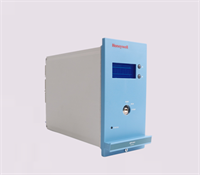
FS-QPP-0002 HONEYWELL
FAQ
What is the processor speed of the FS-QPP-0002?
It is equipped with a 1.2 GHz Quad-Core ARM Cortex-A7 processor, designed for high-speed logic execution.
What voltage does this module require?
The FS-QPP-0002 operates on a 24 VDC power supply with a tolerance of ±20%.
Can I use this in standard environmental conditions?
Yes, it is rated for operating temperatures between -20°C and +70°C, making it suitable for most industrial control rooms and cabinets.
What communication ports are available?
The module features Ethernet, RS232, RS485, and USB ports for versatile connectivity options.
Is the FS-QPP-0002 compatible with older FSC systems?
It is designed for the Safety Manager system. While it shares heritage with FSC, you must verify backplane compatibility and firmware support with your specific chassis version before installation.