 Tel:
 Email:
 WhatsApp:
Description
Key Technical Specifications
| Parameter | Detail |
|---|---|
| Part Number | D20 EME 10BASE-T (also listed as D20-EME) |
| Product Type | Ethernet / Memory Expansion Module |
| Compatible Chassis | GE D20 and D200 series racks |
| Ethernet Interface | 10BASE-T (RJ-45); some revisions support 10BASE2 and 10BASE-FL |
| Data Rate | 10 Mbps |
| Protocol Support | TCP/IP; D20 platform commonly supports DNP3, Modbus, IEC 60870-5 family |
| Power Source | Backplane-powered from D20 rack supply |
| Power Rating | Varies by revision; some listings cite up to 143 W for the D20-EME family, but this must be confirmed against the specific nameplate |
| Memory Option | SRAM expansion option (0 / 8 / 16 MB reported across revisions) |
| Operating Temperature | -20 °C to 60 °C typical; utility-grade D20 deployments may be rated wider |
| Protection Class | IP20 |
| Mounting | Plug-in card for GE D20/D200 chassis |
| Weight | Approx. 0.3–1.3 kg depending on revision and packaging claims |
Product Introduction
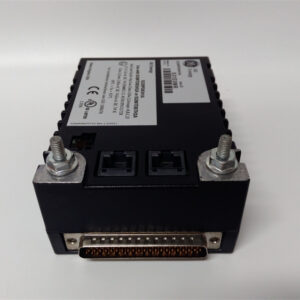
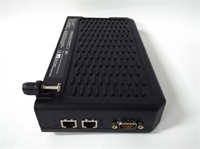
If you have ever walked into a substation cabinet and found a D20 RTU still polling IEDs over serial while someone begged for an Ethernet port, you know exactly why this card exists. The GE D20 EME 10BASE-T is not a general-purpose PLC Ethernet module. It is a chassis-level communications and memory expansion board for GE D20/D200 substation controllers, letting an aging RTU talk to SCADA over TCP/IP instead of relying solely on serial links.That matters in the field. Many D20 installations still sit in utility and industrial power systems where replacing the entire rack is expensive and unnecessary. This card gives you 10 Mbps Ethernet, protocol routing, and additional memory without ripping out field wiring. The 10BASE-T interface is slow by modern standards, but substations do not care about gigabit. They care about stable polling, clean protocol translation, and cards that survive temperature swings. This one does, provided the revision matches your chassis and your SCADA engineer has the right protocol license.
Quality SOP & Tech Pitfalls
The Lab Report (SOP)
- Visual and counterfeit check: verify GE labeling, part number, board revision, and connector condition. Reject boards with corroded RJ-45 jacks or burned backplane contacts.
- Backplane seating check: inspect edge connector pins for bending or oxidation. A dirty backplane contact causes intermittent comms that look like a network problem.
- Power-up in D20 rack: install into a compatible D20/D200 chassis; verify the rack supply is within spec before energizing.
- Ethernet link test: connect to a 10/100 Mbps switch; confirm link/activity LEDs and TCP/IP reachability.
- Serial/function check (if applicable): verify any onboard serial ports, memory recognition, and protocol status per the D20 configuration tool.
- Configuration capture: record board revision, firmware, memory size, IP settings, and serial numbers before packing.
Do not test this card on a bench power supply alone. It is backplane-powered and expects the D20 rack supply.The Engineer’s Warning (Pitfalls)The biggest mistake is treating every “D20 EME” as identical. Some revisions are pure Ethernet/memory boards. Others carry serial ports, different media options, or different memory sizes. Swap the wrong revision and the chassis may recognize it but SCADA will not.Another common failure: connecting it to a gigabit-only managed switch that refuses 10 Mbps half-duplex negotiation. Older 10BASE-T hardware does not always play nice with modern auto-negotiation. If the link LED never lights, try a dumb 10/100 switch before condemning the card. Also, never assume the IP address survives a board swap. Someone always forgets to document it.
Installation & Configuration Guide
Pre-Installation️ De-energize the D20 rack if hot-swap is not confirmed for your specific chassis and revision.
️ Photograph the existing module, slot position, serial number, and any DIP switches or jumpers.
️ Record the IP address, subnet mask, gateway, protocol settings, and serial port assignments from the D20 configuration software.
Verify the replacement revision matches the original media option and memory size.RemovalLabel the slot position. Release the front-panel retention hardware. Pull the module straight out. Do not rock it. Inspect the backplane connector for debris.InstallationAlign the new D20 EME 10BASE-T card with the same slot. Seat it firmly until the backplane connector is fully engaged. Secure the front panel. Reconnect the 10BASE-T cable to the RJ-45 port. If the revision supports 10BASE2 or 10BASE-FL, confirm the correct media interface is used.Power-On & TestingRestore rack power. Verify module LEDs. Download or restore the D20 configuration if required. Test Ethernet communication to SCADA. Confirm protocol polling (DNP3, Modbus, IEC 60870-5, or site-specific protocol). Validate serial device polling if the revision includes serial ports. Monitor for at least one full polling cycle before declaring the job complete.
Compatible Replacement Models
| Compatibility Tier | Model | Notes |
|---|---|---|
| Drop-in Replacement | D20 EME 10BASE-T (same revision) | Match part number, media option, and memory size; no re-engineering needed |
| ️ Functional Equivalent | D20-EME with matching media option | Verify 10BASE-T/10BASE2/10BASE-FL support and memory configuration before substitution |
| ️ Platform Upgrade | GE D20EME enhanced master comm modules (e.g., 0526-21170-1) | Different revision; may require firmware, licensing, and SCADA reconfiguration |
| Not Compatible | GE Multilin UR-series comm cards, D2500 modules, third-party Ethernet switches | Different platforms; not a direct chassis replacement |
Frequently Asked Questions (FAQ)
Can I hot-swap this module?
Only if your D20/D200 chassis revision and site procedure allow it. Many utility racks are powered down for comm card changes. If you must hot-swap, confirm with the OEM manual first. A mis-seated card can take down SCADA polling.Will it work on a modern gigabit switch?
Sometimes. 10BASE-T devices do not always negotiate cleanly with gigabit managed switches. If the link fails, test with a 10/100 Mbps switch or force the port to 10 Mbps half-duplex.Is this the same as a GE Multilin UR Ethernet card?
No. The D20 EME belongs to the D20/D200 substation controller family. UR-series and D2500 platforms use different hardware and firmware.What protocols does it support?
The Ethernet link provides TCP/IP transport. Actual protocol support depends on the D20 chassis firmware and configuration. Typical utility deployments include DNP3, Modbus, and IEC 60870-5 variants, but confirm against your site documentation.Why do some listings show 143 W and others show low power?
Because aftermarket descriptions are inconsistent. Some D20-EME family listings cite higher power figures, while the communication card itself is typically backplane-powered and low-power relative to a full rack. Always trust the nameplate and chassis manual over a generic product page.Can I use it outside of power systems?
It can provide Ethernet connectivity in industrial RTU applications, but it is not a general-purpose PLC Ethernet module. If you need EtherNet/IP or PROFINET for a manufacturing line, this is the wrong card.Do you provide firmware loading?
Standard supply includes power-up and communication verification. Firmware loading, IP configuration, and protocol setup should be performed by qualified personnel using the correct GE D20 configuration tools.