 Tel:
Tel:  Email:
  WhatsApp:
 Description
Key Technical Specifications
| Parameter | Specification |
|---|---|
| Part Number | P0922YK |
| Module Type | Analog Input (Voltage) |
| Channel Count | 8 Independent Inputs |
| Input Range | 0 to 10 Volts DC |
| Conversion Tech | Sigma-Delta A/D Converter |
| Update Rate | Approx. 25ms per channel |
| Isolation | Channel-to-Channel and Channel-to-Ground |
| Input Impedance | > 1 Megaohm (Typical) |
| Power Input | 24V DC (Nominal), Range: 19–36V DC |
| Power Consumption | Approx. 6W |
| Operating Temp | -20°C to 60°C |
| Dimensions | 140mm x 165mm x 45mm |
Product Introduction
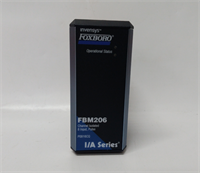
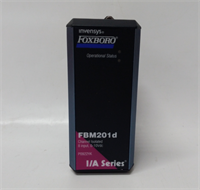
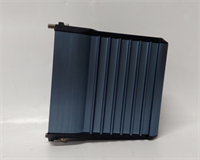
In the world of process control, you spend half your life chasing noise. Electrical interference from VFDs and large motors can turn a steady sensor signal into a jagged mess. The Foxboro FBM201D (P0922YK) is designed specifically to cut through that garbage. It’s an 8-channel analog input module, but unlike the older “dumb” cards, this one uses Sigma-Delta conversion technology.What does that mean for you? It means it filters out the noise digitally. I’ve deployed these in environments with terrible grounding, and they hold a steady value where other cards would fluctuate wildly. This specific revision, the “D” variant, is strictly for 0-10V DC inputs. Do not try to use this for 4-20mA current loops (that’s the FBM201 or FBM211); if you wire a current loop into this voltage card, you won’t get a reading, and you might damage the source. It features full isolation on every channel, which is a lifesaver—if one sensor shorts to ground, it won’t drag down the rest of the card.
Quality SOP & Tech Pitfalls (The Reality Check)
The Lab Report (SOP)
Analog cards are sensitive. We don’t just check if they light up; we check if they read accurately.
- Visual Inspection: We inspect the terminal block pins for corrosion. Oxidation adds resistance, which kills voltage readings. We also check the PCB for “hot spots” or discolored components near the power regulator.
- Precision Calibration Test: Using a Fluke 744 Calibrator, we inject precise voltages (0V, 2.5V, 5V, 7.5V, 10V) into all 8 channels. We verify the module reports these values within tolerance (usually ±0.1%).
- Isolation Verification: We use a megohmmeter (gently) to ensure there is no leakage between Channel 1 and Channel 2.
- Noise Rejection Test: We simulate a noisy signal to verify the Sigma-Delta filter is active and smoothing the data correctly.
The Engineer’s Warning (Pitfalls)
- The “Floating Ground” Issue: Even though this card has isolation, I’ve seen technicians create ground loops by grounding the shield at both the sensor and the panel end and tying the negative terminal to ground. This creates a “ground loop hum” that the card reads as a fluctuating signal. Single-point grounding is your friend.
- Wrong Terminal Assembly (TA): Like most Foxboro modules, the FBM201D requires a specific mating Terminal Assembly. If you force it onto a generic TA or the wrong model, the pinout won’t match. You might be applying 10V to a logic pin.
- Field Disaster: A plant engineer once replaced a bad FBM201D but forgot to configure the “Fail-Safe” direction in the software. When the new card rebooted, the output went to zero, telling the valve to close fully instead of holding position. This caused a pressure spike in the reactor. Always check your control logic’s reaction to “Bad PV” (Process Variable).
Installation & Configuration Guide
Swapping this card requires care to avoid frying the sensitive input circuits.
- Pre-Installation Safety
- ⚠️ CRITICAL: Disconnect field wiring. While 10V isn’t lethal, shorting the wires while the circuit is live can cause sparks or damage the sensor power supply.
- Label your wires. If you pull the Terminal Assembly, it’s easy to mix up Channel 3 and Channel 4.
- Removal
- Unplug the wiring harness from the Terminal Assembly (TA).
- Release the top and bottom locking levers on the module faceplate.
- Slide the FBM201D module off the back of the TA.
- Hardware Setup
- Inspect the gold pins on the back of the new module. Ensure none are bent.
- Align the new module with the TA guides. Push firmly until it seats flush against the backplane connector.
- Engage the locking levers. They must click into place.
- Power-Up & Commissioning
- Reconnect the wiring. Double-check polarity (+ and -).
- Power up the rack. The LED should show a healthy green status.
- Connect your laptop. Force a known voltage (e.g., 5V) from a calibrator and verify the DCS reads 5.0V. If it reads 0V, check your common/ground connection.
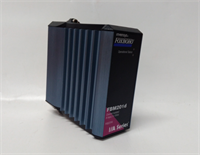
FBM201D FOXBORO
Compatible Replacement Models
- ✅ Drop-in Replacement: FBM201D (P0922YK). This is the exact match for 0-10V inputs.
- ⚠️ Functional Equivalent (Different Range): FBM201 (P0914SQ). This is the 0-20mA version. Physically identical, but electrically different. Do not swap them unless you change the sensor wiring too.
- ⚠️ Functional Equivalent (Different Range): FBM201C (P0922YJ). This handles 0-5V inputs. It can work, but your resolution will be lower (using only half the scale of a 10V signal).
Frequently Asked Questions (FAQ)
Q: Can I use this card for thermocouples?
A: No. This is a voltage input card. Thermocouples require specific linearization and cold junction compensation, which this module does not have. You need an FBM202 for temperature.Q: My reading is fluctuating wildly. Is the card bad?
A: Not necessarily. Since this is a high-impedance voltage input, it acts like an antenna. If your cable shielding is poor or you have VFDs nearby, you might be picking up noise. Try enabling the “filter” or “integration time” setting in the software configuration to smooth it out.Q: What is the difference between FBM201 and FBM201D?
A: The range. FBM201 is for Current (0-20mA). FBM201D is for Voltage (0-10V). They look the same, but their internal circuitry is totally different.Q: Does this module support HART protocol?
A: No. This is a standard analog card. It reads the raw voltage. It does not decode digital HART signals superimposed on the line.Q: How do I handle unused channels?
A: Leave them open (disconnected). Do not short them to ground unless your specific noise environment requires it, and even then, consult the manual. Floating inputs on isolated cards are generally safe.