

 Tel:
Tel:  Email:
  WhatsApp:
 Description
Key Technical Specifications
- Part Number: SE4001S2T2B5
- Associated Base/Charm: KJ3203X1-BK1
- Channel Count: 32 Discrete Inputs
- Nominal Voltage: 24V DC (Field side)
- Logic Type: Sink / Source (Configurable via wiring/base)
- Isolation: Channel-to-Logic Isolation
- Mounting: DIN Rail (via DeltaV Carrier)
- Environmental Rating: Conformal Coated for harsh industrial environments
- System Compatibility: Emerson DeltaV S-Series Controllers
- Revision Info: Commonly found as Rev E (P/N 12P4694X032)

Product Introduction
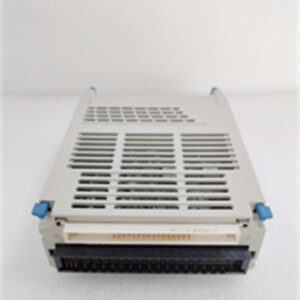
If you have ever walked a DeltaV panel during a plant turnaround, you know the S-Series cards are the workhorses that rarely get the credit. The Emerson SE4001S2T2B5 is your standard-issue 32-channel discrete input card. It doesn’t do fancy PID loops or complex calculations; its only job is to tell the controller, with absolute certainty, whether a pump is running, a valve is open, or an E-stop has been mashed.The beauty of this specific module (often tied to the KJ3203X1-BK1 base) is its density. Getting 32 points of isolated digital input on a single card keeps your panel footprint small and your wiring manageable. I’ve pulled these out of cabinets that have been running since the early 2000s, and as long as they weren’t hit by a massive lightning surge, they just keep ticking. It is a boring piece of hardware, and in our line of work, boring is exactly what you want.
Quality SOP & Tech Pitfalls (The Reality Check)
The Lab Report (SOP)
Before this card ships, it goes through a strict “no-nonsense” check:
- Visual & Pin Check: We inspect the backplane pins for any bends (a classic shipping casualty) and verify the revision label matches the SE4001S2T2B5 order.
- Insulation Resistance: A quick Megger test to ensure the field-side isolation hasn’t degraded during storage.
- Live Rack Test: We slot it into a powered DeltaV carrier. We verify it powers up without throwing a “Module Fail” red light and successfully communicates its identity to the test controller.
- Anti-Static Sealing: Once verified, it goes straight into a shielded bag. Moisture and dust are the enemies of conformal coating over time.
The Engineer’s Warning (Pitfalls)
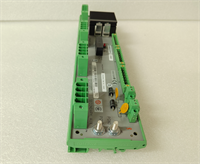
Here is where people mess up: The Baseplate. This card (SE4001S2T2B5) is useless without the correct terminal base (usually the KJ3203X1-BK1). I once watched a contractor spend four hours troubleshooting a “faulty card” only to realize he tried to seat it on an Analog baseplate. The keys won’t let you force it, but don’t try to break the keys off to make it fit. Also, watch your Revision levels. While Rev E is generally backward compatible, mixing ancient firmware controllers with newer hardware revisions can sometimes cause “Incompatible Hardware” faults in the DeltaV Explorer. Check your system patch level first.
Installation & Configuration Guide
Follow this routine to swap the card without tripping the whole rack.
- Pre-Installation: Put the specific I/O card in “Out of Service” (OOS) via the DeltaV Operate or Explorer station. Do not just yank it out.
- Removal: Release the top and bottom latches. Pull the card straight out. If it sticks, don’t pry it—check for obstructions.
- Configuration Check: Verify the Baseplate. Ensure you are plugging this into a 32-channel Discrete Input base (KJ3203X1-BK1). The mechanical keying should match, but always double-check the label.
- Installation: Align the card with the carrier guides. Slide it in firmly until the rear connector seats fully. You should hear a solid click.
- Power-On: Restore power. Watch the LEDs. The “Power” LED should be solid green. The “Fault” LED should remain off.
- Verification: Take the card out of OOS in the software. Force a few points if safe, or check the status of field devices to confirm the logic is reading correctly.
Compatible Replacement Models
- ✅ Drop-in Replacement: SE4001S2T2B5 (Same Revision). If you are replacing a failed unit with the exact same part number and revision (e.g., Rev E), it is a true drop-in. No logic changes required.
- ⚠️ Software Compatible: SE4001S2T2B4. This is the immediate predecessor. It is functionally identical (32-channel DI), but you may need to acknowledge a hardware revision change in the DeltaV Diagnostics. It usually requires zero logic changes.
- ❌ Hardware Mod Required: KJ3201X1 (16-Channel Base). You cannot use this 32-channel card on a 16-channel base. You would need to rewire half your field terminations to a different card slot. Avoid this unless you are redesigning the cabinet.
Frequently Asked Questions (FAQ)
Can I hot-swap this card while the system is running?
Technically, the DeltaV S-Series supports hot-swapping. However, I never recommend it unless the process is absolutely critical and cannot tolerate a shutdown. You risk arcing the backplane or momentarily confusing the controller scan. If you can put the card in OOS and wait 30 seconds, do it.What does the “B5” suffix actually mean?
In Emerson’s legacy coding, the suffixes denote specific hardware revisions and manufacturing batches. For the SE4001S2T2B5, it generally points to the specific component layout and firmware embedded on the card (often aligning with Revision E).Will this work in a CHARMS system?
No. This is a classic S-Series card designed for the traditional carrier/baseplate system. If your rack is set up for DeltaV CHARMS (the smaller, electronic marshalling blocks), this big card will not fit or function.My LED is flashing amber. Is the card dead?
Not necessarily. A flashing amber light usually means the card is powered but not communicating with the controller, or it is in a “Standby” mode if you are running a redundant system. Check your network cables and controller health before condemning the card.Do I need to download new firmware when I install this?
If you are replacing a like-for-like part (SE4001S2T2B5 for SE4001S2T2B5), the controller will recognize it immediately. If you drop in an older revision (like a B4), the system might auto-negotiate, or it might ask you to update the hardware definition in the DeltaV Explorer. Always have your control network laptop handy just in case.