 Tel:
Tel:  Email:
  WhatsApp:
 Description
Key Technical Specifications
| Parameter | Specification |
|---|---|
| Function | Generator Protection & Control |
| Input Monitoring | Voltage, Current, Frequency, Power Factor |
| Protection Features | Overload, Short Circuit, Undervoltage |
| Communication | Modbus RTU, DEIF Programming Interface |
| Control Logic | Programmable (Auto Start/Stop, Load Share) |
| Application | Industrial Power, Marine, Critical Infrastructure |
| Condition | New Surplus / Refurbished (Tested) |
Product Introduction
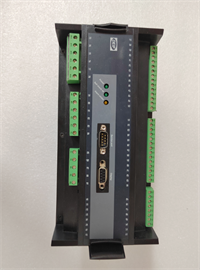
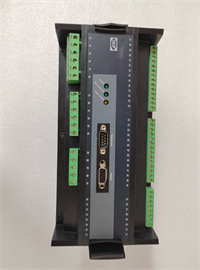
The DEIF GPU-2-GS serves as a specialized protection module for generator management systems. It acts as the primary safeguard, continuously analyzing the generator’s output to detect anomalies. When the unit identifies a fault—such as a sudden voltage drop or current spike—it triggers an immediate disconnect to prevent physical damage to the windings or connected loads.Unlike simple relays, this controller offers programmable intelligence. It supports Modbus RTU, allowing integration into larger SCADA or building management systems. The unit creates a localized decision loop, handling tasks like automatic start/stop sequences and load distribution logic without constant external supervision. Its design prioritizes high reliability in environments with electrical noise or fluctuating temperatures.
Installation & Configuration Guide
Preparation
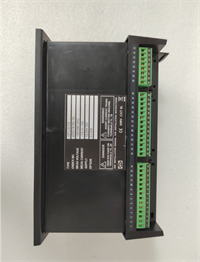
- Verify Hardware: Check the model label matches your order. Ensure the unit is free of physical damage.
- Tools: You will need a flathead screwdriver for terminal blocks and a laptop with the DEIF configuration software (or a Modbus master tool).
- Safety: Ensure the generator is offline and the control voltage is disconnected before touching terminals.
Removal (If replacing an existing unit)
- Label Wires: Photograph or label all wiring connected to the terminal blocks.
- Disconnect: Loosen terminal screws and gently pull connectors from the unit.
- Unmount: Release the DIN rail clip or remove mounting screws.
Installation
- Mounting: Secure the GPU-2-GS onto a standard DIN rail or flat surface.
- Wiring: Reconnect wires to the corresponding terminals. Ensure tight connections to prevent arcing.
- Grounding: Verify the chassis is properly grounded to reduce electrical noise.
Power-On & Test
- Apply Power: Turn on the control supply (typically 24V DC or 110/230V AC depending on variant).
- Self-Test: Observe the LED indicators. The unit should perform a brief self-diagnostic.
- Comms Check: Connect via the programming port. Verify the “heartbeat” or data readout in the software.
Troubleshooting Quick Reference
| Symptom | Probable Cause | Action |
|---|---|---|
| Unit Dead / No LEDs | Power supply failure or loose wiring. | Measure voltage at input terminals. Check fuses. |
| “Comms Error” / Timeout | Baud rate mismatch or wrong ID. | Verify Modbus settings (9600/19200 baud, parity). |
| False Trip (Overload) | Current Transformer (CT) ratio mismatch. | Check CT configuration in software matches physical CTs. |
| erratic Readings | Electrical noise or poor grounding. | Check shield connections on sensor cables. |
Dimensions, Mounting & Wiring Notes
- Mounting: Standard DIN Rail (Top Hat) or Panel Mount.
- Terminals: Pluggable screw terminals. Use 2.5 mm² wires for standard connections.
- Orientation: Mount vertically to allow heat dissipation.
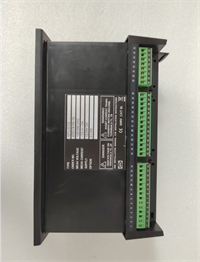
GPU 2 GS DEIF
FAQ
1. What is the difference between the GPU-2-GS and a standard relay?
The GPU-2-GS is a smart controller. It doesn’t just switch circuits; it calculates power factor and frequency, allowing it to make logic-based decisions (like synchronizing or load sharing) that a standard relay cannot.2. Can I use this for marine applications?
Yes. DEIF units are commonly used in marine power systems due to their ruggedized design and ability to handle the vibration and electrical noise typical on ships.3. How do I configure the protection limits?
You connect the unit to a PC via the programming interface. Using the DEIF software, you can set specific thresholds for voltage, current, and frequency trips.4. Is the GPU-2-GS discontinued?
This series is often found as “New Surplus” or stock. While newer digital generations exist, the GPU-2-GS remains a standard for many retrofit projects.5. I’m getting a “checksum error” on startup. What does that mean?
This usually indicates corrupted firmware or a memory fault. Try re-uploading the configuration file. If it persists, the internal memory chip may be damaged.