 Tel:
 Email:
 WhatsApp:
Description
Key Technical Specifications
| Parameter | Specification |
|---|---|
| Model | 3500/20 |
| Part Number | 125744-02W (base P/N 125744-02) |
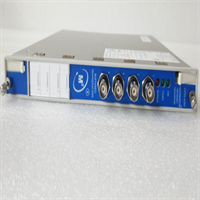
| Product Type | Rack Interface Module (RIM) |
| Host System | Bently Nevada 3500 series |
| Required Slot | Slot 1, immediately adjacent to the power supply |
| Communication | RS-232 serial; RS-232/RS-422 to external communication processors (TDXnet, TDIX, DDIX) |
| Data Rate | Up to 38.4k baud, auto-baud supported |
| Internal Modem | Up to 14.4k baud |
| Power | Backplane powered; 24 VDC; ~4.75 W typical |
| Hot Swap | Yes — module replacement without rack shutdown |
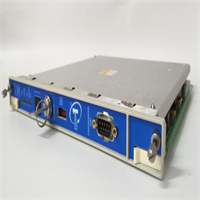
| Front Panel | OK, TX/RX, TM (Trip Multiply), CONFIG OK LEDs; rack reset button; 63-position address switch; RUN/PROGRAM configuration keylock |
| Operating Temperature | −30°C to +65°C per one distributor listing; another lists −40°C to +85°C — verify on the OEM manual and nameplate |
| Protection Class | IP20 |
| Dimensions / Weight | ~114 × 89 × 38 mm; ~0.23 kg |
| HS Code | 8537.10 |
Product Introduction
A 3500 rack is protecting a compressor. Monitors are healthy, trip logic is fine — but configuration downloads fail, waveform capture is dead, and the DCS has gone quiet. The break is not in a sensor. It is in the single module in Slot 1 that carries everything out of the rack.The 3500/20 RIM is that module. It handles rack-wide status, event collection, configuration retrieval, and the serial link to your host system. Critically, it does not participate in the vibration or displacement trip path — so its failure does not trip the machine. But it does end your ability to configure, diagnose, or read the rack remotely. For plants still running legacy 3500 frames on turbines, compressors, fans, and pumps, this is a classic maintenance spare.Engineers value it for two reasons. First, hot-swap: pull the module, drop in a spare, and the rack keeps running. Second, the front-panel keylock and address switch give you deterministic local control — RUN mode locks out unauthorized configuration changes, PROGRAM mode permits remote or local reconfiguration. Subjective note: the CONFIG OK LED is the single most useful diagnostic on this module. If it is not lit, stop and check the configuration before you blame the hardware.
Quality SOP & Tech Pitfalls
The Lab Report (SOP)
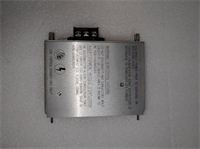
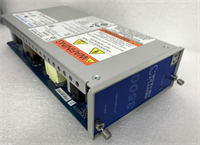
- Nameplate and part-number verification — confirm the full suffix including “W,” casting marks, and connector integrity.
- Visual counterfeit check: re-soldered connectors, blurred silkscreen, mismatched PCB revision.
- Bench test in a known-good 3500 rack — verify Slot 1 recognition, backplane communication, and serial port response.
- Supply and continuity checks with a Fluke multimeter on the 24 VDC backplane feed.
- Configuration read-back compared against the OEM rack configuration file.
- Anti-static sealing; nameplate photographed; serial and test record logged.
The Engineer’s Warning (Pitfalls)The first mistake is slot placement. This module must go in Slot 1, next to the power supply. Put it anywhere else and the rack will not recognize it as the interface.The second is confusing it with the 3500/22M TDI. The TDI is a different module class that replaces the RIM plus an external communication processor, and it also lives in Slot 1. They are not drop-in substitutes for each other.The third is configuration. A replacement RIM does not automatically inherit the rack’s configuration. Load the correct file and verify the address switch setting before you call the job done. I once watched a maintenance team close an outage with the DCS still blind — the module was healthy, the configuration was empty.Fourth: hot-swap is real, but it is not license to pull modules during a trip test or a machine start. Schedule the window.
Installation & Configuration Guide
Phase 1 — Pre-Installation (⚠️)
- Obtain a work permit and confirm the rack’s protection functions are blocked or the machine is safely isolated.
- Record the current rack slot map; photograph the existing module’s nameplate, address switch position, and keylock position.
- Export the rack configuration file from the 3500 Rack Configuration Software before touching hardware.
Phase 2 — Removal
- Tag every wire with its terminal number before disconnecting.
- Release the module retaining hardware; withdraw the module straight along the slot rails. Do not pry against the backplane connector.
- Inspect Slot 1 for dust, bent pins, or discoloration. Clean before inserting the replacement.
Phase 3 — Installation
- Verify the replacement part number matches the old nameplate exactly, including the “W” suffix.
- Set the address switch to the same frame address as the old module — 63 addresses are available, and a mismatch will break host communication.
- Slide the module into Slot 1 until the backplane connector seats fully; fasten the retaining hardware.
- Torque terminals to spec. No cold joints.
Phase 4 — Power-On & Configuration
- Confirm the OK and CONFIG OK LEDs are lit. If CONFIG OK is dark, stop and load the configuration.
- Load the configuration file and verify frame address, channel mapping, and alarm setpoints.
- Set the keylock to RUN once configuration is verified, to lock out unauthorized changes.
- Test the data path end to end: confirm the DCS, PLC, or System 1 host is receiving live data.
- Record the module serial, firmware version, and configuration revision in the asset file.
Compatible Replacement Models
- ✅ Drop-in Replacement: Another 125744-02W. Identical suffix, identical behavior. New-surplus commands a premium over pull stock.
- ⚠️ Software Compatible: Base P/N 125744-02 (without the “W” suffix). Same RIM function, but the suffix may encode a revision or option difference. Verify against the OEM manual and your rack’s firmware level — budget 1–2 hours for documentation review and a bench test.
- ❌ Hardware Mod Required: 125744-01 (TMR RIM) or 3500/22M TDI (part numbers 288055-01 / 138607-01V). These are different module classes — the TMR RIM requires a full TMR rack configuration, and the TDI changes the entire communication architecture. Only consider these in a planned system upgrade, not a single-module replacement.
Frequently Asked Questions (FAQ)
What exactly does 125744-02W do?
It is the standard Rack Interface Module for the 3500 system — rack configuration, status, event retrieval, and serial communication to external processors. It does not participate in the trip path.Which slot does it go in?
Slot 1, immediately next to the power supply. That is mandatory, not a recommendation.Can I hot-swap it?
Yes — 3500 modules support hot-swap replacement without stopping the rack. Do it in a scheduled window, not during a trip test or a machine start.Is the “W” suffix important?
Treat it as important. The base P/N 125744-02 is documented; the “W” is a revision or option suffix that I have not found an OEM datasheet for. Send me a photo of your nameplate and I will confirm before shipping.Will a 3500/22M TDI work instead?
Not as a like-for-like swap. The TDI replaces the RIM plus an external communication processor and changes the communication architecture entirely. Budget for engineering and reconfiguration.What’s the warranty?
Twelve months against manufacturing and functional defects — Slot 1 recognition, backplane communication, serial response. It does not cover a module installed in the wrong slot or loaded with the wrong configuration.Do you have the OEM manual?
The 3500 RIM user manual is the authority; I supply the rating plate photo and my own test record with every unit. For scheme-critical parameters, the OEM manual has the final say.