
 Tel:
Tel:  Email:
  WhatsApp:
 Description
Key Technical Specifications
| Parameter | Specification |
|---|---|
| Processor Type | Pentium III-class |
| Clock Speed | 650 MHz |
| Operating System | VxWorks Real-Time OS |
| DRAM | 64 MB / 128 MB |
| Flash Memory | 4 MB (BIOS on 2MB Flash EPROM) |
| SRAM / FRAM | 512 KB / 64 KB |
| COM1 Interface | 1x RS232C (complete signal set) |
| COM2 Interface | 1x RS232 / RS422 / RS485 (Non-standard) |
| Programming Software | M-PLC (CoDeSys based) |
| Typical Application | Wind Turbine Main Control |
Product Introduction
Wind turbine nacelles are brutal environments. You are dealing with constant vibration, extreme temperature swings, and electromagnetic noise from massive generators. The Bachmann MPC240 was built specifically to survive this chaos. As the core CPU in many WT1650 and similar wind turbine control systems, it handles everything from pitch control to grid synchronization. It runs the VxWorks real-time operating system, which means when a gust of wind hits the blades, the controller reacts in milliseconds without missing a beat.Engineers stick with this module because of its distributed architecture and deterministic timing. With a 650 MHz Pentium III-class processor and up to 128 MB of DRAM, it has more than enough headroom to process complex motion control algorithms and communicate over CANopen or Ethernet. I’ll be honest, though: the COM2 port uses a non-standard pinout. If you don’t use the custom-machined cable Bachmann specifies, you will fry the serial interface. It’s a classic rookie mistake, but it happens every year.
Quality SOP & Tech Pitfalls (The Reality Check)
The Lab Report (SOP)
We don’t just pull these off a shelf and ship them. Every MPC240 goes through a strict QA protocol. First, we do a visual and counterfeit check, inspecting the PCB for corrosion or lifted traces. Next, it goes on a live test rack where we verify the 650 MHz clock, test both COM ports, and validate the VxWorks boot sequence. We check power draw and insulation resistance with a calibrated Fluke multimeter. Finally, we log the firmware version and seal it in an anti-static bag. You get a test report with your shipment.The Engineer’s Warning (Pitfalls)
Let’s talk about the DIP switches. The MPC240 has two拨码盘 (DIP switches) on the front. The bottom one is high-order, the top is low-order. If you set the high-order switch to ‘E’, the controller boots into TEST mode. Set it wrong, and your turbine won’t start. I once watched a tech spend six hours at 2 AM in a freezing nacelle because he bumped the switch during installation and didn’t realize why the RUN LED stayed dark. Also, never ignore ESD. These older Pentium III boards are highly susceptible to static damage. Ground yourself before touching the backplane.
Installation & Configuration Guide
- Pre-Installation: ⚠️ SAFETY FIRST. Lock out and tag out the 24V DC power supply. Wait at least 60 seconds for internal capacitors to discharge. Take high-resolution photos of the existing wiring and, most importantly, the DIP switch positions.
- Removal: Label every wire with a sharpie. Depress the DIN rail clips carefully using a flathead screwdriver. Do not pry against the PCB.
- Installation: MATCH THE DIP SWITCHES EXACTLY. This single step prevents 90% of startup failures. Slide the new MPC240 onto the DIN rail and ensure the backplane connector seats fully. Reconnect wires according to your photos.
- Power-On & Testing: Apply 24V DC. Watch the LED sequence: INT (yellow) means initialization, RUN (green) means good, ERR (red) means trouble. Connect via COM1 (RS232) using M-PLC software to verify communication and download the application logic.
Compatible Replacement Models
| Replacement Model | Compatibility Tier | Notes & Field Advice |
|---|---|---|
| MPC240-128/512M | ✅ Drop-in Replacement | Hardware identical. Verify DRAM size matches your original application requirements. |
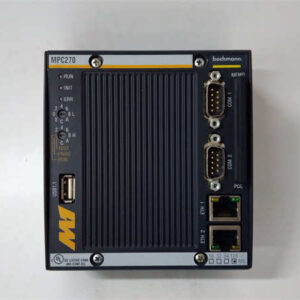
| MPC270 | ⚠️ Software Compatible | Newer generation CPU. Requires M-PLC logic recompile and potential I/O mapping updates. Budget 8-16 hours of engineering time. |
| MC200 Series | ❌ Hardware Mod Required | Multi-core upgrade (up to 1.6 GHz). Requires complete chassis redesign and full system re-validation. Only do this during a major retrofit. |
Frequently Asked Questions (FAQ)
- Can I hot-swap this CPU while the turbine is running?
Absolutely not. Pulling a live CPU will crash the entire control network and could cause a catastrophic turbine overspeed event. Always perform a controlled shutdown. - My COM2 port isn’t communicating. Is the board dead?
Probably not. Bachmann’s COM2 is non-standard. Are you using the factory-specific serial cable? Standard off-the-shelf DB9 cables will not work and can damage the port. Check the wiring diagram first. - What does it mean if the INT and ERR LEDs are both lit?
That yellow/red combo means the controller is stuck in TEST mode. Check your DIP switches immediately. The high-order switch is likely set to ‘E’ instead of the 0-D range required for normal RUN mode. - Is this board still being manufactured by Bachmann?
No, the MPC240 is discontinued. The units we supply are New Surplus or professionally refurbished. They are fully tested, but you should plan a long-term migration strategy to the MC200 series. - Can I just copy the PC card from the old CPU to the new one?
Yes, the MPC240 boots from a PC card (CompactFlash). However, ensure the firmware version on the card matches the replacement board’s BIOS. A major version mismatch can cause boot loops. Always back up the card before swapping. - Does it support modern Ethernet protocols?
It supports basic 10/100 Mbps Ethernet for SCADA integration, but don’t expect gigabit speeds or modern IT security features. If you need advanced cybersecurity, it’s time to upgrade the controller.