 Tel:
Tel:  Email:
  WhatsApp:
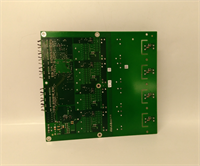
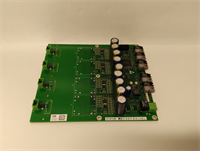
 Description
Key Technical Specifications
| Parameter | Value |
|---|---|
| Brand | ABB |
| Model | GDC801B101 |
| Product Type | Circuit Board Module |
| Work Voltage | 280V |
| Output Frequency | 50kHz |
| Program Capacity | 3MB |
| Data Capacity | 2MB |
| Processing Speed | 15Hz |
| Weight | 1.1 kg |
| Origin | Switzerland |
Product Introduction
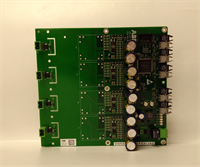
The ABB GDC801B101 is a circuit board module for electronic control and signal processing within ABB control systems. It handles precise control and measurement tasks in industrial settings.This module uses a highly integrated structure for durability. It processes signals reliably and is built for long life in demanding applications like automation and robotics.
Installation & Configuration Guide
Preparation (10 min)
- Power Down: De-energize the control panel. Verify zero potential with a multimeter.
- ESD Safety: Put on an anti-static wrist strap. Connect it to a grounded point.
- Workspace: Clear a static-free surface. Gather necessary screwdrivers.
Removal (5–10 min)
- Label Cables: Mark all wiring connections to the existing board. (Take a photo for reference).
- Disconnect: Remove terminal block wiring carefully.
- Unmount: Unscrew the mounting hardware. Slide the old GDC801B101 module out of the rack.
Installation (10 min)
- Insert Module: Slide the new GDC801B101 into the slot. Ensure it seats firmly against the backplane.
- Secure: Tighten the mounting screws. Do not overtighten; strip threads are a common headache.
- Reconnect: Re-attach wiring to the terminals based on your labels.
Power-On & Test (10 min)
- Verify Voltage: Check the main supply. It must match the 280V rating.
- Energize: Apply power to the system.
- Status Check: Observe the LED indicators. Green usually means good; flashing red means trouble.
- Signal Test: Run a loop test to verify signal processing.
Troubleshooting Quick Reference
| Symptom | Probable Cause | Corrective Action |
|---|---|---|
| No Power / Dead | Blown fuse or bad backplane connection | Check input fuses. Reseat the module firmly. |
| Communication Error | Loose wiring or address conflict | Verify terminal tightness. Check DIP switch settings. |
| Overheat | High ambient temp or blocked vents | Check panel cooling fans. Ensure airflow around the module. |
| Erratic Output | Signal noise or grounding issue | Verify shield grounding. Check for loose neutral wires. |
Dimensions, Mounting & Wiring Notes
- Dimensions: Standard module form factor (refer to rack specifications).
- Weight: 1.1 kg.
- Mounting: Control room installation / DIN rail or Rack mount.
- Wiring: Use crimped ferrules on stranded wire to prevent fraying in terminals.
- Torque: Tighten terminals to manufacturer specification (usually 0.5–0.6 Nm).
FAQ
What is the operating voltage for the GDC801B101?
The unit operates at a working voltage of 280V.Does this module come with a warranty?
Yes, typically we provide a 12-month warranty on tested surplus modules.Can I use this for motor control?
It is designed for signal processing and control logic, not direct high-power motor driving, though it interfaces with drive systems.Is the GDC801B101 new or used?
We supply tested surplus (used) units that have been verified for functionality.How do I reset the module if it hangs?
Cycle the main power to the rack. If issues persist, check the firmware version against your system requirements.