 Tel:
Tel:  Email:
  WhatsApp:
 Description
Key Technical Specifications
| Parameter | Specification |
|---|---|
| Data Transfer Rate | 1.1 MB/s (IEEE 488.1) / 2.8 MB/s (HS488) |
| Max Distance | 1 km (using fiber optic cable) |
| Device Capacity | Up to 26 devices (standard is 15) |
| Cable Type | Fiber Optic (Serial) |
| Standards | IEEE 488.1, IEEE 488.2, ANSI/IEEE 488.2-1992 |
| Transmission Mode | Buffered (FIFO) or Non-buffered |
| Parallel Poll Modes | Immediate or Latched |
| Error Checking | Hardware-based link verification |
| Form Factor | Desktop / External Module |
Product Introduction
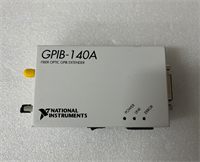
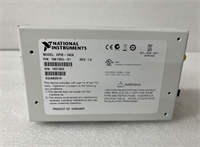
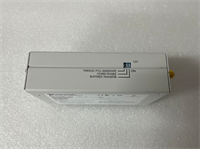
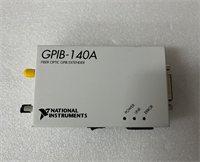
The NI GPIB-140A 186135G-01 is a hardware interface designed to overcome the physical distance limitations of standard IEEE 488 copper cabling. It converts parallel GPIB signals into high-speed serial fiber optic streams, allowing you to control instruments located up to 1 kilometer away from the controller. This is essential for test environments where devices are spread across large facilities or located in high-noise areas where copper cables fail.Unlike standard copper extenders, this unit uses fiber optics to eliminate electromagnetic interference (EMI) and ground loop issues. It increases the system device limit from the standard 15 units to 26 units without requiring software changes. The module supports HS488 protocols to maintain data throughput speeds exceeding 2.8 MB/s, ensuring that long-distance transmission does not bottleneck your test cycle times.
Installation & Configuration Guide
Preparation (10 min)
- Verify you have a matched pair of extenders (one acts as the transmitter, one as the receiver).
- Inspect the fiber optic cables for cracks or dirty connectors.
- Ensure the GPIB devices and controller are powered off before connecting cables.
Removal (N/A – New Install)
- Note: If replacing an existing copper bus, disconnect the GPIB cables from the controller and instruments.
Installation (10 min)
- Connect the local GPIB devices to the “GPIB” port of the first GPIB-140A unit.
- Plug the fiber optic cable into the serial port on the extender.
- Route the fiber cable to the remote location (max 1 km).
- Connect the remote end of the fiber cable to the second GPIB-140A unit.
- Connect the remote GPIB instruments to the second unit.
Power-On & Test (10 min)
- Power on both GPIB-140A units.
- Check the status LEDs on both units (typically indicates link integrity).
- Power on the controller and instruments.
- Run a simple poll or identification command from the controller software (e.g., NI-MAX) to verify the remote instruments are recognized.
Troubleshooting Quick Reference
| Symptom | Probable Cause | Corrective Action |
|---|---|---|
| Link LED is Off | Fiber cable broken or disconnected. | Reseat fiber connectors; inspect cable for physical damage. |
| Data Timeout / Error | Distance exceeds 1 km limit. | Verify cable length; ensure it is under 1000 meters. |
| Device Not Found | Address conflict or power loss. | Check that remote instruments are powered on and have unique GPIB addresses. |
| Slow Data Transfer | Running in Non-Buffered mode. | Verify configuration; HS488 requires buffered mode for max speed. |
| Garbled Data | Grounding issues at endpoints. | Even with fiber, ensure local instrument grounds are secure. |
Dimensions, Mounting & Wiring Notes
- Dimensions: Compact desktop footprint (approx. 4″ x 3″ x 1.5″).
- Mounting: Designed for benchtop use; no DIN rail mount.
- Connectors: Standard 24-pin female GPIB connector and fiber optic port.
- Wiring Note: The unit requires external power (check specific voltage rating on label, usually 100-240VAC or 24VDC depending on sub-revision).
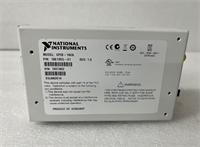
GPIB-140A 186135G-01 NI
FAQ
Can I use standard copper GPIB cables with this?
Yes, but only for the short “drop” cables connecting your instruments to the GPIB-140A box. The long-distance link between the two boxes must be fiber optic.Does this work with HS488 devices?
Yes. The 186135G-01 supports the HS488 protocol, which allows for faster data transfer rates (up to 2.8 MB/s) compared to standard IEEE 488.1.I have devices in two different rooms. Will this work?
Yes, this is the primary use case. As long as the rooms are within 1 km of each other, the fiber link will bridge the gap perfectly.Do I need to rewrite my LabVIEW code?
No. The extension is transparent to the software. Your application sees the remote instruments exactly as if they were connected via a short copper cable.What is the difference between GPIB-140A and GPIB-140A/2?
The standard GPIB-140A supports distances up to 1 km. The “/2” variant typically supports extended distances up to 2 km. Verify your specific range requirements before purchasing.