 Tel:
 Email:
 WhatsApp:
Description
Key Technical Specifications
| Parameter | Specification |
|---|---|
| Product Model | RMP201-8 |
| Manufacturer | KONGSBERG |
| System Type | RBUS Remote I/O |
| Channel Configuration | HART-enabled analog input field channels |
| Safety Integrity Level | SIL (single), SIL (redundant) |
| Hazardous Area Approval | ATEX (Zone) |
| Operating Temperature | Industrial operating range |
| Storage Temperature | Industrial storage range |
| Humidity | Max relative humidity, non-condensing |
| Ingress Protection | IP rating (IEC) |
| Mechanical Dimensions | Standard DIN rail width and depth |
| Weight | Lightweight marine enclosure |
| Mounting | Vertical DIN rail |
| MTBF | Extended mean time between failures |
| Spare Part Reference | RMP422S |
Product Introduction
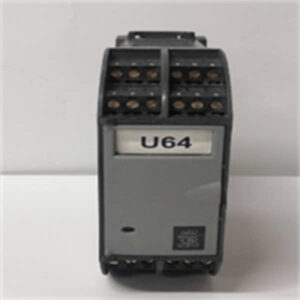
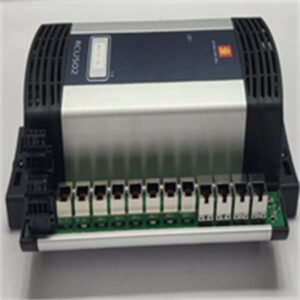
When you’re maintaining a Kongsberg RBUS network on a drilling rig or a commercial vessel, you don’t have the luxury of swapping out standard PLC cards. You need hardware that survives salt spray, extreme vibration, and the constant threat of explosive atmospheres. The RMP201-8 is exactly that kind of hardware. It’s an analog input module designed specifically for safety applications within the RBUS architecture.What I actually like about this module is its flexibility in the field. It handles transparent HART communication, meaning you can access device variables directly from the control application without ripping out the wiring. It features extended circuit monitoring, including current leakage detection per channel. The MTBF is highly rated for marine automation. But don’t let the specs fool you into thinking it’s plug-and-play. This specific revision is notoriously picky about firmware matching. If your system is running an older K-Chief or DC C20 configuration, dropping in a mismatched firmware version will cause the RBUS network to reject the module.
Quality SOP & Tech Pitfalls
The Lab Report (SOP)
Before I let a spare part leave the shop, it gets put through the wringer. We don’t just look at it and box it up.
- Visual & Counterfeit Check: Inspecting PCB traces under magnification for micro-fractures or corrosion. Checking the silkscreen for OEM authenticity.
- Live Test on Test Rack: Powering up the module on a dedicated RBUS test rack. Verifying the DC input and checking the status LEDs for the correct boot sequence.
- Insulation & Multimeter Checks: Using a Fluke multimeter to verify continuity and checking insulation resistance on the analog input loops to ensure no short-to-ground faults.
- Firmware Version Logging: Reading the internal memory to confirm the exact firmware revision matches the OEM documentation for your specific system generation.
- Anti-Static Sealing: Vacuum-sealing the module in an ESD-compliant bag with desiccant. Moisture is the enemy of marine electronics.
The Engineer’s Warning (Pitfalls)
- The Firmware Trap: I once watched a crew lose an entire RBUS branch because they swapped in an RMP201-8 with a newer firmware build. The master controller didn’t recognize the hardware ID. Result? A total loss of analog data for the ballast system until they could flash the module. Always check your system’s required firmware version first.
- Ignoring the DIP Switches/Addressing: The RBUS network relies on strict node addressing. If you fail to copy the exact address configuration from the old module to the new one, you’ll create a duplicate address conflict. The network will fault out, and you’ll be troubleshooting in the middle of the night.
Installation & Configuration Guide
Phase 1: Pre-Installation
- ️ Safety First: Put the RBUS system into maintenance mode or safely shut down the specific branch.
- Discharge Wait: Wait for capacitors to discharge.
- Documentation: Take high-resolution photos of the old module’s wiring, terminal blocks, and especially the node address settings or DIP switches.
Phase 2: Removal
- Labeling: Tag every single wire. Do not trust your memory.
- Release Clips: Carefully release the DIN rail clips. Don’t pry aggressively; the plastic tabs on marine enclosures get brittle over time.
- Extraction: Pull the module straight out. Avoid wiggling it side-to-side, which can damage the backplane connectors.
Phase 3: Installation
- Copying Settings: Set the node address on the new RMP201-8 to exactly match the old module. This single step prevents the vast majority of startup failures.
- Seating the Module: Slide the new module onto the DIN rail and push it firmly into the backplane connector until it clicks.
- Wiring: Reconnect the field wiring according to your photos. Double-check the polarity on the analog loops.
Phase 4: Power-On & Testing
- Power Up: Restore power to the branch.
- LED Verification: Watch the status LEDs. You want a steady green for power and network communication. A flashing red indicates a fault or address conflict.
- System Verification: Log into the Kongsberg configuration tool. Verify the module is recognized, the firmware matches, and the analog channels are reading live data without errors.
Compatible Replacement Models
- Drop-in Replacement: RMP201-8 (Same Firmware). If you find a surplus unit with the exact same firmware revision, it’s a direct swap. Just copy the address and go.
- ️ Software Compatible: RMP201-8 (Different Firmware). You can use this, but you will need to connect to the module via a service laptop and flash the firmware to match your system’s requirements. Expect some labor and configuration time.
- Hardware Mod Required: RMP420 / RMP422S. The RMP422S is listed as a spare part reference, but it often requires different backplane wiring or system configuration changes. Do not attempt this unless you are doing a full system upgrade and have the OEM engineering manual open in front of you.
Frequently Asked Questions (FAQ)
Can I hot-swap the RMP201-8 while the system is running?
Technically, the RBUS network supports hot-swapping, but I don’t recommend it unless you are absolutely certain about the node addressing. If you plug in a module with a conflicting address, it can disrupt communication for the entire branch. If you must hot-swap, put the system in maintenance mode first.What does the ATEX Zone certification actually mean for my installation?
It means the module is certified for use in areas where an explosive atmosphere is not likely to occur in normal operation, but if it does occur, it will exist for a short period. You still need to ensure your enclosure and wiring methods comply with local hazardous area regulations. The module has a specific IP rating, so it must live inside a properly rated control cabinet.How do I know if my replacement module has the right firmware?
You don’t, just by looking at it. You have to ask the supplier for the exact firmware revision printed on the label or, better yet, ask them to verify it via a terminal read before shipping. If you don’t know your system’s required firmware, check the existing module or consult your Kongsberg system documentation.What happens if I get a current leakage fault on one of the channels?
The RMP201-8 has built-in extended circuit monitoring. If it detects current leakage on a channel, it will flag a diagnostic alarm. This usually means moisture has gotten into your field junction box or the insulation on your analog loop is compromised. You’ll need to isolate the field wiring and megger the loop to find the fault.Is the RMP422S a direct replacement for the RMP201-8?
The RMP422S is listed as a spare part reference, but in my experience, it’s not always a simple drop-in. It often implies a different hardware generation or requires specific system configuration changes. Always verify with your Kongsberg system integrator before buying an RMP422S as a replacement for an RMP201-8.Can I use this module for safety-critical shutdown systems?
Yes, but only if configured correctly. The module is certified for specific SIL levels depending on whether it is used in a single or redundant configuration. If you are using it for a safety instrumented function (SIF), you must ensure your system architecture and proof testing procedures align with those safety integrity levels. Don’t just wire it up and hope for the best.