 Tel:
Tel:  Email:
  WhatsApp:
 Description
Key Technical Specifications
| Parameter | Specification |
|---|---|
| Manufacturer | ABB |
| Product Series | Control Systems |
| Model Numbers | IC660BBA104, 6231BP10910 |
| Input Voltage | 24 VDC |
| Output Voltage | 24 VDC |
| Product Net Weight | 1.8 kg |
| Function | Analog Current Signal Source |
| Application | Process Control, Automation |
Product Introduction
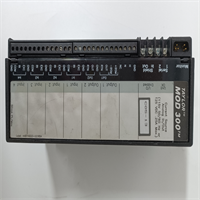
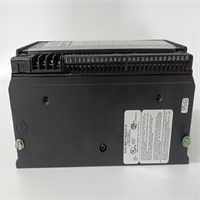
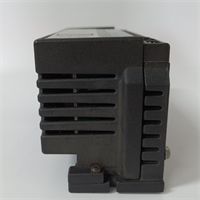
The IC660BBA104 (also identified as 6231BP10910) is an analog current source module manufactured by ABB. It is designed to generate and output precise analog current signals, which are essential for controlling various industrial processes and actuators. This module acts as a reliable signal generator within larger automation architectures.Engineered for high stability and accuracy, the IC660BBA104 ensures consistent signal output even in demanding industrial environments. Its robust construction and reliable performance make it suitable for applications requiring exact current control, such as driving control valves or other current-loop devices in power, chemical, and manufacturing plants.
Installation & Configuration Guide
Phase 1: Preparation (10 min)
- Safety First: Disconnect all power to the control panel. Follow Lockout/Tagout (LOTO) procedures to prevent accidental startup.
- Verify Compatibility: Confirm that the IC660BBA104 is compatible with your existing ABB control system rack and backplane.
- Gather Tools: You will need a Phillips screwdriver and a multimeter to verify voltage levels.
Phase 2: Removal (5–10 min)
- Mark Wires: Before disconnecting anything, label all field wires connected to the module for easy reconnection.
- Disconnect Power: Unplug the 24V DC power supply cable from the module.
- Remove Screws: Loosen and remove the screws securing the module to the DIN rail or mounting panel.
- Extract: Carefully pull the module away from the mounting surface.
Phase 3: Installation (10 min)
- Mounting: Align the IC660BBA104 with the DIN rail or panel mounting holes. Slide it into place until it clicks or secure it with screws.
- Reconnect Power: Plug the 24V DC power supply back into the module.
- Wire Reconnection: Connect the analog output wires to the appropriate terminals. Ensure wires are securely fastened under the screw heads.
- Check Configuration: Verify any configuration switches or jumpers are set according to the system requirements for current output.
Phase 4: Power-On & Test (10 min)
- Visual Inspection: Look for any loose wires or obvious damage.
- Power Up: Restore power to the control panel.
- LED Check: Observe the status LEDs on the module. A steady green LED typically indicates normal operation.
- Function Test: Use a multimeter to measure the analog current output. Verify that the signal matches the expected value from the control system.
Troubleshooting Quick Reference
| Symptom | Probable Cause | Corrective Action |
|---|---|---|
| No Output Signal | Loose Power Connection | Reconnect and tighten the 24V DC power cable. |
| Inaccurate Signal | Improper Calibration | Recalibrate the module according to the ABB technical manual. |
| Intermittent Signal | Loose Field Wiring | Inspect and retighten all terminal screws on the IC660BBA104. |
| Module Fault LED | Internal Failure | Replace the module if fault persists after reseating and power cycling. |
| Communication Error | Backplane Issue | Ensure the module is properly seated in the chassis and the backplane is functional. |
Dimensions, Mounting & Wiring Notes
- Dimensions: The specific dimensions are not listed in the available documentation, but the unit weighs 1.8 kg.
- Mounting: The IC660BBA104 is designed for standard industrial mounting, likely on a DIN rail or panel using the provided hardware.
- Wiring: The module uses screw-type terminals for field wiring. It handles analog current output signals. Ensure you follow the specific wiring diagram in the ABB user manual to avoid miswiring the current loop.
IC660BBA104 6231BP10910 ABB
FAQ
What is the difference between IC660BBA104 and IC660BBA101?
The primary difference lies in their specific function and output characteristics. The IC660BBA104 is an analog current source module. You must verify the specific output range and compatibility with your system controller.Can I use this with a GE VersaMax CPU?
No. The IC660BBA104 is an ABB component designed for ABB control systems. While the “IC660” prefix was historically used by GE Fanuc for their Genius I/O line, this specific model is identified as an ABB product. It is not compatible with the GE VersaMax platform.What voltage does this module require?
The IC660BBA104 operates on 24V DC for both its input power and output signal generation. Ensure your power supply can provide stable 24V DC to the module.Is this a new or used part?
This is typically listed as “New Surplus” or “Refurbished.” New surplus parts are unused units from the original manufacturer’s inventory, while refurbished parts have been tested and verified to function correctly.What is the purpose of this module?
The IC660BBA104 acts as an analog current source. It takes a control signal and converts it into a precise electrical current to drive field devices like control valves or actuators that operate on a current loop (e.g., 4-20mA).
ABB IC660BBA104 Analog Current Source