 Tel:
Tel:  Email:
  WhatsApp:
 Description
Key Technical Specifications
| Parameter | Specification |
|---|---|
| Product Type | Quad Processor Pack (Controller) |
| Processor Architecture | Quad-Core Redundant Logic |
| Program Capacity | 3 MB |
| Data Capacity | 1 MB |
| Processing Speed | Up to 15 Hz execution rate |
| Input Voltage | 24 VDC (Nominal) |
| Communication Ports | RS-232, RS-485, Ethernet |
| Mounting Type | Chassis Mount (FC-IOCHAS series) |
| Certifications | UL Listed, CE Marked |
| Operating Temp | -20°C to +60°C (Typical industrial range) |
| Weight | Approx. 1 kg |
Product Introduction
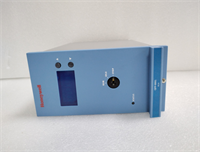
The Honeywell FC-QPP-0001 is a Quad Processor Pack designed to serve as the central processing unit for industrial automation systems. It handles complex logic solving and safety management tasks, acting as the “brain” of the controller rack. This module is specifically engineered for environments requiring high availability and fault tolerance.Unlike standard single-core PLCs, this unit utilizes a quad-core architecture to ensure data integrity and continuous operation even if a core fails. With a program capacity of 3MB and a scan rate hitting 15Hz, it manages heavy I/O loads without latency issues common in older legacy hardware. You will typically find this paired with a C-series or similar Honeywell chassis.
Installation & Configuration Guide
Phase 1: Preparation (10 min)
- Power Down: Cut main power to the rack. Verify 0V with a multimeter at the terminal block.
- ESD Safety: Strap on your anti-static wristband. The chips on the backplane connector are sensitive to static discharge.
- Verify Hardware: Ensure you have the correct chassis (e.g., FC-IOCHAS-0001 or -0002R). The FC-QPP-0001 will not fit in generic DIN-rail setups without the specific carrier.
Phase 2: Removal (Old Unit Only)
- Disconnect Cables: Unplug the RS-232/RS-485 comms cables from the front face. Note their positions (Port A vs. Port B).
- Unlock: Rotate the ejector latches (top and bottom) outward until they click loose.
- Extract: Pull the module straight out. Do not wiggle it excessively; the backplane pins can bend.
Phase 3: Installation (New Unit)
- Align: Line up the top and bottom guide rails of the chassis slot.
- Insert: Slide the FC-QPP-0001 into the slot firmly.
- Seat: Push until the backplane connector engages. You should feel a distinct “thud” or resistance stop.
- Lock: Rotate the ejector latches inward to lock the card in place. Tighten retention screws if present.
Phase 4: Power-On & Test
- Apply Power: Restore 24VDC power to the rack.
- Observe LEDs: Watch the status LEDs on the front panel.
- RUN: Should be solid green after boot.
- FAULT: Must be off. If it flashes red, check the firmware version.
- Connect Software: Hook your engineering laptop to the Ethernet or Serial port. Perform a handshake test via the configuration software.
Troubleshooting Quick Reference
| Symptom | Probable Cause | Corrective Action |
|---|---|---|
| No LEDs lit | Backplane power loss | Check chassis power supply unit (PSU) and fuses. Verify 24VDC input at the rack. |
| Red FAULT LED blinking | Firmware mismatch | Verify the firmware version (e.g., V1.4) matches the system requirement. Reload if necessary. |
| Cannot connect via PC | Comms cable error | Ensure you are using the correct null-modem adapter for RS-232. Check DIP switch settings. |
| System runs slow | High scan time | Review logic code size. 3MB is the limit; if near capacity, optimize the code or upgrade hardware. |
| Intermittent drops | Loose connection | Reseat the module. Check for bent pins on the rear connector. |
Dimensions, Mounting & Wiring Notes
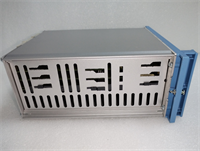
- Form Factor: Standard Eurocard/Module size for Honeywell racks.
- Mounting: Slides into the dedicated processor slot (usually Slot 0 or 1) of the FC-IOCHAS chassis.
- Connections:
- Front Face: DB9 connectors for Serial (RS-232/485) and RJ45 for Ethernet.
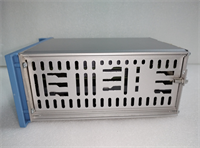
- Rear: 96-pin DIN 41612 style connector (plugs into backplane).
- Clearance: Leave at least 2 inches of vertical clearance above the module for heat dissipation and cable routing.
FC-QPP-0001 HONEYWELL
FAQ
1. Is the FC-QPP-0001 a direct replacement for older QPP models?
Generally, yes, but you must verify the firmware revision. If your system is running an older kernel, a newer V1.4 module might require a firmware downgrade or system update to communicate correctly.2. What does “Quad Processor” actually mean here?
It refers to the internal redundancy. The module processes logic across multiple cores to prevent single-point failures. It doesn’t mean you get four separate controllers; it acts as one highly reliable unit.3. Can I hot-swap this module?
If configured in a redundant pair (primary/secondary), yes, usually. However, swapping the last active processor while the system is live is risky and generally not recommended without bypassing the safety logic first.4. Why is the FAULT light flashing amber?
This often indicates a configuration error or a communication timeout with the I/O modules. Check your network settings and ensure the rack address switches are set correctly.5. Does this come with the chassis?
No. The FC-QPP-0001 is just the processor module. You need to purchase the chassis (like the FC-IOCHAS-0002R) separately unless listed as a bundle.