 Tel:
 Email:
 WhatsApp:
Description
Key Technical Specifications
| Parameter | Specification |
|---|---|
| Brand | HIMA |
| Model | F8628X |
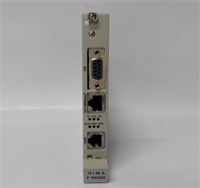
| Product Type | HIMax communication module |
| Platform | HIMA HIMax safety controller family |
| Communication Interface | Ethernet per published listings; verify exact port type |
| Supported Protocols | Profibus DP slave and Ethernet-based configuration per published data; other protocol claims vary by source |
| Safety Role | Part of HIMA SIL-rated safety system; verify exact SIL claim with OEM documentation |
| Typical Application | SIS/ESD racks, process safety networks, HIMax controller communication expansion |
| Availability | Obsolete; surplus and tested stock only |
Product Introduction
When a HIMA HIMax rack starts throwing communication faults, the first instinct is to blame the network. Usually the network is fine. The problem sits in the comm module, the configuration, or a revision mismatch nobody documented.The HIMA F8628X is a communication module for the HIMax safety controller platform. It is not a standalone PLC, and it is not a generic Ethernet card you can drop into any rack. Its job is to give the HIMax controller a controlled path to talk to external systems while keeping the safety logic isolated and deterministic. That is why engineers still hunt for these modules: replacing an entire HIMax station is expensive, and the existing safety logic may not have been migrated yet.This specific module is dependable when handled correctly. The trap is assuming every F8628X is identical. Different suffixes, firmware levels, and rack generations can change behavior. Always verify the full part designation and the installed HIMax software version before committing to a swap.
Quality SOP & Tech Pitfalls
The Lab Report (SOP)
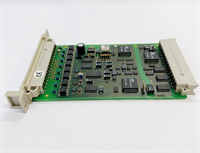
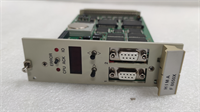
- Visual inspection: check for burned components, swollen capacitors, damaged Ethernet/serial ports, and missing label plates.
- Counterfeit/revision check: verify HIMA branding, full model number, hardware revision, and serial number.
- Connector inspection: examine Ethernet ports, backplane contacts, and terminal blocks for oxidation or bent pins.
- Live test: install into a compatible HIMax rack, apply rated power, and verify module recognition and LED status.
- Communication check: verify IP address, node address, protocol settings, and handshake with the master or host system.
- Electrical checks: measure supply rails, insulation resistance, and connector continuity with a multimeter or equivalent.
- Firmware/logging: record firmware version and configuration snapshot; do not flash unverified firmware.
- Packaging: seal in anti-static bag with nameplate photo, revision label, and test record.
The Engineer’s Warning (Pitfalls)
The most common failure with HIMA comm modules is not the hardware. It is the configuration. I have seen plants replace an F8628X, get the LEDs to light up, and declare victory—only to find the safety controller cannot talk to the host because the IP address, node address, or protocol settings were never copied from the old module.Another frequent mistake is trusting third-party protocol lists. Some sellers claim this module supports Modbus TCP, IEC 61850, OPC UA, Profinet, and half the industrial protocol menu. That is not something I would bet a shutdown window on. Confirm the supported protocols against the HIMA manual and the actual module revision.
Installation & Configuration Guide
- Pre-Installation
- ️ Follow plant safety procedures before working on the HIMax rack.
- Photograph every label, LED state, switch position, cable connection, and slot location.
- Export or back up the existing HIMax configuration before removing any module.
- Record the IP address, node address, protocol settings, and firmware version.
- Removal
- Label all Ethernet and communication cables.
- Release retention hardware carefully.
- Remove the module without forcing the backplane connector.
- Inspect the rack slot and backplane contacts for damage.
- Installation
- Copy all communication settings from the old module. This includes IP address, subnet mask, node address, baud rate, and protocol parameters.
- Seat the module firmly into the correct HIMax slot.
- Verify retention hardware is secured before powering up.
- Reconnect communication cables exactly as labeled.
- Power-On & Testing
- Apply power and observe the LED sequence.
- Confirm the HIMax controller recognizes the module.
- Verify communication with the host system or master station.
- Check for fault LEDs, timeout errors, or protocol mismatches.
- Run a controlled communication test before returning the system to normal operation.
Compatible Replacement Models
| Compatibility Tier | Model / Option | Notes |
|---|---|---|
| Drop-in Replacement | HIMA F8628X, same revision | Match full part number, hardware revision, firmware, and slot position. |
| ️ Software Compatible | HIMA F8628X, different suffix or revision | May require configuration reload, firmware verification, or HIMax software check. |
| ️ System Migration | HIMA HIMax F8627X or newer HIMax comm modules | Verify rack compatibility, firmware, and safety application impact. |
| Hardware Mod Required | Non-HIMax or non-HIMA communication cards | Not compatible. Requires new controller architecture and safety revalidation. |
Frequently Asked Questions (FAQ)
Q1: Is the HIMA F8628X still in production?
It is considered obsolete in most markets. Available units are typically new surplus, unused stock, or tested surplus. Verify the revision before purchasing.Q2: Can I hot-swap this module?
Only if the HIMax manual and your plant procedure explicitly allow it for this exact module and slot. Many safety racks tolerate controlled module replacement, but communication modules can disrupt host links if swapped incorrectly.Q3: Does this module support Modbus TCP or OPC UA?
Some listings claim it does, but those claims are not consistently confirmed by OEM documentation. Treat them as unverified unless your module manual or HIMA datasheet explicitly lists the protocol.Q4: Can I use any F8628X as a replacement?
No. The part suffix matters. Different revisions can change firmware behavior, communication settings, and rack compatibility. Always match the full part number.Q5: What causes communication failures after replacement?
Most post-swap issues come from incorrect IP addresses, wrong node addresses, mismatched protocol settings, firmware differences, or damaged backplane contacts. The module itself is often fine.Q6: What should I send before ordering?
Provide a clear nameplate photo, full model number, hardware revision, firmware version, HIMax rack model, slot position, and current communication settings.Q7: Is this module a safety CPU?
No. The F8628X is a communication module for the HIMax platform. The safety logic runs on the HIMax controller; this module handles external communication.