 Tel:
Tel:  Email:
  WhatsApp:
 Description
Key Technical Specifications
| Parameter | Specification |
|---|---|
| Part Number | 984323602 |
| Module Type | Digital Input (Safety Related) |
| Channel Count | 16 Independent Inputs |
| Input Signal | 24V DC (Mechanical Contact) or 6mA (NAMUR) |
| Processor | Dual Intel 386EX (32-bit, 25MHz) |
| Switching Time | Typical 8 ms |
| Safety Rating | SIL 3 (IEC 61508), TÜV AK6 Certified |
| Logic Architecture | QMR (Quadruple Modular Redundancy) capable |
| Power Input | 5V DC (120mA) / 24V DC (200mA) via Backplane |
| Operating Temp | -20°C to +60°C |
| Isolation | Channel-to-Bus Isolation |
| Dimensions | 4 TE (Eurocard width approx.) |
Product Introduction
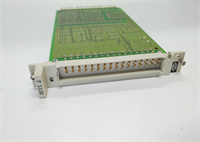
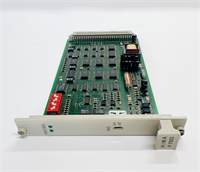
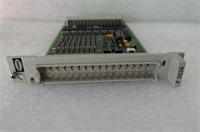
In the world of Emergency Shutdown (ESD) systems, a “stuck” input isn’t just an annoyance—it’s a catastrophe waiting to happen. The HIMA F3236 is a 16-channel digital input module designed specifically for these high-stakes environments. Unlike standard PLC input cards that just read voltage, the F3236 has its own “brain”—literally. It houses dual Intel 386EX microprocessors that run in lockstep (one processing actual data, the other inverted data) to cross-check every single bit.If one processor drifts or fails, the hardware comparator catches it instantly and forces the system into a safe state. I’ve seen these modules sitting in offshore platforms for 20 years, monitoring gas detectors and fire panels without a glitch. They are built to survive harsh electromagnetic interference (EMI) and temperature swings. However, because they are “smart” modules with their own firmware, you can’t just swap them blindly; you need to respect the configuration and the specific terminal assembly wiring.
Quality SOP & Tech Pitfalls (The Reality Check)
The Lab Report (SOP)
We don’t trust “pulls” from the field. Here is how we verify a 984323602:
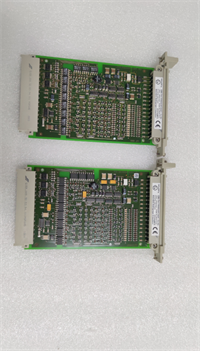
- Visual Inspection: We check the PCB for signs of heat stress near the processors. We also inspect the backplane pins—bent pins here will prevent the module from communicating with the safety logic solver.
- Dual-CPU Sync Test: This is the critical test. We verify that both internal processors are running and synchronizing correctly. If the “Hardware Comparator” detects a mismatch, the module fails.
- Channel Loopback: We toggle all 16 inputs at high speed to ensure the response time meets the 8ms spec. We also test the “Wire Break” detection feature if configured for 6mA (NAMUR) inputs.
- Self-Diagnosis Verification: We simulate a fault (like a memory error) to ensure the module’s internal watchdog trips the alarm LED.
The Engineer’s Warning (Pitfalls)
- The “Floating Input” Hazard: The F3236 is sensitive to noise on unused channels. If you leave inputs floating (unconnected) without pulling them to a defined state (high or low) via the terminal assembly, the high impedance can pick up stray RF noise. This can cause the module to register false “1” signals, confusing the safety logic. Always terminate unused channels.
- Voltage Mismatch: This card supports both 24V mechanical contacts and 6mA NAMUR sensors. These settings are often determined by the Terminal Assembly (TA) or jumpers. If you wire a 24V source into a TA configured for 6mA, you will fry the input circuitry instantly. Verify the TA part number.
- Field Disaster: A technician replaced a faulty F3236 but didn’t realize the system was using “Forced Values” to bypass a bad sensor during maintenance. When the new card initialized, it cleared the forces, causing the logic to see a sudden “Open” condition on a critical pressure switch. This triggered a full unit shutdown. Always check for active forces before swapping.
Installation & Configuration Guide
This is a safety component. Precision is non-negotiable.
- Pre-Installation Safety
- ⚠️ CRITICAL: Place the relevant safety logic loops in “Maintenance Mode” or override the trip votes. Swapping the card breaks the link to the field sensors, which the CPU might interpret as a dangerous condition.
- Take a photo of any jumpers or DIP switches on the old module (if accessible) and the wiring on the Terminal Assembly.
- Removal
- Disconnect the field wiring harness from the Terminal Assembly (TA). Label cables if they aren’t pre-labeled.
- Release the locking mechanism (screw or lever) on the module faceplate.
- Slide the module out of the HIMatrix carrier.
- Hardware Setup
- Inspect the gold pins on the back of the new module. Ensure none are bent.
- Copy Config: If there are jumpers or switches, set them to match the old module exactly.
- Insert the module into the slot. Push firmly until the backplane connector seats fully. Lock the mechanism.
- Power-Up & Commissioning
- Reconnect the wiring harness.
- Remove the maintenance bypass.
- Watch the LEDs. You want to see the “Run” LED solid green. A flashing red LED usually indicates a self-test failure or sync error between the two CPUs.
- Verify the input status in the HIMA engineering software (SILworX). Toggle a field switch and watch the bit change.
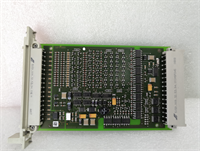
F3236 HIMA
Compatible Replacement Models
- ✅ Drop-in Replacement: F3236 (984323602). This is the exact model. Suffix variations (revisions) are generally compatible.
- ⚠️ Functional Equivalent: F3213. This is another digital input module in the HIMA lineup. It may have different channel counts (e.g., 8 channels) or voltage ratings. Requires checking the pinout.
- ❌ System Upgrade: HIMatrix F60 DI Module. Newer HIMA systems use the F60 series. These have different form factors and protocols. You cannot mix F3236 cards in an F60 rack.
Frequently Asked Questions (FAQ)
Q: Can I hot-swap this module?
A: Yes, the HIMatrix system is designed for hot-swapping. However, because this is a safety input card, removing it breaks the connection to your field sensors (e.g., ESD buttons). Unless you have redundant inputs or the loop is bypassed, this could cause a nuisance trip. Proceed with caution.Q: What does the “Fault” LED mean?
A: On the F3236, a red fault LED usually indicates an internal hardware failure (CPU mismatch, memory error) or a watchdog timeout. It rarely indicates a field wiring issue (that’s usually a specific channel diagnostic). If the LED is red, the card likely needs replacement.Q: Can I use this for AC signals?
A: No. The F3236 is designed for DC inputs (24V or 6mA). Connecting AC voltage (like 120V AC) will destroy the module. For AC inputs, you need a different HIMA module (like the F3330 or similar AC-rated cards).Q: Why does this module have processors inside it?
A: Because it’s a “Safety Integrity Level 3” (SIL3) device. The onboard processors allow the card to perform self-diagnostics, detect wire breaks, and filter noise autonomously, ensuring that the main CPU receives only valid, safe data.Q: Is the 984323602 obsolete?
A: It is considered “mature” technology. While HIMA supports the platform, finding brand new units is harder. Most available stock is now high-quality surplus or refurbished.