 Tel:
Tel:  Email:
  WhatsApp:
 Description
Key Technical Specifications
| Parameter | Specification |
|---|---|
| Manufacturer | GE Fanuc |
| Product Series | VersaMax / 90-30 Series |
| Model Number | HE693ADC409A-22 |
| Signal Type | Analog Input (Millivolt) |
| Resolution | High Resolution (12-bit/15-bit equivalent) |
| Channels | 8 Independent Inputs |
| Operating Temp | 0°C to 60°C |
| Mounting | VersaMax Baseplate / DIN Rail |
Product Introduction
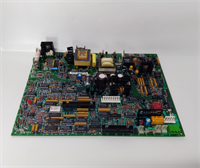
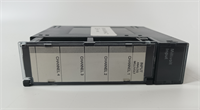
The HE693ADC409A-22 is a high-performance Analog Input Module manufactured by GE Fanuc. It is a key component of the VersaMax family (compatible with the 90-30 series architecture), designed to provide precise signal acquisition for industrial automation systems.This module is specifically engineered to interface with low-level analog sensors, such as thermocouples or millivolt-output transducers. It features high resolution and accuracy, ensuring that subtle changes in process variables (like temperature or pressure) are captured reliably. Its modular design allows for easy integration into existing control panels, making it a versatile choice for manufacturing, process control, and scientific applications.
Installation & Configuration Guide
Phase 1: Preparation (10 min)
- Safety First: Disconnect all power to the control panel. Follow Lockout/Tagout (LOTO) procedures.
- Verify Compatibility: Ensure the HE693ADC409A-22 is compatible with your specific VersaMax or 90-30 PLC CPU and baseplate.
- Gather Tools: You will need a small flathead screwdriver for terminal wiring and a laptop with VersaPro or Proficy Machine Edition software for configuration.
Phase 2: Mechanical Installation (10 min)
- Mounting: Align the module with the VersaMax baseplate (or DIN rail assembly). Slide it into place until it locks securely.
- Secure: Ensure the module is firmly seated to prevent connection issues with the backplane.
Phase 3: Wiring (10 min)
- Field Wiring: Connect your analog sensors (e.g., thermocouples or mV transmitters) to the front terminal block.
- Polarity: Pay close attention to positive (+) and negative (-) terminals, especially for millivolt signals, to ensure accurate readings.
- Shielding: If using shielded cables, ensure the shield is properly grounded to minimize electrical noise.
Phase 4: Configuration & Test (10 min)
- Software Setup: Open your configuration software (e.g., VersaPro).
- Hardware Configuration: Add the HE693ADC409A-22 to your hardware configuration tree.
- Parameter Setting: Configure the specific input range (Millivolts) and filtering settings (see troubleshooting section).
- Power Up: Restore power and monitor the input values in the software to verify signal integrity.
Troubleshooting Quick Reference
| Symptom | Probable Cause | Corrective Action |
|---|---|---|
| No Power LED | Backplane Connection | Reseat the module firmly on the baseplate. |
| Fluctuating Readings | Electrical Noise | Increase the Filter Time Constant in the software (e.g., to 50ms for static signals). |
| Inaccurate Data | Wiring Polarity | Check sensor wiring polarity and terminal tightness. |
| Channel Fault | Open Circuit | Verify the sensor is functioning and the loop is complete. |
| Configuration Error | Mismatch | Ensure the software configuration matches the physical module installed. |
Dimensions, Mounting & Wiring Notes
- Dimensions: Standard VersaMax module size (approx. 120mm height x 30mm width).
- Mounting: Designed for VersaMax Baseplates (which mount to DIN rails or panels).
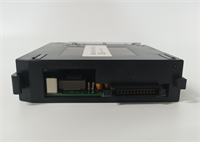
- Wiring: Uses removable terminal blocks for easy maintenance. Supports Millivolt inputs, requiring careful handling of low-level signals to avoid noise interference.
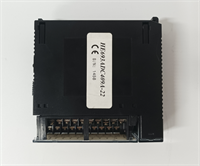
HE693ADC409A-22 GE
FAQ
What is the difference between HE693ADC409 and HE693ADC409A-22?
The HE693ADC409A-22 is a specific revision or variant of the standard HE693ADC409 module. The “-22” suffix often indicates specific regional configurations, packaging, or minor firmware/hardware updates. Functionally, they are generally interchangeable, but you should verify the specific input range and firmware compatibility in your system manual.What software is used to program this module?
The module is configured using GE Fanuc VersaPro or Proficy Machine Edition software. You use this software to define the input type (e.g., ±10mV, ±50mV) and set filtering parameters.What kind of sensors connect to this module?
Because it is a Millivolt input module, it is primarily used for connecting thermocouples (for temperature) or other low-voltage analog transducers that output small voltage signals.Can I use this with a 90-30 PLC?
Yes, the HE693ADC409A-22 is part of the VersaMax family, which is designed to be compatible with and often upgrade the GE 90-30 series PLC systems.How do I fix noisy signal readings?
If your data fluctuates, you can adjust the Filter Time Constant in the VersaPro software. For static signals (like tank levels), setting the filter to 50ms is recommended. For dynamic signals (like flow), a lower setting (e.g., 20ms) is better.