 Tel:
 Email:
 WhatsApp:
Description
Key Technical Specifications
| Parameter | Specification |
|---|---|
| Device type | Microprocessor-based transformer / LTC monitor controller |
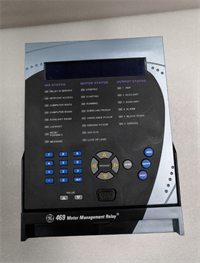
| Display | Backlit graphic LCD, 128 × 64 pixels, 7 lines × 20 characters |
| Keypad | Membrane keypad with navigation and 3 interactive keys |
| LED indicators | Power, System OK, Alarm 1, Alarm 2 |
| Analog inputs (DC) | 8 inputs, configurable as PT-100 RTD (0–270 Ω, ±0.15 Ω) or isolated 4–20 mA (±0.01 mA, max 220 Ω, 24 Vdc wetting, max 40 mA) |
| AC analog inputs | 5 inputs, 2000 V RMS dielectric strength, 150 Ω input impedance |
| AC input use | 3 winding currents (H, X, Y via 50 mV/A CT), 2 fan-group currents |
| Communications | RS-232 (DB-9M, 1500 V RMS isolation), RS-485, LAN and modem remote access |
| Data logging | 3700+ alarm/event records, 4900+ daily service logs, 100+ days short-term logging at 15-min intervals |
| Operating temperature | -40 to +55 °C (-40 to +131 °F) |
| Storage temperature | -40 to +85 °C (-40 to +185 °F) |
| Watchdog / clock | Built-in watchdog timer and real-time clock |
Product Introduction
The MO150 is not a general-purpose PLC. It sits on power transformers — usually near the LTC mechanism — and does the math most operators don’t have time to run manually. I’ve seen these on older substation and heavy-industrial transformers where the LTC starts hunting, cooling fans lag, or hotspot estimates drift because nobody trusts the old paper curves anymore.Engineers keep the MO150 because it actually models the transformer instead of just alarming on a single temperature point. It tracks winding hotspot temperature, insulation moisture, aging acceleration, LTC position, and cooling efficiency, then pushes that data out over RS-485 or LAN. The 8 configurable analog inputs are the practical part: you can mix RTDs and 4–20 mA sensors without adding a separate transmitter rack. One caution — this is a legacy GE Intellix product, so spare parts, firmware tools, and configuration software should be verified before committing it to a critical feeder.
Quality SOP & Tech Pitfalls
The Lab Report (SOP):
- Visual and counterfeit check — housing, connectors, nameplate, firmware label, PCB revision.
- Power-up test on bench supply — verify LCD boot, LED sequence, keypad response.
- Input verification — inject 4–20 mA and PT-100 values; check displayed readings against a Fluke 115 or calibrated source.
- Communication check — RS-232/RS-485 link test and LAN/modem path confirmation where fitted.
- Insulation resistance and multimeter checks on power and signal terminals.
- Firmware version, event log count, and clock status recorded.
- Anti-static bag, desiccant, and sealed shipping box.
The Engineer’s Warning (Pitfalls):
Do not pull an MO150 and assume the replacement will inherit the old settings. I’ve watched a plant lose half a day because nobody photographed the RS-485 address, CT ratio, RTD type, alarm setpoints, and cooling control mode. The hardware boots fine; the transformer model does not. Also, treat the RS-232/RS-485 and AC current inputs as sensitive. A floating shield or reversed CT lead can give believable but wrong load and hotspot readings.
Installation & Configuration Guide
1. Pre-Installation ️
- Obtain work permit and isolate control power.
- Wait for capacitor discharge; verify 0 V with a multimeter.
- Photograph every wiring tag, terminal block, DIP/switch setting, RS-485 address, CT ratio, RTD assignment, and alarm setpoint.
- Confirm replacement MO150 firmware revision and accessory kit.
2. Removal
- Label all wires before disconnecting.
- Disconnect RS-232/RS-485/LAN cables first.
- Release DIN rail or mounting clips carefully.
- Remove the unit without stressing terminal blocks.
3. Installation
- Copy all configuration settings from the old unit before powering the new one. This prevents most startup mismatches.
- Mount the MO150 securely and verify grounding.
- Reconnect RTD, 4–20 mA, AC current, fan control, and communication wires exactly as labeled.
- Check CT polarity and shield connections.
4. Power-On & Testing
- Apply rated control power and verify the Power and System OK LEDs.
- Confirm LCD boot and keypad operation.
- Verify RTD and 4–20 mA readings against known values.
- Check CT current display, LTC position tracking, alarm outputs, and communication links.
- Download or confirm configuration, then witness one full monitoring cycle before returning to service.
Compatible Replacement Models
- ️ Software/Firmware Compatible: GE Intellix MO150, same hardware revision. Requires configuration transfer, communication address check, and CT/RTD verification. Estimated labor: 1–3 hours plus site testing.
- ️ Family Upgrade Path: Later GE / GE Grid Solutions Intellix or Multilin transformer monitoring controllers may replace the MO150, but expect firmware, wiring, and configuration changes. Treat as a re-engineering job, not a drop-in swap.
- Not a Direct Substitute: Generic PLCs, RTUs, or standalone temperature relays. They may read sensors, but they will not reproduce the MO150 transformer thermal, moisture, aging, and LTC models without a full redesign.
Frequently Asked Questions (FAQ)
Can I hot-swap the MO150?
No. Treat it as a de-energized replacement unless the OEM manual explicitly allows live removal. You are working near transformer control circuits, LTC wiring, and communication links — not a 24 V I/O rack.Is the MO150 still in production?
It is a legacy GE Intellix product. New surplus and unused stock exist, but availability and firmware revisions vary. Verify condition and documentation before purchase.Will any MO150 work as a replacement?
Not automatically. Check firmware version, communication options, input configuration, and accessory sensors. A unit with different firmware or missing options can delay commissioning.Does it support Modbus?
RS-485 is listed, and devices in this class commonly use Modbus RTU, but the exact protocol support must be confirmed in the MO150 OEM manual. Do not assume register maps.What sensors can I connect?
Up to 8 configurable inputs for PT-100 RTD or isolated 4–20 mA, plus 5 AC current inputs for transformer windings and fan groups. Match sensor type and range to the existing design.What happens if the configuration is lost?
The unit may power up but report wrong temperatures, currents, alarms, or LTC positions. That is why photographing the original setup is non-negotiable.Is there a warranty?
Typical surplus supply carries a 1-year functional warranty unless otherwise stated. This covers DOA and bench-tested failures, not site miswiring or configuration errors.