

 Tel:
 Email:
 WhatsApp:
Description
Key Technical Specifications
| Parameter | Value |
|---|---|
| Part Number | IC695CRU320 |
| Brand | GE Fanuc / GE Intelligent Platforms |
| Series | PACSystems RX3i |
| Product Type | Redundancy CPU (hot standby) |
| Microprocessor | Intel Celeron M, 1 GHz |
| Slots Occupied | 2 |
| User Memory | Up to 64 MB battery-backed RAM |
| Non-Volatile Memory | 64 MB flash |
| Serial Ports | 2 (RS-232, RS-485) |
| Serial Protocols | Modbus RTU slave, SNP, Serial I/O |
| Backplane | Dual support — RX3i PCI and high-speed serial bus; PCI 2.2 compliant |
| Program Blocks | Up to 512; max 128 KB per block |
| Reference Tables | %I/%Q: 32K bits discrete; %AI/%AQ: up to 32K words |
| Switchover Time | Max 1 logic scan; min 3.133 ms |
| Redundancy Links | Up to 2 × IC695RMX128/228 sync links |
| Transfer List Max | Up to 2 MB |
| Power Requirements | 3.3 VDC @ 1.0 A; 5 VDC @ 1.2 A |
| Operating Temperature | 0 to 60°C (32 to 140°F) |
| Flash Endurance | Min 100,000 write/erase cycles |
| ECC | Single-bit correction, multi-bit detection |
| Battery | IC695ACC302 lithium smart battery |
| Shipping Weight | 2 kg |
Product Introduction
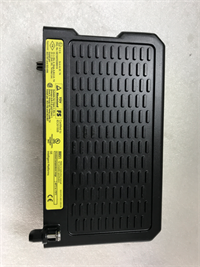
Redundancy fails quietly. Not with an alarm — with a sync link that dropped six months ago and nobody noticed. I’ve been called to a plant at 3 AM where the “redundant” CPU pair had been running single-threaded for a year, because the IC695RMX128 link cable got clipped during a panel retrofit. The primary failed. The backup had stale data. The process tripped.This is the IC695CRU320, GE Fanuc’s hot-standby redundancy CPU for the PACSystems RX3i platform. It occupies two slots on the RX3i backplane, mounts directly to the PCI bus, and runs on a 1 GHz Celeron M with 64 MB of battery-backed RAM plus 64 MB of non-volatile flash. Its job is to keep a second CPU rack synchronized in real time — program state, register values, I/O image — so that when the active rack fails, control transfers to the standby in a maximum of one logic scan, minimum 3.133 ms. Manual switchover is supported too.Engineers pick it for continuous processes where a trip costs more than the hardware: pipeline monitoring, chemical trains, power generation, water treatment. The quantified reason is that 3.133 ms switchover figure, plus the fact it still supports legacy 90-30 series I/O for phased migrations. That migration path is worth real money when you’re not ready to rip out field wiring. One subjective note: this revision is picky about firmware parity between the primary and standby. Mismatched revisions cause sync faults that look like hardware failures. Check both before you blame the module.

Quality SOP & Tech Pitfalls
The Lab Report (SOP)
- Visual / counterfeit check — nameplate legibility, suffix marking (‑EJ, ‑EZ, or base), conformal coat, solder joint inspection. Recapped boards have a distinct glossy look.
- Live test on test rack — mounted in a working RX3i chassis, boot sequence verified, CPU OK and RUN LEDs confirmed, COM1/COM2 activity checked.
- Insulation resistance + multimeter checks — Fluke 115 for continuity and rail voltage; Hi-Pot on the backplane connector.
- Firmware version logging — CPU firmware revision read and recorded, along with S/N and suffix. Photo attached to the shipping file.
- Anti-static sealing — ESD bag, foam cradle, box. Battery shipped separately if the unit is long-term stored.
The Engineer’s Warning (Pitfalls)First: firmware mismatch between primary and standby. The two CPUs in a redundant pair must run compatible firmware. Flash one and not the other, and you get sync faults that present as random switchover attempts. I’ve burned three hours on a “bad CPU” that was actually a firmware mismatch.Second: not photographing the old unit’s slot position, DIP/jumper settings, and battery status. Field disaster, real: a tech swapped a CRU320 into the wrong slot on the backplane. It powered up. It didn’t sync. Two hours of tracing before someone checked the manual and found the slot assignment requirement.
Installation & Configuration Guide
⚠️ Phase 1 — Pre-Installation
Shut down the rack per site LOTO. Wait 5 minutes for bus capacitor discharge. Photograph everything: slot position, backplane orientation, battery compartment state, serial cable assignments (COM1/COM2), and the firmware revision shown in Proficy Machine Edition. Do not skip the firmware photo.Phase 2 — Removal
Label COM1 and COM2 cables before disconnecting. Release the module from the backplane with even pressure — do not pry against the PCI connector. Remove the battery separately and note its install date.Phase 3 — Installation
Confirm the firmware revision on the new module matches the standby (or primary, whichever you’re replacing) before seating it. This prevents the majority of startup sync failures I’ve been called for. Install the battery. Seat the module fully into the correct slot. Reconnect serial cables to the correct COM ports — COM1 and COM2 are not interchangeable.Phase 4 — Power-On & Testing
Verify 3.3 VDC and 5 VDC rails at the backplane. Watch the LED boot sequence: CPU OK, then RUN, then COM1/COM2 ACTIVE. Confirm the redundancy link is synchronized in Proficy Machine Edition. Download and verify the program. Log the S/N and firmware revision in your asset register the same day.

Compatible Replacement Models
| Model | Tier | Notes |
|---|---|---|
| IC695CRU320 (base) | ✅ Drop-in Replacement | Exact match. Preferred. |
| IC695CRU320-EJ / -EZ | ⚠️ Software/Config Compatible | Same hardware platform, different suffix/revision. Verify firmware compatibility with your existing pair. ~2 hours labor to swap and re-sync. |
| IC695CMU310 (Max-ON hot standby) | ❌ Hardware Mod Required | Different redundancy architecture — uses dedicated Ethernet LAN, not RMX sync links. Requires reconfiguration. Advise against unless doing a full system upgrade. |
| IC695CPU320 (non-redundant) | ❌ Hardware Mod Required | Same CPU family, no redundancy. Only viable if you’re abandoning hot standby. |
Frequently Asked Questions
Can I hot-swap this safely?
No. This is a backplane-mounted CPU, not a hot-swappable I/O card. In a redundant pair, you can take the standby offline per the OEM redundancy procedure, but you do not pull a running primary.What’s the actual switchover time?
Maximum one logic scan, minimum 3.133 ms. Real-world time depends on your scan cycle and transfer list size — a 2 MB transfer list takes longer than a small one.Do I need the RMX module?
Yes. Redundancy requires the IC695RMX128 or IC695RMX228 memory exchange module configured as the redundancy link in each unit. No RMX, no redundancy.Is this still available from GE?
It’s a legacy RX3i item. Most supply flows through the surplus and broker channel. Treat any “in stock” claim as unverified until you see a photo of the actual nameplate with the suffix.One listing says IP65 and -40 to +85°C. Is that right?
No. That’s a reseller error. The OEM-referenced rating is 0 to 60°C, open-frame, backplane-powered. Install it in a protected enclosure.What battery does it use?
IC695ACC302 lithium smart battery. Replace it on the OEM schedule, not when the low-battery LED comes on — by then you may already have lost retentive data.What’s the warranty?
12 months on manufacturing defects from the delivery date. Surplus electronics carry batch-aging risk, so test on arrival.