

 Tel:
 Email:
 WhatsApp:
Description
Key Technical Specifications
| Parameter | Value |
|---|---|
| Processor | Intel Celeron M, 1 GHz |
| User Memory | 64 MB battery-backed RAM + 64 MB non-volatile flash |
| Program Blocks | Up to 512 blocks, max 128 KB each |
| Switching Time | Max 1 logic scan; min 3.133 ms |
| Redundancy Links | Up to 2 × IC695RMX128/228 sync links |
| Transfer List Data | Up to 2 MB |
| Serial Ports | 2 (RS-232 and RS-485) |
| Serial Protocols | Modbus RTU Slave, SNP, Serial I/O |
| Backplane | RX3i PCI and high-speed serial bus; PCI 2.2 compliant |
| Power Requirement | 3.3 VDC @ 1.0 A; 5 VDC @ 1.2 A |
| Operating Temp | 0 to 60 °C (32 to 140 °F) |
| Flash Endurance | Min 100,000 write/erase cycles |
| Hazardous Location | Class I, Div 2 Groups ABCD; Temp Code T4; Ex nA IIC T4 X |
| Slots Occupied | 2 |
| Shipping Weight | 2 kg |
Product Introduction
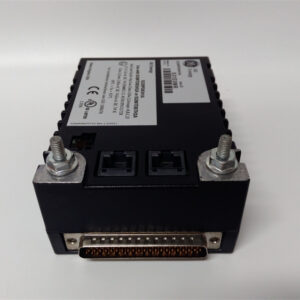
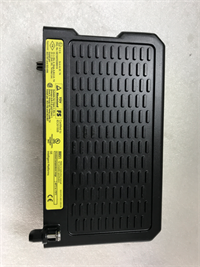
A redundant CPU is only as good as the spare sitting on your shelf. I’ve seen plants run CRU320 pairs for twelve years without touching them — then one fails on a Sunday night, and the “hot standby” becomes a cold, dead rack because nobody stocked the part. That’s the real risk with this module. Not the spec. The inventory.The IC695CRU320-EJ is GE’s 1 GHz Celeron M-based redundant processor for the PACSystems RX3i platform. It occupies two slots, carries 64 MB of battery-backed RAM plus 64 MB of non-volatile flash, and hands off control in a maximum of one logic scan — 3.133 ms at minimum. That number is the whole reason you buy it. Paired with IC695RMX128/228 sync links, it supports hot-standby configurations where the backup rack mirrors the active one and takes over automatically on a detected fault. Manual switchover is available too, which is more useful than people admit during commissioning.One honest note: this revision is picky about firmware parity between the two CPUs. Mismatched versions between active and standby will cause sync failures that look like hardware defects. Check both nameplates before you order.

Quality SOP & Tech Pitfalls
The Lab Report (SOP)Every unit gets the same treatment before it ships:
- Visual / counterfeit check — nameplate silkscreen, “-EJ” suffix, serial number, UL file number E157515, and anti-static bag integrity
- Live test on a test rack — powered in an RX3i backplane; verify RUN, CPU OK, and COM1/COM2 ACTIVE LED sequence
- Insulation resistance and multimeter checks — Fluke 115 for continuity and voltage; Hi-Pot between logic and chassis
- Firmware version logging — record the firmware revision and battery condition against the nameplate photo shipped with the unit
- Anti-static sealing — vacuum bag, foam, shock-rated outer carton
The Engineer’s Warning (Pitfalls)Two mistakes account for most of the CRU320 downtime I’ve been called out for.First: firmware mismatch between the active and standby CPU. The failover logic will not sync cleanly across different firmware revisions. The symptom is a standby unit that reports healthy but refuses to take over — until it does, badly, under load.Second: replacing only one CPU in a redundant pair. Swapping a 2010-vintage unit with a 2018-vintage surplus unit in the same rack is asking for sync instability.Field disaster, real: a water treatment plant replaced a failed CRU320 with a surplus unit from a broker. Firmware was two revisions ahead of the partner CPU. The rack ran fine for six weeks. Then a real fault hit, the standby refused to promote, and the plant lost a pumping station for nine hours. The part wasn’t defective. The pairing was.
Installation & Configuration Guide
Phase 1 — Pre-Installation (⚠️)
- ⚠️ Confirm the partner CPU is healthy and currently carrying the load. If both are degraded, plan a controlled shutdown.
- ⚠️ Photograph the nameplate of the old unit — model suffix, serial, and firmware revision. Also photograph the slot position and the IC695RMX128/228 cable routing.
- ⚠️ Place the rack in a safe state. Do not remove a CPU from a live redundant pair without confirming the standby is promoted or the process is held.
- Wait 5 minutes for backplane capacitor discharge. Verify 0 VDC at the slot with a Fluke 115.
Phase 2 — Removal
- Label the sync link cables (RMX128/228) and any serial connections before disconnecting.
- Release the module’s retaining clips evenly. Do not pry from one corner — bent backplane connectors cause intermittent faults later.
- Record the slot number. The CRU320 occupies two slots; note both.
Phase 3 — Installation
- Verify the firmware revision of the new unit matches the partner CPU. This single check prevents roughly 90% of startup failures on this platform.
- Seat the module fully into the backplane until the connector engages with positive resistance. A half-seated CPU will pass a no-load check and fail under scan load.
- Reconnect the sync link cables to the same ports they came from.
Phase 4 — Power-On & Testing
- Restore power. Confirm the LED boot sequence: CPU OK → RUN → COM1/COM2 ACTIVE.
- Verify the standby CPU reports “in sync” in Proficy Machine Edition.
- Force a manual switchover and confirm the partner promotes cleanly. Log the result.
- Record serial number, firmware revision, and commissioning date in your maintenance record.

Compatible Replacement Models
| Tier | Model | Notes |
|---|---|---|
| ✅ Drop-in Replacement | IC695CRU320-EJ (same part, new surplus) | 100% hardware and firmware match. Match the “-EJ” suffix exactly. Price varies widely by channel. |
| ⚠️ Software Compatible | IC695CRU320-EZ / IC695CRU320 (base) | Same hardware platform, different revision suffix. Requires firmware verification and offline sync testing before commissioning. Estimate 2–4 hours of engineer time. |
| ⚠️ Software Compatible | IC695CRU310 | Lower-tier RX3i CPU. Verify scan time and memory requirements before substituting — do not assume equivalence. |
| ❌ Hardware Mod Required | IC695CPU310 / non-redundant RX3i CPUs | No hot-standby capability. Requires re-architecture of the rack. Do not use unless doing a full system upgrade. |
Frequently Asked Questions (FAQ)
“Can I hot-swap this safely?”
Not without conditions. If the partner CPU is healthy and promoted, removal is generally acceptable. If the standby is degraded or out of sync, you are removing your only remaining controller. Confirm sync status in Proficy Machine Edition first. When in doubt, do a planned swap.“What’s the difference between -EJ and -EZ?”
Revision suffix. Brokers often list them interchangeably, and some resellers even mislabel the CPU speed on -EZ listings. Match the suffix on your old unit. If you must cross-reference, load-test before commissioning.“What condition is this sold in?”
New surplus or used-tested. GE discontinued this line, so the OEM channel is closed. Ask for the receiving date, nameplate photos, and test records — and put the condition in writing on the purchase order.“Do I need to replace the battery when I install it?”
If the unit has been in storage for more than a few years, yes. The battery-backed RAM is only as good as the battery. A dead battery means your program and retentive data vanish on the next power cycle. Budget for a fresh battery and check GFK-2741 for the correct part.“Why does my new CPU refuse to sync with the standby?”
Ninety percent of the time it’s a firmware mismatch. Check both nameplates. If revisions differ, flash the newer unit down or upgrade both — and never do it under production load.“What warranty should I expect?”
Surplus channels typically offer 6–12 months. Get it in writing, and specify that coverage includes sync and failover performance, not just “powers up.”Disclaimer: Parameters compiled from public reseller and nameplate sources. Reseller listings conflict on CPU speed (800 MHz vs 1 GHz), power supply (24 VDC vs 3.3/5 VDC backplane), and IP rating. Final selection must be based on GE/Emerson document GFK-2222 and the physical nameplate. For safety-instrumented or hazardous-area installations, engage a certified engineer.