

 Tel:
Tel:  Email:
  WhatsApp:
 Description
Key Technical Specifications
| Parameter | Detail |
|---|---|
| Manufacturer | Bently Nevada (Baker Hughes) |
| Model | 3300/16 |
| Full Part Number | 3300/16-12-01-01-00-00-00 |
| Channels | 2 (dual proximity probe inputs) |
| Measurement Modes | Vibration amplitude, shaft gap (position), XY orbit |
| Input Type | Bently Nevada 3300/3300 XL proximity probes with matching Proximitor sensors |
| Output Signals | Vibration (1X/Not 1X/Total), gap DC voltage, XY vector outputs |
| System Compatibility | Bently Nevada 3300 rack (e.g., 3300/05) |
| Standards | API 670 compliant |
| Installation | 3300 rack slot; verify exact slot width and power requirements with OEM manual |
| Operating Temperature | -29°C to +66°C (3300 system specification; verify with OEM datasheet) |
| Origin | USA |
Product Introduction
The 3300/16 is a classic Bently Nevada dual-channel monitor that does two things simultaneously: it tells you how much the shaft is vibrating and where the shaft is sitting in the bearing clearance. That second measurement — the gap — is what separates this from a simple vibration monitor. On a large steam turbine or centrifugal compressor, knowing that the shaft has migrated toward the bearing surface can be an early warning of oil pressure loss, thermal bow, or coupling misalignment long before vibration alone trips the unit.The XY capability is what keeps this card relevant in diagnostic work. When you connect two orthogonal probes (X and Y) on the same bearing, the 3300/16 can drive an XY plot that shows the shaft centerline orbit. That orbit reveals rubs, oil whirl, and misalignment in ways that a single-channel vibration reading cannot. The 3300/16 fits into the older 3300 rack system, which predates the 3500 family. It is not software-configurable in the same way a 3500/42M is — configuration is typically handled through internal jumpers, front-panel switches, or fixed factory settings depending on the dash-number suffix.

Quality SOP & Tech Pitfalls
The Lab Report (SOP)
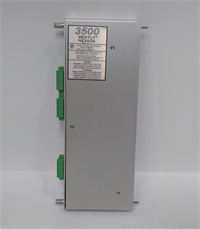
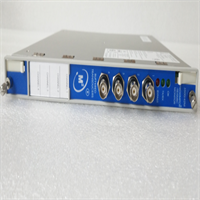
- Visual and counterfeit check: verify Bently Nevada branding, 3300/16 label, and full part number 3300/16-12-01-01-00-00-00 on the front panel. Check for resoldered components, mismatched screws, or reprinted labels.
- Mechanical inspection: inspect the backplane connector pins, card guides, front-panel LEDs or meters, and terminal blocks for damage or corrosion.
- Rack verification: seat the module in a 3300/05 test rack with a known-good 3300 power supply.
- Power-up check: confirm the module receives rack power and shows normal indicator behavior.
- Input verification: connect a known-good 3300 proximity probe and Proximitor sensor, verify gap voltage response, and check vibration output scaling.
- XY mode check: if configured for XY output, verify both channels respond correctly in vector mode.
- Alarm/setpoint verification: if the unit has alarm relays, verify trip points against the configuration code.
- ESD-safe packing: anti-static bag, foam support, and rigid outer box.
The Engineer’s Warning (Pitfalls)
The most common mistake is treating any 3300/16 as a drop-in replacement for any other 3300/16. The dash-number suffix matters. A 3300/16-03-02-00-00-00-00 may have different input ranges, output scalings, or alarm options than a 3300/16-12-01-01-00-00-00. I have seen plants swap in a “3300/16” and discover the output scaling is 0–5 V instead of 4–20 mA, or the XY mode is not enabled. Always match the full part number.The second pitfall is confusing the 3300/16 with the 3500 family. The 3300/16 is an analog-era monitor in the 3300 rack. It is not interchangeable with a 3500/40M or 3500/42M. The rack connectors, power distribution, and configuration methods are completely different.
Installation & Configuration Guide
1. Pre-Installation ⚠️
- Confirm whether this monitor feeds trip relays or alarm annunciators. If it does, treat the replacement as a controlled change.
- Photograph all labels: full part number, serial number, rack slot, and terminal wiring.
- Verify the replacement part number matches exactly: 3300/16-12-01-01-00-00-00.
- Confirm proximity probe type and cable length match the Proximitor sensor input requirements.
2. Removal
- Identify the rack slot number.
- If the system allows hot-swap per site procedure, proceed with caution. Otherwise, schedule a controlled outage.
- Label all terminal connections before disconnecting.
- Release the card guides and withdraw the module straight out.
3. Installation
- Compare old and new module labels side by side.
- Insert the new 3300/16 into the same slot.
- Seat the card guides evenly before applying pressure.
- Reconnect terminal wiring according to the labeled diagram.
4. Power-On & Testing
- Confirm rack power is stable.
- Verify gap voltage on both channels matches expected probe gap settings (typically around -10 VDC for an 8 mm probe at mid-range gap).
- Verify vibration output scaling against the connected display or DCS input.
- If XY mode is configured, verify orbit display on the connected XY monitor or oscilloscope.
- Confirm alarm/trip behavior if relays are present.

Compatible Replacement Models
- ✅ 3300/16-12-01-01-00-00-00 (same full P/N): Direct replacement if the rack slot, wiring, and probe configuration match. This is the preferred option.
- ⚠️ 3300/16 with different dash-number suffix: May be mechanically compatible but could have different output scaling, input range, or XY configuration. Expect 1–4 hours of engineering time to verify and adjust.
- ❌ 3500/40M, 3500/42M, 3300/15, 3300/20: Not direct replacements. These are different monitor types in different rack families or with different channel configurations. Do not substitute without a full engineering review.
Frequently Asked Questions (FAQ)
Can I replace a 3300/16 with a 3500/42M?
No. The 3300/16 mounts in a 3300 rack, while the 3500/42M mounts in a 3500 rack. The backplane connectors, power distribution, and configuration methods are incompatible. A migration from 3300 to 3500 requires a full rack and wiring redesign.What does the dash-number suffix mean?
The suffix encodes configuration options such as input type, output scaling (e.g., 4–20 mA vs. 0–5 V), XY mode enablement, alarm relay options, and filter settings. Always match the full part number when replacing.Does this module support XY orbit display?
Yes, the 3300/16 is designed for XY orbit display when configured with two orthogonal probes on the same bearing. However, XY capability depends on the specific dash-number configuration. Verify against the OEM manual for your exact part number.Is this module still produced by the OEM?
The 3300 series is considered obsolete. Availability is typically through surplus, verified used, or remaining stock. Always verify condition and return rights before purchase.What probe system does it use?
The 3300/16 accepts Bently Nevada 3300 or 3300 XL proximity probes with matching Proximitor sensors. The probe diameter (5 mm, 8 mm, etc.) and cable length must match the Proximitor input specification. Verify compatibility against the OEM manual.What documentation should I keep on file?
Save photos of the full part number label, terminal wiring diagram, rack slot assignment, probe type and cable length, output scaling values, and any alarm setpoints. On a legacy 3300 system, that documentation is often the only record of how the monitor was configured.