 Tel:
Tel:  Email:
  WhatsApp:
 Description
Key Technical Specifications
| Parameter | Specification |
|---|---|
| Part Number | UMT 162 / D-984-0721 |
| Related Part | C1003140 (System Integration) |
| Application | Turbine & Generator Control |
| Signal Handling | High-Frequency Sensor Inputs |
| Output Capacity | Heavy Load Capability |
| Environment | Resistant to vibration & EMI |
| Integration | Seamless backplane compatibility |
| Material | Industrial-grade PCB & Housing |
Field Engineer’s Perspective
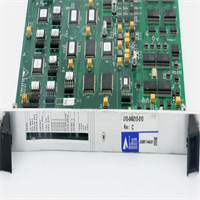
You don’t buy Alstom gear because it’s cheap; you buy it because the plant is already running on it, and downtime costs more than the hardware. The UMT 162 isn’t a standalone controller—it’s the muscle behind the brain. It sits in the rack handling the dirty work: taking those noisy, high-frequency sensor inputs from the turbine and converting them into data the CPU can actually use without choking.I’ve seen these modules sitting in cabinets hitting 50°C next to a steam line, humming along for a decade without a hiccup. While the MICOM P743 gets all the glory for protection relaying, the UMT 162 is doing the heavy lifting on data acquisition. It’s built like a tank—specifically designed to ignore the electromagnetic interference (EMI) that makes cheaper PLCs go haywire. If you’re expanding a PRIMA series system or maintaining an older D-984-0721 setup, this module is non-negotiable. Just make sure your firmware matches the rest of the rack, or you’ll be staring at a blank screen for hours.

Quality SOP & Tech Pitfalls
The Lab Report (SOP)
Before we ship a single unit, it goes through the wringer. We don’t just look at the box.
- Visual Inspection: We check the DIN rail clips. They get brittle with age. If the clip snaps during install, you’re dead in the water.
- Live Test: We rack it up on a test bench and throw random high-freq signals at the inputs to verify the conversion logic holds up under load.
- Continuity Check: Using a Fluke multimeter, we verify every terminal block connection. Cold solder joints are common in vintage stock.
- Packaging: It gets bagged in anti-static wrap. No exceptions.
The Engineer’s Warning (Pitfalls)
Here is where people mess this up. The UMT 162 is sensitive to grounding loops. I was at a petrochem plant in Texas last year where the techs replaced a bad module, but they didn’t clean the DIN rail contact point. The new module fried in three days because it couldn’t find a proper ground path through the chassis. Always check your rack grounding bar before sliding this thing in. Also, watch out for the ribbon cables—if you force the connector, you will bend the pins on the backplane, and then you have a very expensive paperweight.
Installation & Configuration Guide
Don’t rush this. A sloppy install is a ticket to a callback.
- Power Down & Lockout: I shouldn’t have to say this, but I do. Kill the 24V DC supply. Discharge any residual capacitance in the rack.
- Verify Backplane: Check the slot you’re inserting into. Is it keyed correctly? Forcing a UMT 162 into a power supply slot will let the magic smoke out instantly.
- DIP Switches: STOP. Look at the old module. Take a picture of the DIP switches or jumper settings. Copy them exactly to the new unit. This is the #1 cause of “no comms” errors.
- Seat the Module: Slide it in firmly until the locking tab clicks. Don’t leave it loose; vibration will kill the connection.
- Termination: Tighten the terminal screws to spec. Loose wires + high current = melted plastic.
- Power Up: Turn the juice back on. Watch the LEDs. If you see a red fault light immediately, power down and check your wiring. Do not ignore it.

Compatible Replacement Models
| Compatibility | Model | Notes |
|---|---|---|
| ✅ Drop-in | UMT 162 | Exact match. Ensure revision levels are close to avoid protocol mismatches. |
| ⚠️ System Match | C1003140 | Often used in tandem. Not a direct replacement for UMT162, but part of the same ecosystem. |
| ❌ Incompatible | MICOM P743 | Different function entirely (Protection Relay). Do not attempt to cross-reference. |
Frequently Asked Questions (FAQ)
Q: Can I hot-swap this module while the turbine is running?
A: Technically, the bus architecture might support it, but would I do it? No. Unless you have redundant controllers and know exactly how the logic handles I/O removal, pull the plug. Restarting a tripped turbine costs way more than a scheduled outage.Q: My old module has a different suffix. Does it matter?
A: Yes. Alstom revisions can change pinouts or firmware requirements. Send me a photo of the label on your old unit. I need to match the hardware revision to ensure it talks to your CPU correctly.Q: What is the lead time on these?
A: Since this is legacy hardware, we keep a rotating stock. If I have it on the shelf, I can ship it today. If not, sourcing takes about a week.Q: Does this come with a warranty?
A: Standard is 12 months. If it dies because of a manufacturing defect, I replace it. If you blow it up by wiring 110V AC into a 24V DC input, that’s on you.Q: Is this compatible with the PRIMA series?
A: Yes, the UMT 162 integrates well with PRIMA automation solutions, provided your system software is updated to recognize the module version.