 Tel:
 Email:
 WhatsApp:
Description
Key Technical Specifications
| Parameter | Specification |
|---|---|
| Control Type | Closed-loop digital servo control (Torque, Velocity, Position) |
| Supply Voltage | AC or DC configurable |
| Current Rating | Continuous and Peak Current (Sizing dependent) |
| Velocity Loop Bandwidth | High-bandwidth response for dynamic motion |
| Current Loop Bandwidth | High-performance current regulation |
| Feedback Resolution | High-resolution encoder interface |
| Communication Protocol | SynqNet (via RJ45 interface) |
| Analog Inputs | High-bit resolution analog reference |
| Ingress Protection | IP20 (Panel/Enclosure mounted) |
| Operating Temperature | Industrial wide range |
| Mounting | DIN rail or chassis fixed |
| System Integration | Electronic Motor Nameplate (Plug-and-Play) |
Product Introduction
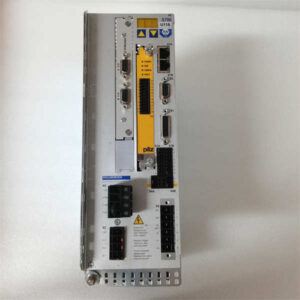
When a high-speed pick-and-place machine or a precision winding application starts throwing tracking errors, you don’t have time to re-engineer the motion control architecture. You need a drop-in servo drive that maintains the dynamic response your machine was designed for. The Kollmorgen S20360-SRS is a legacy powerhouse from the S200 series. It takes the heavy lifting of high-bandwidth current and velocity loop calculations off the main motion controller, ensuring the motor tracks the commanded profile with zero lag.What makes this specific revision stand out in the field is the “-SRS” suffix, indicating native SynqNet integration via an RJ45 interface. In older multi-axis systems, this drive acts as a critical node on the SynqNet ring. Another massive advantage for maintenance engineers is the independent “keep-alive” control power input. If the main AC line drops during an emergency stop, the drive retains logic power, keeping the network connection alive for diagnostics and allowing for a rapid, fault-free recovery once power is restored. Just a heads-up: the S200 series relies heavily on the electronic motor nameplate (smart feedback). If your motor feedback cable is degraded, the drive won’t be able to auto-configure, and you’ll be stuck debugging PID loops manually.
Quality SOP & Tech Pitfalls
The Lab Report (SOP)
Before this drive ships, it goes through a rigorous bench check:
- Visual & Counterfeit Check: Inspecting the PCB for swollen capacitors, verifying the part number etching, and checking the RJ45 SynqNet port for bent pins or corrosion.
- Bench Live Test: Powered via a regulated DC supply (simulating the bus) and a control supply. I verify the LED boot sequence and ensure the SynqNet link establishes a connection.
- I/O & Encoder Verification: Injecting a simulated smart feedback signal to ensure the drive reads the electronic motor nameplate correctly, and verifying the analog reference inputs track a generated waveform.
- Firmware/Version Logging: Confirming the internal DSP firmware matches the S200 series release expectations for SynqNet compatibility.
- Anti-Static Sealing: Bagged with desiccant. Moisture is the enemy of these high-density digital boards.
The Engineer’s Warning (Pitfalls)
- SynqNet Node ID Mismatch: The S200 series relies on the network master to assign or verify node IDs. If you drop this replacement drive into a machine without clearing the old node’s network cache in the motion controller, the SynqNet ring will fault out. You must ensure the controller recognizes the new drive’s MAC address or properly assigns the node ID.
- Keep-Alive Power Miswiring: I’ve seen techs tie the keep-alive control power directly to the main AC contactor output. This defeats the entire purpose of the feature. During an E-stop, the control power drops, the drive loses network communication, and the system throws a “node lost” error, requiring a full cold boot of the machine. Wire the keep-alive to an uninterrupted power supply (UPS) or a control circuit that stays energized during an E-stop.
Field Disaster Anecdote: I was called to a converting line where a new S20360-SRS was throwing constant “Following Error” faults. The maintenance guy swore the motor was bad. I spent hours checking the mechanical load. It turned out the previous tech used a standard, non-shielded Ethernet cable for the SynqNet connection instead of proper shielded Cat5. The VFDs on the same machine were inducing enough noise to corrupt the SynqNet packets. Always use shielded, industrial-grade cabling for motion networks.
Installation & Configuration Guide
Phase 1: Pre-Installation
️ Lockout/Tagout (LOTO). Kill the main AC power and the DC bus. Wait for the capacitors to discharge (check the DC bus voltage with a multimeter). Take a photo of the old wiring, especially the motor power, feedback, and SynqNet routing.Phase 2: Removal
Label all D-sub and terminal block connections. Disconnect the motor power, smart feedback cable, and the RJ45 SynqNet cable. Unscrew the mounting brackets. Pull the old drive straight out.Phase 3: Installation
Mount the new S20360-SRS on the DIN rail or chassis. Ensure the motor feedback cable is securely locked and the shield is properly grounded at the drive end. Hand-tighten the electrical connectors. Do not use pliers on the D-sub screws.Phase 4: Power-On & Testing
Restore the keep-alive control power first, then the main AC power. Watch the LED status indicators. You need a solid green for power and a specific blinking pattern indicating a successful SynqNet handshake. Using the motion controller software, verify the drive is recognized on the network. Jog the motor at a low velocity and verify the feedback matches the commanded position before running at full speed.
Compatible Replacement Models
| Compatibility Tier | Model / Option | Notes |
|---|---|---|
| Drop-in Replacement | S20360-SRS (Same Suffix) | 100% identical. Ensure the internal firmware version is compatible with the existing SynqNet motion controller to avoid handshake issues. |
| ️ Software Compatible | Other S200 Series Drives (e.g., S20660-SRS) | Requires verifying the continuous and peak current ratings match or exceed the original. You must also update the motion controller’s configuration file to recognize the new drive’s current limits. |
| Hardware Mod Required | Modern AKD Series Drives | Requires abandoning the SynqNet architecture. You’ll need to reprogram the motion logic in the main PLC to support a modern protocol (like EtherCAT or Ethernet/IP) and completely rewire the motor feedback and power cables. Not recommended unless doing a full machine retrofit. |
Frequently Asked Questions (FAQ)
Q1: Can I hot-swap the S20360-SRS while the machine is running?
A: Absolutely not. This is a high-power servo drive. Pulling it while the DC bus is charged will cause a massive voltage spike, potentially destroying the drive’s output stage and damaging the motion controller’s network port. Always kill the main power and verify the DC bus is discharged.Q2: The drive is throwing a communication fault on the SynqNet ring. Is it dead?
A: Not necessarily. Check your network topology and cabling. SynqNet is sensitive to cable quality and shielding. If a node was added or removed upstream, or if the shield isn’t properly grounded, the drive might not be getting its sync pulses. Check the RJ45 link lights and verify the network configuration in your motion control software.Q3: Will this work with a third-party servo motor?
A: It will physically work, but it’s highly discouraged. The S200 series relies heavily on the Kollmorgen “Electronic Motor Nameplate” (smart feedback) for auto-tuning. If you use a third-party motor with a standard encoder, you lose the plug-and-play capability and will have to manually calculate and tune the PID loops, which is a massive engineering headache.Q4: I see a lot of cheap “refurbished” ones online. Are they safe to buy?
A: I’d avoid them. Legacy servo drives often have degraded internal capacitors. A cheap refurbished unit might pass a quick bench test but fail under the thermal stress and high-frequency switching of a full production cycle. Buy verified surplus or new.Q5: What happens if the DC keep-alive supply drops?
A: The drive will lose its network connection and drop out of the SynqNet ring. The motion controller will immediately throw a “node lost” or “communication fault” error and trigger an emergency stop. Ensure the keep-alive supply is robust and independent of the main machine contactors.Q6: How do I know if the motor or the drive is the actual problem?
A: Swap the motor cable first. If the fault follows the cable, it’s a wiring issue. If the fault stays, you can inject a known good simulated smart feedback signal into the drive using a test box. If the drive accepts the simulated signal without faulting, the physical motor’s feedback device is likely bad.