
 Tel:
Tel:  Email:
  WhatsApp:
 Description
Key Technical Specifications
| Parameter | Details |
|---|---|
| Product Type | High impedance differential protection module |
| Brand | GE / GE Multilin |
| Model | MIB30HICE00000 |
| Application | Bus protection / transformer differential protection |
| Protection Principle | High impedance differential |
| System Family | GE Multilin MIB |
| Typical Use | SIS / protection relay panels / substation protection |
| Mounting | Panel / rack-mounted protection module |
| Verification Required | CT ratio, burden, pickup settings, wiring scheme, and firmware/revision must be checked against the removed unit and OEM documentation |
Product Introduction
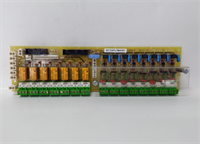
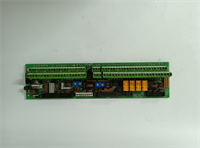
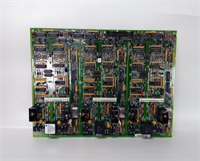
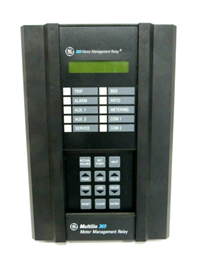
High impedance differential protection is one of those functions that looks simple on paper but punishes you fast if the CTs, wiring, burden, or module settings are wrong. The GE MIB30HICE00000 belongs to the GE Multilin MIB family and is used as a high impedance differential protection module, typically applied on bus or transformer protection schemes where you need fast, selective fault detection.In the field, this is not a “plug it in and walk away” part. Engineers specify MIB-style hardware because high impedance differential schemes can stay stable during heavy external faults while still responding quickly to genuine internal faults. The catch is that the module must match the original protection design exactly — same part number, same revision, same CT arrangement, and same wiring discipline. If the replacement module has a different suffix or internal configuration, the protection scheme may not behave the way the drawings expect.
Quality SOP & Tech Pitfalls
The Lab Report
A proper pre-shipment check for MIB30HICE00000 should include:
- Visual inspection — check the enclosure, terminals, PCB area, connectors, labels, and mounting points for corrosion, burnt marks, cracked solder joints, or signs of rework.
- Nameplate verification — confirm the full marking is MIB30HICE00000, with matching GE Multilin branding and revision codes.
- Terminal and wiring check — inspect terminals for damage, loose screws, pushed-back contacts, oxidation, or incorrect labeling.
- Continuity / insulation checks — verify obvious shorts, open circuits, and insulation integrity where safe and applicable.
- Live functional test if possible — energize in a compatible test setup and confirm normal startup, no persistent fault indications, and correct protection-module behavior.
- Firmware / revision logging — record any visible firmware, hardware revision, or configuration markings.
- ESD-safe packing — pack with anti-static protection and mechanical protection for terminals and connectors.
The Engineer’s Warning
The biggest mistake with MIB30HICE00000 is treating it like a generic replacement differential module. It is not.Two field traps:
- Ignoring the full part number. The suffix matters. A different MIB variant can look physically similar but carry different protection settings, input arrangements, or firmware behavior.
- Swapping without copying CT and wiring details. High impedance differential schemes depend on CT ratios, CT class, burden, wiring polarity, and module settings. If those are not matched, you can get nuisance trips, failure to trip, or unstable behavior during external faults.
I have seen protection panels come back up with fault alarms simply because someone assumed “same family, same function.” In high impedance differential protection, that assumption can create a serious reliability problem.
Installation & Configuration Guide
Pre-Installation
- ⚠️ Lock out and tag out the protection panel before removing any module.
- ⚠️ Confirm with operations that the protected equipment is de-energized or that the protection scheme is placed in a safe, approved state.
- Verify that all CT secondary circuits are handled safely and are not left open-circuited under load.
- Photograph the old module completely:
- Full nameplate
- Part number MIB30HICE00000
- Revision codes
- Terminal assignments
- CT wiring
- Auxiliary supply wiring
- Any DIP switches, jumpers, or configuration labels
Removal
- Label every wire before disconnecting.
- Record terminal numbers and wire markings.
- Do not pull wires by the conductor.
- Release terminals carefully to avoid damaging screws or terminal blocks.
- Inspect the mounting area for dust, moisture, corrosion, or damaged insulation.
Installation
- Confirm the replacement is exactly MIB30HICE00000.
- Match the mounting position to the original installation unless OEM documentation allows otherwise.
- Copy all terminal assignments, CT wiring, and configuration markings from the old module before installation.
- Seat the module securely and tighten terminals to the correct torque.
- Reconnect wiring exactly as photographed and labeled.
- Double-check CT polarity and wiring direction before energizing.
Power-On & Testing
- Verify auxiliary supply voltage before energizing the module.
- Apply power and check module indicators.
- Confirm there are no persistent fault, supervision, or wiring alarms.
- Verify protection scheme status through local indicators and/or relay diagnostics.
- If the system requires settings download or configuration verification, confirm all protection settings before returning the panel to service.
- Document the installation with photos, LED status, settings, and test results.
Compatible Replacement Models
| Compatibility Tier | Guidance |
|---|---|
| ✅ Drop-in Replacement | Only valid if the replacement is exactly MIB30HICE00000 with matching revision, terminal layout, and protection configuration. |
| ⚠️ Configuration-Compatible | Other MIB family modules may require firmware/revision checks, setting verification, CT burden checks, and full protection review before use. |
| ❌ Hardware Mod Required | Different GE Multilin protection modules should not be forced as substitutes unless a full engineering review confirms compatibility. |
Frequently Asked Questions
Is MIB30HICE00000 a general-purpose I/O module?
No.
It is a high impedance differential protection module in the GE Multilin MIB family, typically used for bus or transformer protection applications. It is not a standard PLC I/O card.
Can I replace it with another MIB module?
Not automatically.
Other MIB variants may look similar, but differences in revision, suffix, settings, or wiring arrangement can change how the protection scheme behaves. Match the full part number first.
What happens if I install the wrong MIB module?
You risk incorrect differential operation, nuisance trips, failure to trip during internal faults, instability during external faults, or protection supervision alarms. In a substation or plant protection panel, that is not a minor issue.
Can this module be hot-swapped?
Do not assume hot-swap is allowed.
Protection modules and their CT/auxiliary circuits usually require a controlled shutdown, safe isolation, and verification before removal. If you are not certain, treat it as non-hot-swappable.
How do I know if this MIB30HICE00000 is genuine?
Check the nameplate carefully. Look for consistent GE Multilin branding, the exact model MIB30HICE00000, clean labeling, correct terminal layout, and matching revision codes. If the supplier cannot provide real photos of the actual unit, treat it as a risk.
What should I check before buying this module?
Check four things:
- The full part number: MIB30HICE00000
- The condition: new surplus, used, refurbished, or tested
- The revision codes and terminal layout
- The compatibility with the existing protection scheme and CT wiring