Tel:
Tel:  Email:
  WhatsApp:
 Description
Key Technical Specifications
- Product Type: Interface Card / I/O Module
- Communication Protocol: Profibus DP (Distributed Peripherals)
- Ports: 1 Port
- Current Draw: 600mA
- Operating Voltage: 12V DC / 24V DC (Check device label for specific model variant)
- System Compatibility: Emerson DeltaV Series 2
- Mounting Type: DIN Rail / DeltaV Chassis Mount
- Condition: New Surplus / Original (Sealed)
- Application: Industrial Automation, Process Control
- Origin: Imported
Product Introduction
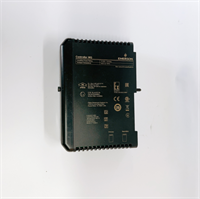
The Emerson VE4036P2 is a dedicated interface card designed for the DeltaV Series 2 distributed control system (DCS). It functions primarily as a serial communication module, enabling the controller to exchange data with external field devices using the Profibus DP protocol.This module is essential for integrating third-party instrumentation into an Emerson architecture without requiring extra gateways. Field engineers often deploy this card to reduce wiring complexity in large-scale plants (like refineries or power stations). It handles the serial handshake directly, offloading communication processing from the main CPU and ensuring stable data transfer at standard industrial baud rates.
Installation & Configuration Guide
Phase 1: Preparation (10 min)
- Ensure the DeltaV chassis is powered down or the specific slot is depowered.
- Verify the module part number (VE4036P2) matches your system configuration database (ControlStudio).
- Safety: Wear an anti-static wrist strap. Industrial logic cards are highly sensitive to ESD (electrostatic discharge).
Phase 2: Removal of Old Module (5–10 min)
- If replacing a faulty card, disconnect the Profibus cable from the front port.
- Unscrew the mounting screws (top and bottom) securing the card to the chassis.
- Gently pull the card straight out. Do not wiggle it side-to-side to avoid bending the backplane pins.
Phase 3: Installation (10 min)
- Align the VE4036P2 with the designated slot.
- Push the card firmly into the backplane connector until it seats fully.
- Secure the mounting screws. Torque them to standard panel specs (do not overtighten).
- Reconnect the Profibus DP cable. Check the terminator switch on the connector if this is the last node on the trunk.
Phase 4: Power-On & Test (10 min)
- Restore power to the chassis.
- Observe the module LEDs. Typically, a solid green “OK” or “Run” light indicates healthy communication. A flashing red light usually points to a configuration mismatch or bus fault.
- Open the DeltaV Explorer/Diagnose view to confirm the module is recognized and reporting “Good” status.
Troubleshooting Quick Reference
| Issue | Probable Cause | Quick Fix |
|---|---|---|
| Module Fault LED is Red | Configuration mismatch | Download the latest hardware configuration from the workstation to the controller. |
| No Communication | Cable/Termination issue | Check the 9-pin D-sub connector. Ensure the terminating resistor is active only at the ends of the Profibus line. |
| Intermittent Faults | Loose mounting | Reseat the card and tighten chassis screws. Vibration can cause backplane disconnects. |
| Card not detected | Backplane power issue | Measure 24V DC at the chassis power supply. Ensure the 600mA load capacity is available. |
Dimensions, Mounting & Wiring Notes
- Mounting: Designed for the standard Emerson DeltaV chassis (Series 2). It snaps into the backplane and is secured with two screws.
- Wiring: Uses a standard 9-pin D-sub connector for Profibus DP.
- Note: Pinout follows standard Profibus DP specifications (Pin 3: B-line, Pin 8: A-line). Always verify with the specific DeltaV wiring diagram before cutting cables.
FAQ
Q: Is the VE4036P2 compatible with the newer DeltaV Series 3?
A: Generally, Series 2 I/O cards like the VE4036P2 are designed for the Series 2 chassis. While some backward compatibility exists in hybrid systems, you should verify the specific chassis generation in your plant before purchasing. Mixing generations can sometimes cause backplane communication errors.Q: I received the module, but the LED is flashing red. Is it broken?
A: Not necessarily. A flashing red light often means the module is powered but hasn’t received a valid configuration from the controller yet. Check your DeltaV software to see if the card is assigned to the correct slot.Q: Can I use this for Modbus communication?
A: This specific model (VE4036P2) is optimized for Profibus DP. If you need Modbus, you typically look for a different serial module or a gateway, although some DeltaV serial cards can be firmware-configured. Check the exact firmware capability of the unit you are buying.Q: What is the lead time if this isn’t in stock?
A: Since this is a specialized industrial component, lead times can vary from 2 to 6 weeks depending on global supply chain conditions. We recommend checking our current inventory status for “New Surplus” availability.Q: Do you provide a warranty on this?
A: Yes. All modules undergo a visual inspection and basic continuity test before shipping. We offer a standard 30-day replacement warranty for Dead-on-Arrival (DOA) units, provided the anti-tamper seals are intact.