 Tel:
Tel:  Email:
  WhatsApp:
 Description
Key Technical Specifications
- Reading Capability: 1D and 2D barcodes (including DPM – Direct Part Mark)
- Mounting Type: Fixed-mount (designed for conveyor belts and assembly lines)
- Interface: Industrial Ethernet / Discrete I/O (standard for DataMan 475 series)
- Lighting: Integrated high-power illuminators (specific LED configuration depends on exact sub-model)
- Protection Rating: Industrial-grade housing (typically IP65/IP67 for factory floor dust and moisture)
- Operating Temperature: Designed for harsh industrial environments (verify specific range in OEM datasheet, usually 0°C to 50°C)
- Configuration Software: Compatible with Cognex DataMan Setup Tool
- Part Number: 821-10079-2R (for DMR-475X-0000-M variant)
Product Introduction
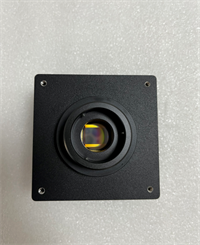
If you have ever stood on a packaging line watching good products get rejected because a scanner missed a crinkled label, you know how much a bad reader costs you. The Cognex DMR-475X is the workhorse I recommend when standard laser scanners just can’t keep up with the line speed or struggle with damaged codes. It is a fixed-mount 1D/2D reader engineered specifically for high-throughput factory automation.What makes the 475X stand out in the field is its ability to read Direct Part Mark (DPM) codes and damaged labels that would blind a cheaper sensor. It processes images incredibly fast, meaning it won’t bottleneck a conveyor running at full tilt. I have deployed these on automotive assembly lines where grease, vibration, and variable lighting are constant headaches, and the 475X just keeps reading. Just be aware that the integrated lighting on the “-0000-M” variant is standard; if you are reading highly reflective metal parts, you might need to tweak the lighting parameters in the setup tool to kill the glare.
Quality SOP & Tech Pitfalls (The Reality Check)
The Lab Report (SOP)
Before this reader leaves our facility, it goes through a strict checkout:
- Visual Inspection: We check the housing for cracks and ensure the lens is free of scratches or factory residue. We verify the label matches the manifest (DMR-475X-0000-M).
- Port Check: Physical inspection of the Ethernet and power connectors to ensure no bent pins from previous handling.
- Connectivity Test: We power it up on the test rack to verify the boot sequence LEDs light up correctly and it establishes a link with the DataMan Setup Tool.
- Anti-Static Packing: It gets sealed in an ESD bag with heavy-duty bubble wrap. These things are tough, but the optics are sensitive.
The Engineer’s Warning (Pitfalls)
Here is where people mess this up: Mounting distance and angle. The 475X has a specific depth of field. I once saw a plant manager mount one of these six inches too far from the belt because “it looked about right.” They spent three days blaming the PLC for read errors when it was just simple physics. Also, do not ignore the heat. If you mount this inside a sealed junction box in a hot plant without ventilation, the internal temperature will climb, and it will eventually thermal throttle or fail. Give it room to breathe.
Installation & Configuration Guide
Here is how to swap this out without halting production for half a day:
- Pre-Installation: ⚠️ Kill the power. Lock out/tag out the 24V DC supply. If the conveyor is live, make sure it is in E-stop.
- Removal: Label your Ethernet and I/O cables immediately. Loosen the mounting bracket. Take a photo of the old reader’s position relative to the product flow—this is your baseline.
- Installation: Mount the DMR-475X using the bracket. Crucial: Match the exact distance and tilt angle from your photo. Tighten the locking screws firmly; conveyor vibration will loosen them over time if you don’t.
- Power-On & Testing: Restore 24V power. Watch the status LED—it should go solid green or blue once booted. Connect your laptop to the reader’s IP address using the DataMan Setup Tool. Run a “Live View” and pass a test code under it to verify the read rate before you let the line run full speed.
Compatible Replacement Models
- ✅ Drop-in Replacement: Cognex DMR-475X-0000-M (821-10079-2R). This is the exact unit. It fits the same bracket and uses the same software profile.
- ⚠️ Software Compatible: Cognex DMR-475X-0100 or other 475X variants. The hardware footprint is identical, but the lighting or lens might differ. You can physically install it, but you will likely need to reload the job file and tweak the lighting settings in the software to get a good read.
- ❌ Hardware Mod Required: Cognex DataMan 375X or 260X Series. While they do the same job, the physical dimensions and mounting brackets are different. You would need to drill new holes and re-route cables. Only do this if you are upgrading the whole system.
Frequently Asked Questions (FAQ)
Can I hot-swap this reader while the line is running?
Technically, the electronics support it, but I wouldn’t recommend it. If you unplug the Ethernet while the PLC is polling it, you will likely fault the conveyor logic and trip the line. It is safer to pause the line for 5 minutes.Does the DMR-475X read 1D barcodes, or just 2D?
It reads both. It is an imager-based system, so it handles standard UPC/EAN 1D codes just as easily as Data Matrix or QR codes.My old reader was a DMR-475X-0100. Will this -0000-M work?
Physically, yes. The -0000-M usually denotes a standard lighting configuration. If your application relies on specific polarized lighting (which the -0100 might have had), you might struggle with glare on shiny surfaces. You will need to test it with your specific product labels.What software do I need to configure this?
You need the Cognex DataMan Setup Tool. It is free to download from the Cognex website. Make sure you have the latest version, as older releases sometimes struggle to recognize newer firmware on these readers.Is this unit brand new?
We sell this as New Surplus. It is a genuine Cognex unit that was never installed in the field. It comes in the original packaging, not a brown box.How do I know if the focus is right?
In the DataMan Setup Tool, there is a “Live View” mode. It gives you a real-time video feed. If the barcode looks crisp on your laptop screen, the focus is good. If it is blurry, adjust the physical distance of the reader from the target.