Tel:
Tel:  Email:
  WhatsApp:
 Description
Key Technical Specifications
| Parameter | Specification |
|---|---|
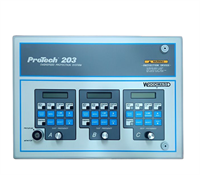
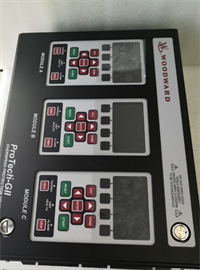
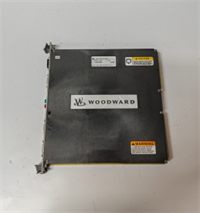
| Product Model | Woodward 9907-1200 |
| Application | EGCP-3 Engine Control System |
| Logic Supply Voltage | 24 VDC (Nominal) |
| Operating Temperature | -40°C to +70°C |
| Speed Input | Magnetic Pickup (MPU) / TTL |
| Mounting | DIN Rail / Backplane Mount |
| Configuration | DIP Switch selectable parameters |
| Communication | RS-485 / Modbus (Gateway dependent) |
| Weight | Approx. 0.8 kg |
Product Introduction
The “Brain” of the Generator Set
If you are running older Caterpillar G3306 or G3400 engines, you know the drill. The mechanical governors were simple, but they couldn’t handle the complex load sharing required by modern grids. The Woodward 9907-1200 is the core PCB for the EGCP-3 system, designed to retrofit these older iron beasts into digital precision. It replaces the analog chaos with a solid-state controller that manages start-up sequences, speed regulation, and emergency stops.Why this board matters
I have seen these units sit in a control cabinet at 60°C for a decade and still boot up without a hiccup. The 9907-1200 revision is built for harsh environments—thick PCBs, conformal coating, and heavy-duty connectors. It handles the critical speed signal processing via the Magnetic Pickup input, which is the heartbeat of the engine. If this board fails, the engine doesn’t just stop; it bricks. Getting a verified, tested unit is the only way to guarantee you don’t get stuck with a generator that won’t crank.

Quality SOP & Tech Pitfalls (The Reality Check)
The Lab Report (SOP)
We don’t just pull it off the shelf and tape up the box. Every 9907-1200 goes through a strict validation process:
- Visual Inspection: We check the date codes on the chips and inspect the solder joints for cold spots or corrosion.
- Live Test: We mount it on a test rack, apply 24VDC, and simulate a speed signal to verify the processor wakes up and the LED indicators cycle correctly.
- Multimeter Check: Using a Fluke 115, we verify the continuity of the input terminals and ensure there are no shorts on the power rails.
- Packaging: It gets sealed in anti-static shielding bags with desiccant packs. Moisture kills these old boards during shipping.
The Engineer’s Warning (Pitfalls)
Watch the Jumpers.
This is where guys get burned. The 9907-1200 board has configuration jumpers or DIP switches that must match your old board exactly. I once spent six hours troubleshooting a “no start” condition on a remote site, only to realize the replacement board had the voltage select jumper set to 110V instead of 24V.
ESD is a silent killer.
This is a legacy CMOS-based board. It is incredibly sensitive to static. If you touch the connector pins without a wrist strap, you might not kill it immediately, but you will introduce a “ghost” fault that will fail at 3 AM during a storm.
Installation & Configuration Guide
Phase 1: Pre-Installation
- Safety First: Disconnect the 24VDC battery charger and the negative battery cable. Wait 5 minutes for capacitors to discharge.
- Document Everything: Take a high-resolution photo of the old board. Specifically, zoom in on the DIP switches and jumper blocks. Do not trust your memory.
Phase 2: Removal
- Label Wires: Use a Sharpie or tape to label every wire connected to the terminal blocks. The silkscreen on these old boards can be faded and hard to read in a dark cabinet.
- Unclip: Release the DIN rail clip at the bottom. Pull the module out gently.
Phase 3: Installation
- Copy Settings: Before mounting the new 9907-1200, set the jumpers and DIP switches to match your photo of the old unit. Do this on the bench, not in the cabinet.
- Mount: Clip the new board onto the DIN rail. Reconnect the wiring harness. Ensure the connectors seat fully; they should click.
Phase 4: Power-On
- Verify Voltage: Check the input voltage at the terminals with a multimeter. Ensure it is stable 24VDC.
- Boot: Reconnect the battery. Watch the LED status lights. You should see a specific boot sequence (usually all LEDs flash momentarily).
- Calibration: You may need to perform a speed calibration (gain adjustment) if the engine hunts or surges.
Compatible Replacement Models
| Model Number | Compatibility | Notes |
|---|---|---|
| Woodward 9907-1200 | ✅ Direct Drop-in | Exact match. Verify revision level. |
| Woodward 8290-966 | ⚠️ Upgrade Path | Newer generation (EGCP-4). Requires rewiring harness adapter and logic reconfiguration. |
| Woodward 8270-104 | ❌ Incompatible | Different form factor and pinout. Do not attempt to force fit. |
Frequently Asked Questions (FAQ)
1. Will this work on my Cat G3406 engine?
Yes, but you need to check your existing harness. The 9907-1200 is the standard board for many G3400 series engines equipped with the EGCP-3 system. If your current board is a 9907-1200, this is a direct swap.2. My generator is “hunting” (surging) after I installed this. Is the board bad?
Unlikely. Surging usually means the Gain and Stability potentiometers (or digital settings) are not tuned for your engine. The new board is at factory default settings. You need to adjust the response settings to match your engine’s inertia.3. Does this come with the display panel?
No. This listing is for the 9907-1200 control board only. The display (usually a 9905-xxx series) connects to this board but is sold separately.4. Can I hot-swap this while the engine is running?
Absolutely not. This is the engine controller. Removing it while the engine is running will cut power to the fuel solenoid/actuator, causing an immediate emergency shutdown.5. Why is there a “Rev” number on the board?
Revision. Woodward updates the internal circuitry slightly. Generally, a higher revision number is backward compatible, but you should always try to match the revision or check the Woodward manual for specific firmware requirements.