 Tel:
Tel:  Email:
  WhatsApp:
 Description
Key Technical Specifications
| Parameter | Specification |
|---|---|
| Product Model | Triconex EOI3382 |
| Module Type | Digital Output (TMR) |
| Channel Count | 32 Points |
| Output Voltage | 24 VDC (Nominal) |
| Current Rating | 0.5 A per channel (2.0 A total per group) |
| Logic Type | Source (Positive Switching) |
| Isolation | Optical Isolation (Field to Logic) |
| Response Time | < 1 ms (Typical) |
| Operating Temp | 0°C to 60°C |
| Mounting | Tricon Chassis (DIN Rail or Rack) |
Product Introduction
The “Muscle” of the Safety System
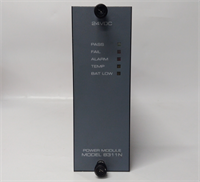
In a Triconex system, the Main Processor (MP) does the thinking, but the EOI3382 does the heavy lifting. This is a 32-channel digital output module designed for high-density applications where panel space is at a premium. Unlike standard PLC output cards, this module is built for Triple Modular Redundancy (TMR). It takes three logic decisions and votes them before sending power to the field. If one of the internal channels fails, the module masks the failure and keeps the output stable.Why this part is critical
I’ve seen standard PLC output cards weld their relays shut during a short circuit. The EOI3382 is solid-state and designed to handle the inrush current of solenoid valves without fusing. The “3382” revision brings improved optical isolation, which is vital in plants with dirty grounding. It’s a dense card—32 points in a single slot—which means if you lose it, you lose a massive chunk of your control logic. Having a tested spare isn’t an insurance policy; it’s a necessity.

Quality SOP & Tech Pitfalls (The Reality Check)
The Lab Report (SOP)
We don’t just visually inspect these; we run them through a TMR simulation.
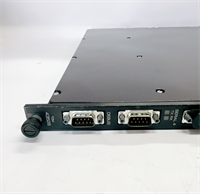
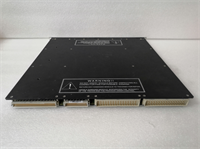
- Visual Inspection: We check the 96-pin DIN connector for bent pins and inspect the terminal block interface area for heat discoloration.
- Live Test: We install the EOI3382 into a Tricon chassis. We force logic “1” and “0” from the TriStation software to verify all 32 channels toggle correctly.
- TMR Verification: We simulate a “stuck” channel to ensure the module’s internal voting logic masks the fault and keeps the output active.
- Packaging: Sealed in anti-static shielding bags with desiccant. These boards are sensitive to moisture during transit.
The Engineer’s Warning (Pitfalls)
The “Source” vs. “Sink” Trap.
The EOI3382 is a Source output (it provides +24V). If your field wiring is designed for a “Sinking” card (where the card provides the ground path), this module will not work, and you could create a dead short if you aren’t careful. Check your wiring diagrams.
Heat Generation.
This is a 32-channel card. If you have all 32 channels driving solenoids at 100% duty cycle, this card gets hot. I’ve seen these cook themselves in cabinets with failed cooling fans. Ensure your cabinet airflow is active. A hot EOI3382 will trigger a chassis over-temp fault, shutting down the whole safety system.
Installation & Configuration Guide
Phase 1: Pre-Installation
- Safety First: While Triconex supports hot-swap for many modules, I recommend removing power to the chassis if the process allows. If you must hot-swap, ensure you are wearing a grounded wrist strap connected to the chassis.
- Identify Slot: Note the exact slot number. In Tricon, physical location dictates the software tag.
Phase 2: Removal
- Unlatch: Open the ejector levers on the top and bottom of the module.
- Extract: Pull the card straight out. Do not twist it; the backplane connectors are fragile.
Phase 3: Installation
- Inspect: Check the EOI3382 connector pins. Ensure they are straight and free of debris.
- Insert: Align the card with the chassis guides. Push firmly and evenly on the faceplate until the connectors seat fully.
- Lock: Close the ejector levers. They must be flush with the faceplate to ensure proper grounding and retention.
Phase 4: Power-Up
- Status Check: Watch the “Module Status” LED. It should turn Green. If it flashes Red, check the TriStation diagnostics for “Configuration Mismatch” or “Hardware Fault.”
- Commissioning: Force outputs from the logic solver to verify field devices (solenoids/valves) actuate.

Compatible Replacement Models
| Model Number | Compatibility | Notes |
|---|---|---|
| Triconex EOI3382 | ✅ Direct Drop-in | Exact match. Standard 32-channel source output. |
| Triconex 3382 | ✅ Direct Drop-in | Often the same hardware, just different labeling conventions. |
| Triconex 3364 | ⚠️ Software Compatible | 16-channel module. Fits the slot, but requires logic changes to accommodate fewer points. |
| Triconex 3351 | ❌ Incompatible | Relay output module. Different pinout and logic requirements. |
Frequently Asked Questions (FAQ)
1. Does this module support “Hot Swap”?
Yes, the Triconex architecture allows for removing and inserting modules while the system is running. However, the outputs will go to their “Fail-Safe” state (usually de-energized) while the card is out. Ensure your process can handle that transient state.2. My “Module Status” LED is flashing red. What does that mean?
It usually means the module doesn’t match the software configuration. This happens if you put a newer revision card in an older system without updating the TriStation database. It can also indicate a bad backplane connection—reseat the card firmly.3. Can I use this for 120VAC loads?
No. This is a 24 VDC solid-state module. Connecting AC voltage will destroy the output drivers instantly. For AC loads, you need a relay output module (like the 3351).4. What is the difference between “Source” and “Sink”?
“Source” (this card) pushes positive voltage to the load. “Sink” accepts current from the load to ground. You cannot mix these wiring schemes without changing your field wiring or using relays.5. Why is this card so expensive compared to a standard PLC card?
You are paying for the TMR redundancy. You aren’t buying one output channel; you are buying three independent channels with voting logic to ensure that a fire or gas detection system always triggers when it needs to. It’s the cost of safety integrity.