 Tel:
Tel:  Email:
  WhatsApp:
 Description
Key Technical Specifications
| Parameter | Specification | Notes |
|---|---|---|
| Processor | 80486 | 66 MHz Clock Frequency |
| Memory | 896 kB RAM | Up to 3MB internal storage |
| Expansion | PCMCIA Slot | Supports up to 8MB memory card |
| I/O Capacity | 500 Inputs / 500 Outputs | Distributed I/O limit |
| Network Ports | 1x Modbus Plus, 2x RS232 | Standard legacy interfaces |
| Power Input | 24 VDC | Bus current: 1250 mA |
| Battery | Lithium | Typical life: 10 years |
| Operating Temp | -20°C to 60°C | Derating may apply at extremes |
| Humidity | 10% to 90% RH | Non-condensing |
| Mounting | Control Room / Panel | IP20 Rating |
Product Introduction
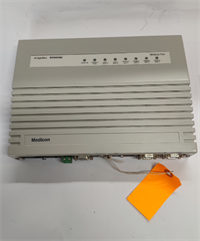
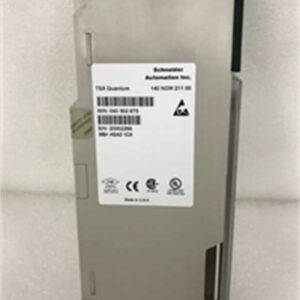
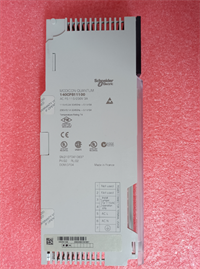
Let’s be honest: the 140CPU43412A is a dinosaur in the best possible way. It runs on a 66MHz 80486 processor—technology that predates the internet as we know it—but in the world of heavy industrial automation, “old” often means “battle-tested.” I’ve seen these units running in power plants and water treatment facilities for two decades without a single hiccup. It isn’t flashy, and it won’t win any computing speed contests against modern Ethernet-based controllers, but it does exactly what it’s supposed to do: execute logic reliably and keep the plant running.The real value here is the Modbus Plus (MB+) integration. If you are maintaining a legacy system where the backbone is a shielded twisted pair cable running at 1 Mbps, this CPU is your lifeline. It handles up to 63 remote I/O drops and manages the token passing without breaking a sweat. Just be aware that the memory is tight by modern standards—896kB fills up fast if you start logging historical data, so keep your logic lean.

Quality SOP & Tech Pitfalls (The Reality Check)
The Lab Report (SOP):
Before we ship a 140CPU43412A, we don’t just look at the box.
- Visual Inspection: We check the battery compartment for corrosion. Old lithium batteries leak and destroy the PCB traces.
- Live Test: We rack it in a Quantum chassis and force a handshake. We verify the RUN LED lights up and that the ERR LED stays dark.
- Port Verification: We loop back the RS232 ports and ping the Modbus Plus network to ensure the transceiver chips aren’t fried.
- Firmware Check: We confirm the firmware version (e.g., V2.2.0) matches the customer’s requirement.
The Engineer’s Warning (Pitfalls):
- The Battery Trap: This module uses a lithium battery to hold RAM and the real-time clock. If you pull a CPU out of a rack that’s been sitting on a shelf for 5 years, the battery might be dead. Result: You lose your program and retention registers. Always have a backup on your laptop before swapping.
- Modbus Plus Addressing: I’ve watched junior techs waste four hours troubleshooting a “dead” CPU, only to realize they forgot to set the Rotary Switch on the front for the MB+ address. If it’s set to 0, it won’t talk. Check the switch before you call support.
Installation & Configuration Guide
- Pre-Installation:
- ⚠️ Power Down: While the Quantum backplane is technically hot-swappable, I never trust 24VDC bus bars with loose fingers. Kill the power if you can.
- Backup: Connect your PC and upload the project from the old CPU if it’s still alive.
- Removal:
- Disconnect the Modbus Plus cable (usually a blue shielded cable).
- Release the locking tab at the bottom of the module and slide it out.
- Installation:
- DIP Switches: This is critical. Check the Key Switch position and any specific configuration jumpers on the old unit. Copy them exactly to the new 140CPU43412A.
- Seat the module firmly into the slot. You should hear the backplane connector engage.
- Power-On & Testing:
- Restore power. Watch the LED sequence: PWR -> RUN.
- If the BAT light is on, replace the battery immediately.
- Download your logic via the RS232 or MB+ port using Unity Pro or Concept software.
Compatible Replacement Models
| Compatibility Tier | Model Number | Notes & Differences |
|---|---|---|
| ✅ Drop-in Replacement | 140CPU43412A | Exact match. Ensure firmware versions are close to avoid download errors. |
| ⚠️ Upgrade (Software) | 140CPU53414B | Faster processor, more memory. Requires hardware migration in Unity Pro and likely a recompile of the logic. |
| ⚠️ Upgrade (Software) | 140CPU67160 | High-end flagship. Massive overkill for simple apps, requires significant re-engineering to utilize its capabilities. |
| ❌ Incompatible | 140CPU11302 | Different architecture (Quantum Lite/Compact). Will not fit or function in a standard Quantum rack. |
Frequently Asked Questions (FAQ)
Q: Can I hot-swap this CPU without stopping the process?
A: Technically, the Modicon Quantum backplane supports it, but I wouldn’t risk it unless you have a redundant Hot Standby system (which requires two CPUs and a specific sync cable). Swapping the main CPU in a single-processor system will stop the logic scan, meaning your outputs will freeze or drop out. Plan for downtime.Q: The battery light is flashing. How long do I have?
A: If the BAT LED is flashing, the voltage is critically low. You have days, maybe hours. The RAM is volatile. Get a new battery (usually a standard industrial lithium cell) and swap it immediately, or download the program to the PLC right now to refresh the memory.Q: Does this support Ethernet?
A: No. The 140CPU43412A has RS232 and Modbus Plus ports only. If you need Ethernet/IP or Modbus TCP, you have to install a separate Ethernet module (like the 140NOE) in the rack, or upgrade to a newer CPU like the 140CPU65150.Q: I lost my password for this PLC. Can you reset it?
A: That’s a security feature, not a bug. If the memory is protected, you can’t just “reset” it without wiping the program. If you don’t have the original source code, you’re in a tough spot. Sometimes a “warm start” works if you know the default credentials, but usually, you’re stuck.Q: Is the 140CPU43412A obsolete?
A: It’s considered “Mature” or “Legacy.” Schneider still supports it, but don’t expect to buy it off the shelf at a local distributor. You’re looking at specialized surplus vendors or direct factory orders with long lead times.