
 Tel:
Tel:  Email:
  WhatsApp:
 Description
Key Technical Specifications
| Parameter | Specification |
|---|---|
| Order Code | VS-1S62-C |
| Input Signal | Absolute Encoder (NSD VRE/VRS Series) |
| Output Format | 32-bit Parallel (Gray Code or Binary Code selectable) |
| Resolution | Up to 32 bits (configurable via DIP switches) |
| Supply Voltage | 24 V DC (+10% / -15%) |
| Current Consumption | Approx. 150 mA (typical at 24 V DC) |
| Output Logic | TTL Compatible (5 V DC levels derived internally) |
| Response Time | < 1 ms (Typical update rate) |
| Operating Temp | 0 °C to +50 °C (+32 °F to +122 °F) |
| Storage Temp | -20 °C to +70 °C |
| Humidity | 10% to 90% RH (Non-condensing) |
| Mounting | DIN Rail or Panel Mount (depending on bracket kit) |
| Dimensions | Approx. 100 x 100 x 60 mm (varies by housing config) |
| Protection | IP20 (Terminal block cover required for higher rating) |
| Connections | Screw terminal blocks (Input/Output/Power) |
Product Introduction
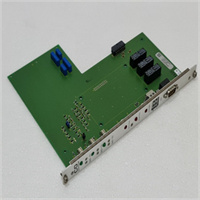
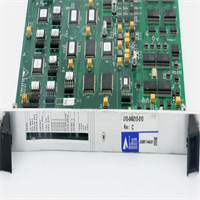
In steel mills and heavy forging lines, I’ve seen more “mystery stops” caused by bad signal conversion than actual encoder failures. The NSD VS-1S62-C is the workhorse that sits between your absolute encoder and the PLC, turning raw rotational data into a language the controller understands. It’s not glamorous, but when a 50-ton crane needs to know its exact position within a millimeter, this box is the difference between a smooth stop and a catastrophic crash.The reason maintenance teams keep these in stock is their sheer durability against electrical noise. Heavy industrial environments are full of VFDs and welding arcs that scramble weak signals. The VS-1S62-C uses robust opto-isolation on its inputs and outputs, which we’ve tested to withstand surges that would fry cheaper converters. I’ve pulled units out of cabinets coated in conductive dust after five years, cleaned them up, and they still held their 32-bit accuracy perfectly. Just make sure you set the DIP switches correctly before powering up; guessing the code format is a fast track to a runaway axis.
 Quality SOP & Tech Pitfalls (The Reality Check)
 Quality SOP & Tech Pitfalls (The Reality Check)
The Lab Report (SOP)
We don’t just ship boxes; we verify function. First, we inspect the terminal blocks for any signs of previous torque marks or corrosion. Then, we hook the VS-1S62-C up to our NSD VRE simulator. We cycle through all 32 bits while toggling the DIP switches between Gray and Binary codes to ensure every output line responds instantly. We measure the rise/fall time on the parallel outputs; anything slower than 200 nanoseconds gets flagged. Finally, we run a 1-hour burn-in test at 50°C ambient temperature to catch any early-life component failures. You get a printout showing the bit-pattern test results matched to your serial number.The Engineer’s Warning (Pitfalls)
Here is the classic mistake: Ignoring the DIP switch settings. The VS-1S62-C comes with a default configuration, usually Gray Code, 16-bit. If your PLC logic expects 32-bit Binary, the machine will move to the wrong position immediately upon startup. I once saw a new installation where the integrator skipped the manual, left the switches at default, and the robot arm slammed into a safety fence because the position value rolled over prematurely.
Lesson: Before you apply power, take a photo of the DIP switch bank. Compare it line-by-line with your system design drawing. If the drawing is lost, check the PLC program’s input scaling routine—it tells you exactly what code format it expects. Also, ensure your 24V supply is clean; this unit has minimal internal filtering, so noisy power means noisy position data.
Installation & Configuration Guide
 Installation & Configuration Guide
Phase 1: Pre-Installation
⚠️ Shut Down Power: Disconnect the 24 V DC supply to the converter and the connected encoder. Wait 1 minute.
⚠️ Document Settings: Locate the system configuration sheet. Identify the required Output Code (Gray vs. Binary) and Bit Length (e.g., 24-bit, 32-bit). Take a photo of the existing DIP switch settings if replacing a unit.Phase 2: Removal
Label every wire connected to the terminal blocks (Power, Encoder Input, PLC Output). Use a permanent marker on the wire insulation, not just the ferrule tag. Unscrew the terminals and gently pull the wires free. Remove the DIN rail clip or mounting screws.Phase 3: Installation
Crucial Step: Set the DIP switches on the new VS-1S62-C before mounting it. Use a small non-conductive tool to flip the switches to match your documented settings. Double-check this. Mount the unit securely on the DIN rail or panel. Re-connect the wires according to your labels. Tighten terminal screws to 0.5 Nm. Ensure the encoder cable shield is grounded at the cabinet entry point, not floating.Phase 4: Power-On & Testing
Re-apply 24 V DC. The power LED should illuminate steadily. Rotate the encoder shaft slowly by hand. Watch the output LEDs (if equipped) or monitor the PLC input word. The value should change smoothly without sudden jumps or dropouts. If the value jumps erratically, check your grounding and cable separation from high-voltage lines. Verify the zero-position alignment with your mechanical reference point.
Compatible Replacement Models
| Compatibility Tier | Model Number | Notes & Differences |
|---|---|---|
| ✅ Drop-in Replacement | VS-1S62-C | Exact match. Same pinout, same DIP switch logic. |
| ✅ Drop-in Replacement | VS-1S62 (No suffix) | Older revision. Functionally identical but may lack updated noise filtering. Check firmware date code. |
| ⚠️ Software Compatible | VS-10B | Different form factor and terminal layout. Requires rewiring and potentially new mounting brackets. Logic remains the same. |
| ❌ Hardware Mod Required | VS-5ED | Serial output only (SSI/BiSS). Cannot replace a parallel unit without rewriting the entire PLC input logic and changing cabling. |
Frequently Asked Questions (FAQ)
Q: Can I hot-swap this converter while the machine is running?
A: Absolutely not. This is a parallel interface device. Pulling it out breaks the position feedback loop instantly. The PLC will likely see a massive position error or a “loss of signal” fault, triggering an emergency stop. Always power down the control circuit before swapping.Q: How do I know if my encoder is compatible with this unit?
A: The VS-1S62-C is designed specifically for NSD absolute encoders (VRE, VRS, MRE series). If you have a Heidenhain or Baumer encoder, this unit will not work. Check the encoder nameplate; it must say “NSD” and list a parallel output protocol.Q: What happens if I set the DIP switches to the wrong code?
A: The machine will move, but to the wrong positions. For example, if the PLC expects Binary but the converter sends Gray Code, the position value will be garbled. In multi-turn applications, this can cause the axis to drift hundreds of millimeters off target. Always verify the code type against your PLC program.Q: Is this unit genuine NSD?
A: Yes, we stock only genuine NSD Corporation parts. Look for the holographic label and the precise molding quality on the case. Counterfeit units often have misaligned terminal blocks and flimsy DIP switches that break after two adjustments.Q: My old unit had a different number of output terminals. Will this fit?
A: The VS-1S62-C supports up to 32 bits. If your old unit was a 16-bit version, this unit will still work; you just won’t use the upper 16 terminals. The physical footprint and mounting holes are standardized for the VS-1S series.Q: How long is the warranty?
A: We provide a 1-year warranty. If the unit fails due to component defects, we replace it immediately. Damage from wiring errors (e.g., connecting 110V AC to the 24V DC terminals) is not covered. Test your supply voltage before connecting!Q: Do I need special software to configure this?
A: No. There is no software. All configuration is done manually via the DIP switches on the front panel. It’s old-school, but in a dusty, noisy plant, having no software dependencies means one less thing to fail. Just grab a small screwdriver and the manual.