 Tel:
Tel:  Email:
  WhatsApp:
 Description
Key Technical Specifications
| Parameter | Specification |
|---|---|
| Manufacturer | NEC |
| Part Number | FC-9821KE |
| Processor | 486DX2 (66MHz) |
| Memory (RAM) | 2 MB |
| Memory (ROM) | 96 KB |
| Cache | 8 KB High-Speed |
| Structure | Industrial Rack-Mount |
| Application | 楼宇 Automation, Industrial Control |
| Condition | Used / Surplus (Verify availability) |
| Origin | Japan |
Product Introduction
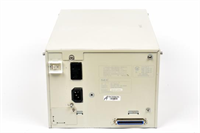
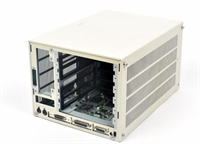
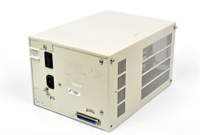
The NEC FC-9821KE is a high-performance industrial controller designed for rack-mount installation in automation environments. It integrates a 486DX2 processor running at 66MHz to handle complex control logic and system management tasks. This unit acts as the central processing node for NEC equipment, ensuring synchronized operation across connected devices.Engineered for reliability, the module features 2MB of RAM and 96KB of ROM to support substantial data buffering and firmware storage. Its architecture allows for seamless integration into楼宇 automation, energy management systems, and security monitoring networks. The controller’s robust design withstands the rigors of continuous industrial duty cycles.
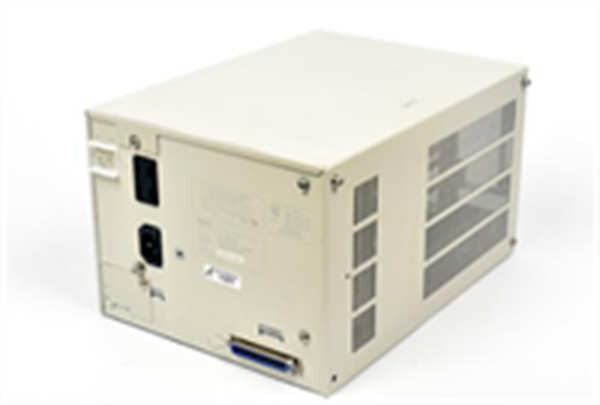
FC-9821KE NEC
Installation & Configuration Guide
Phase 1: Preparation (10 min)
- Gather tools: Anti-static wrist strap, Phillips screwdriver, interface cables.
- Verify the FC-9821KE part number matches the existing system hardware.
- Inspect the unit chassis for physical damage or bent mounting ears.
Phase 2: Removal (5–10 min)
Warning: Disconnect all power sources before handling internal components or cabling.
- Power down the control cabinet and lock out/tag out the main breaker.
- Disconnect communication cables and power cords from the rear panel.
- Remove the mounting screws securing the unit to the rack rails.
- Slide the controller out carefully; avoid pulling on connected wires.
Phase 3: Installation (10 min)
- Position the FC-9821KE in the designated rack slot.
- Secure the unit firmly using the mounting screws to prevent vibration issues.
- Reconnect all interface cables, ensuring locking mechanisms click into place.
- Verify ground connections are tight to maintain noise immunity.
Phase 4: Power-On & Test (10 min)
- Restore power to the system.
- Observe startup LEDs for normal boot sequence activity.
- Check system logs or diagnostic screens for error codes.
- Run a basic communication test with the host controller or上位机.
Troubleshooting Quick Reference
| Symptom | Probable Cause | Corrective Action |
|---|---|---|
| No Power / LEDs Off | Blown fuse or loose cable | Check input voltage at terminals. Inspect power cord seating. |
| System Won’t Boot | Corrupted memory or CPU fault | Reseat memory modules if accessible. Cycle power completely. |
| Communication Error | Cable mismatch or noise | Verify cable pinout. Check shield grounding. |
| Overheating | Dust buildup or fan failure | Clean air vents. Verify internal cooling fans are spinning. |
| Intermittent Faults | Vibration loosening connectors | Re-torque terminal blocks. Check mounting stability. |
Dimensions, Mounting & Wiring Notes
- Form Factor: Industrial Rack-Mount Unit.
- Mounting: Standard rack rails with screw-in mounting ears.
- Connections: Proprietary NEC I/O and standard communication ports.
- Note: Ensure adequate clearance around ventilation slots for airflow.
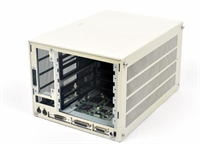
FC-9821KE NEC
FAQ
What specific CPU does the FC-9821KE use?
It utilizes an Intel 486DX2 processor clocked at 66MHz, which provides sufficient speed for legacy industrial control logic.Is this unit new or refurbished?
Availability varies. We stock used surplus and tested units. Please check the specific listing condition or request photos before purchase.Can I use this for楼宇 automation?
Yes, this controller is explicitly designed for applications including楼宇 automation, industrial control systems, and energy management.Does it come with a warranty?
Yes, we provide a standard warranty on functional performance. Dead-on-arrival units are replaced.I need a manual for setup, do you have one?
Documentation for legacy NEC industrial hardware can be scarce. We recommend verifying pinouts physically before connecting to live systems.