 Tel:
Tel:  Email:
  WhatsApp:
 Description
Key Technical Specifications
| Parameter | Specification |
|---|---|
| System Compatibility | Metso DNA / Valmet DNA (Versions 5.x to 8.x) |
| Channel Capacity | Up to 64 Digital I/O points (depending on configuration) |
| Communication Protocol | Proprietary DNA Fieldbus / Ethernet-based backplane |
| Input Voltage Range | 24V DC (Nominal), Logic levels compatible with PLC standards |
| Output Drive Current | Typically 0.5A – 2A per channel (Check specific sub-module) |
| Isolation | Channel-to-Logic and Channel-to-Channel isolation (Varies by config) |
| Diagnostic Features | Per-channel short circuit detection, open load, overload reporting |
| Operating Temperature | -20°C to +60°C (Industrial Grade) |
| Mounting | DIN Rail or Specific Metso DNA Rack Slot |
| Redundancy | Supports redundant communication paths (if paired with redundant bus) |
| Update Rate | High-speed scanning (ms range) configurable via DNA Studio |
| Certifications | CE, UL, ATEX (Zone 2 often available with specific housing) |
Product Introduction
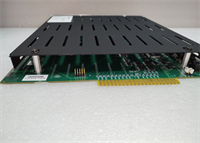
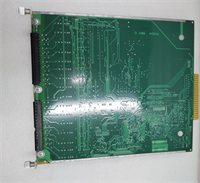
If you are running a paper machine, board mill, or power boiler controlled by a Metso DNA system, the IOP302 is the workhorse sitting in your remote cabinets keeping the solenoids firing and sensors reading. When Metso split into Valmet and Neles, this hardware became part of the Valmet DNA portfolio, but legacy plants still refer to it as “Metso.” The IOP302 isn’t just a dumb terminal block; it’s an intelligent processor that offloads the scanning burden from the main CPU, ensuring that even with hundreds of IO points, the control loop remains tight.I’ve seen these modules survive in humid paper mill basements where condensation drips off the pipes, thanks to their robust conformal coating and sealed connectors. The real value here is the diagnostic granularity. Unlike older distributed I/O that just gave you a “Card Fault,” the IOP302 can tell you exactly which channel has a short or an open wire, saving hours of troubleshooting during a wet-end break. Just be aware: if you are upgrading your DNA software to version 8, you must verify the firmware on these IOPs, as older revisions might not communicate correctly with the new station controllers.
Quality SOP & Tech Pitfalls (The Reality Check)
The Lab Report (SOP)
Before we ship an IOP302, it undergoes a full functional simulation in a Valmet DNA test rack. We connect it to a running DNA station and force every single channel state (0 to 1, 1 to 0) while monitoring the response time in the DNA Studio diagnostics. We simulate short circuits on the outputs to verify the protection logic trips instantly without latching the whole card. We also check the communication buffer integrity by flooding the bus with traffic to ensure no packet loss occurs under load. Finally, we verify the module identity string matches the hardware revision to prevent “ghost” device errors in the system tree.
The Engineer’s Warning (Pitfalls)
The Firmware Trap. This is the most common headache. You cannot simply pull an old IOP302 from a shelf and plug it into a modernized DNA v8 system. The station controller will likely reject it or flag it as “Incompatible Firmware.” You need to use the DNA Maintenance Tool to flash the correct firmware before putting it into production service. I once saw a startup delayed by 12 hours because the team tried to download logic to a station with mismatched IOP firmware, causing constant communication timeouts.Also, watch out for the addressing switches. Some versions of the IOP302 use physical DIP switches or rotary selectors for node addressing, while newer ones are addressed purely via software. If you mix these up or leave the switches in the wrong position, you’ll get address conflicts on the fieldbus that are a nightmare to trace. Always document the switch settings of the failed card before removing it. And remember: these are 24V DC devices. Accidentally connecting 120V AC to the input terminals (a common wiring error during retrofits) will fry the input optocouplers instantly.
Installation & Configuration Guide
- Pre-Installation ⚠️
- Backup the DNA Project: Ensure you have the latest backup of the DNA Studio project and hardware configuration.
- Check Firmware: Compare the firmware version of the spare IOP302 with the required version in your DNA hardware tree. Update if necessary using a bench setup.
- Power Down: While some DNA systems support hot-swapping, it is safer to power down the specific I/O segment or the whole station if redundancy isn’t fully active.
- Removal
- Label all field wiring cables at the connector block.
- Disconnect the fieldbus communication cable (usually a multi-pin connector or Ethernet).
- Release the locking mechanism (often a lever or screw) and slide the module out of the rack.
- Installation
- Set Addressing: If your model uses hardware addressing, set the DIP switches/rotary dials to match the old unit exactly.
- Insert the module into the slot and lock it securely.
- Reconnect the fieldbus cable and field wiring. Ensure terminal screws are torqued to spec (usually 0.5 Nm).
- Power up the segment.
- Power-On & Testing
- Observe the LEDs: Power (Green), Comm (Green blinking/solid), Fault (Off).
- Open DNA Studio or the Operator Station. Navigate to the Hardware Tree.
- The new IOP302 should appear online without fault icons. If it shows “Configuration Mismatch,” right-click and select “Download Hardware Configuration.”
- Force a test output on one channel and verify the physical device (solenoid/light) activates.
- Monitor the diagnostics tab for any “Wire Break” or “Short Circuit” alarms to ensure wiring integrity.
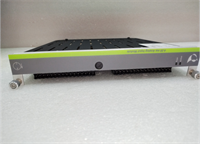
IOP302 METSO
Compatible Replacement Models
| Compatibility Tier | Model Number | Notes |
|---|---|---|
| ✅ Drop-in Replacement | IOP302 | Exact match. Ensure firmware is updated to match the current DNA station version. |
| ⚠️ Software Compatible | IOP302 (Older Rev) | Hardware identical. Requires firmware update via DNA Maintenance Tool before use in newer systems. |
| ⚠️ Successor Model | Valmet DNA I/O Series 4/5 | Newer generation I/O processors. May require hardware rack adaptation and significant project re-engineering. Not a direct swap. |
| ❌ Incompatible | Metso MaxDNA / Ovation | Different architecture entirely. Cannot be used in standard Metso DNA racks. |
Frequently Asked Questions (FAQ)
Is Metso Automation still supporting these modules?
Metso Automation’s process automation business is now Valmet. Valmet continues to support the DNA system and its legacy I/O modules like the IOP302, providing spares and firmware updates. However, for long-term upgrades, they may recommend migrating to the newest DNA I/O series.Can I hot-swap the IOP302 without stopping the process?
The Metso DNA system is designed with redundancy in mind. If your fieldbus and station controller are fully redundant, you can often hot-swap an IOP module. However, the outputs might glitch momentarily during the re-initialization. For critical safety loops (ESD), it is always recommended to perform the swap during a planned maintenance window or bypass the loop temporarily with strict safety protocols.My IOP302 shows a red “Fault” LED but communicates fine. What’s wrong?
This usually indicates a local hardware issue, such as a blown fuse on the board (if user-serviceable), a detected short circuit on one of the output channels, or an internal self-test failure (e.g., memory error). Check the detailed diagnostics in DNA Studio; it will usually pinpoint the specific channel or internal component causing the fault.How do I find the firmware version on the card?
You can usually see the firmware version on the label sticker on the front of the module (look for “FW” or “Ver”). Alternatively, when the card is online in the DNA system, right-click the device in the Hardware Tree in DNA Studio and select “Properties” or “Diagnostics” to view the installed firmware version.What is the difference between IOP302 and IOP301?
The IOP301 was an earlier generation I/O processor with lower channel density and slower processing speeds. The IOP302 offers higher density, faster scan rates, and more advanced diagnostics. While they may fit in the same racks, they are not functionally interchangeable without updating the hardware configuration in the DNA project database.