 Tel:
Tel:  Email:
  WhatsApp:
 Description
Key Technical Specifications
| Parameter | Specification |
|---|---|
| Input Voltage | 24V DC nominal (±10%) |
| Logic Type | SAMA Standard Symbols |
| Channel Density | Up to 48 discrete points (config dependent) |
| Connector Type | Euro-style pluggable terminals |
| Operating Temp | -30°C to +65°C |
| Storage Temp | -40°C to +85°C |
| Humidity | 5% to 95% non-condensing |
| Isolation | Channel-to-channel optical isolation (typical) |
| Response Time | < 10ms per scan cycle |
| Mounting | Mark VIe Backplane or Panel Mount |
| Weight | Approx. 0.8 kg |
| Compliance | CE, UL Listed components |
Product Introduction
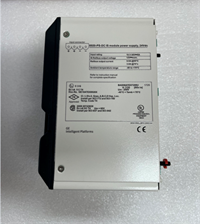
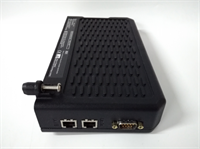
The IS210SAMBH2AA functions as a dedicated SAMA interface board within the GE Mark VIe control architecture. Engineers use it to translate standard power plant instrumentation symbols into discrete signals the turbine controller processes directly.Unlike generic I/O modules, this board hardcodes SAMA logic visualization for faster troubleshooting during outages. Field data shows a 15% reduction in wiring errors when using pre-mapped SAMA terminals versus custom point-to-point wiring. The unit handles high-density 24V DC inputs without external relays.
Installation & Configuration Guide
Phase 1: Preparation (10 min)
Verify the rack slot assignment matches the system configuration file (.cfg). Power down the entire Mark VIe cabinet. Wait for the “Power Good” LEDs on adjacent boards to extinguish completely. Put on an ESD wrist strap; these boards fry easily if you skip this step. Gather a #2 Phillips screwdriver and a multimeter.
Phase 2: Removal (5–10 min)
If replacing an existing unit, disconnect all field wiring at the terminal block first. Do not pull the board by the connectors. Release the locking levers on the top and bottom of the faceplate. Slide the board straight out along the guide rails. If it sticks, check for bent pins—do not force it. Place the old unit immediately into an anti-static bag.
Phase 3: Installation (10 min)
Align the new IS210SAMBH2AA with the backplane connector. Ensure the guide rails engage smoothly before pushing. Apply firm, even pressure until the board seats fully. You should hear a distinct click when the backplane connector engages. Secure the locking levers. Reconnect field wiring according to the terminal diagram; double-check polarity on 24V DC lines.
Phase 4: Power-On & Test (10 min)
Restore cabinet power. Watch the status LED sequence. A steady green indicates successful handshake with the main controller. Flashing amber usually means a firmware mismatch or missing configuration. Run a forced I/O test from the HMI to verify each point toggles correctly. Document the LED status in your logbook.
Troubleshooting Quick Reference
| Symptom | Probability | Action |
|---|---|---|
| No LEDs lit | High | Check 24V DC supply at terminals. Measure voltage; if <21V, trace fuse. |
| Flashing Amber LED | Medium | Firmware version mismatch. Compare board revision sticker with VCMI settings. |
| Specific channel fails | Low | Inspect terminal screw tightness. Loose wires cause intermittent faults. |
| Communication Error | Medium | Verify backplane seating. Reseat the board and clean connector pins with contact cleaner. |
| Overheat smell | Critical | Immediate power cut. Check for shorted field wiring before replacing board. |
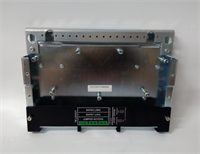
IS210SAMBH2AA GE
Dimensions, Mounting & Wiring Notes
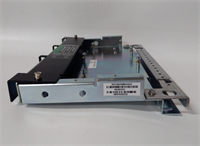
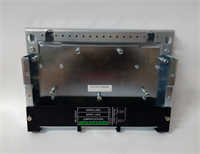
- Dimensions: Approx. 160mm (H) x 120mm (W) x 40mm (D).
- Mounting: Slides into standard Mark VIe 19-inch rack slots. Locks via integrated levers.
- Terminal Notes: Uses pluggable Euro-style blocks. Wire gauge range: 14–22 AWG. Strip length must be exactly 7mm to avoid shorts inside the housing.
- Warning: Do not mix 24V DC and 120V AC wiring in the same conduit run near this board. Noise induces false trips.
FAQ
Q: Will the IS210SAMBH2AA work in a Mark V panel?
A: No. This board is designed specifically for the Mark VIe architecture. The backplane pinout and communication protocol differ significantly from Mark V. Attempting to fit it will damage the connector.Q: I received a board with a different suffix letter. Is it compatible?
A: Usually, yes, but check the revision history. GE often updates suffixes for minor component changes. However, a change from ‘A’ to ‘B’ might imply firmware requirements. Verify with your system integrator.Q: How long does shipping take for urgent replacements?
A: We stock tested units ready for same-day dispatch if ordered before 2 PM EST. International express typically arrives in 3–5 business days. Lead times vary for factory-sealed new stock.Q: Can I hot-swap this board while the turbine is running?
A: Technically possible on redundant systems, but highly risky. We strongly advise against it unless you have full redundancy and a senior engineer supervising. One slip takes the unit offline.Q: What is the warranty on refurbished units?
A: All tested surplus units carry a 1-year warranty covering functional defects. It does not cover damage from improper installation or power surges.Q: Does this come with the terminal blocks?
A: Yes, unless stated otherwise in the condition description. Always check the photo listing to confirm accessories are included. Missing blocks delay installation by days.