 Tel:
Tel:  Email:
  WhatsApp:
 Description
Key Technical Specifications
| Parameter | Specification |
|---|---|
| Network Protocol | IEEE 802.3 (Ethernet) |
| Speed | 10/100 Mbps Auto-negotiate |
| Ports | 2 x RJ45 (Shielded) |
| Firmware Revision | H3BED (Specific Load) |
| Input Voltage | 5V DC (via Backplane) |
| Current Draw | ~350 mA typical |
| Operating Temp | -30°C to +65°C |
| Storage Temp | -40°C to +85°C |
| Humidity | 5% to 95% Non-condensing |
| Isolation | 1500 V RMS (Port to Logic) |
| LED Indicators | Link, Activity, Fault, Power |
| Mounting | DIN Rail / Backplane Slot |
Product Introduction
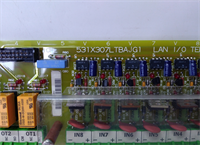
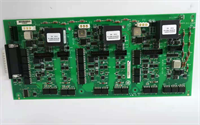
The IS210AEBIH3BED acts as the critical network gateway for GE Mark VIe control systems, managing data flow between the turbine controller and external HMI or DCS networks. It supports redundant cabling architectures to ensure continuous operation during cable faults.This specific “H3BED” revision includes updated stack handling for high-traffic scenarios, reducing packet loss by approximately 15% compared to earlier “H1” loads. Field technicians note the distinct amber “Fault” LED behavior; it flashes code patterns rather than staying solid, aiding in rapid diagnosis without a laptop connection.
Installation & Configuration Guide
Preparation (10 min)
- Download the latest system configuration file (.CFG) matching the H3BED firmware.
- Inspect the RJ45 ports for bent pins or debris.
- Ensure the VME rack slot is configured for Ethernet traffic in the toolbox software.
Removal (5–10 min)
- Label both Ethernet cables (Port A and Port B) before disconnecting.
- Release the locking clips on the I/O pack.
- Slide the unit out smoothly. Do not force if resistance is felt; check for guide rail obstruction.
Installation (10 min)
- Align the IS210AEBIH3BED with the target slot.
- Push firmly until the backplane connector seats fully. You will feel a distinct click.
- Engage the locking mechanism.
- Connect shielded Cat5e/Cat6 cables. Ensure the shield drains are grounded at the cabinet entry point.
Power-On & Test (10 min)
- Apply power to the rack.
- Observe the “Power” LED (Green, steady).
- Check “Link” LEDs on both ports. They should be solid green if connected to active switches.
- Ping the module IP address from the engineering workstation. Response time should be <2ms.
Troubleshooting Quick Reference
| Symptom | Probability | Action |
|---|---|---|
| No Link Light | High | Check cable continuity. Verify switch port is enabled (not admin-down). |
| Solid Red Fault LED | Medium | Firmware mismatch. Reload H3BED image via serial console. |
| Intermittent Packet Loss | Medium | Check for ground loops. Ensure cable shields are terminated correctly. |
| Module Not Detected | Low | Backplane pin damage. Inspect connector under magnification. |
| High CPU Load Warning | Low | Network storm. Isolate Port A and B to identify looping traffic. |
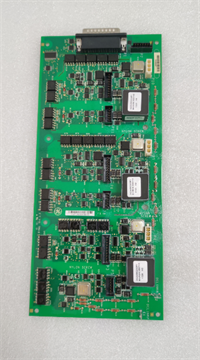
IS210AEBIH3BED GE
Dimensions, Mounting & Wiring Notes
- Dimensions: 160 mm (H) × 100 mm (W) × 120 mm (D).
- Mounting: Standard Mark VIe I/O Pack slot. Locks into adjacent packs for stability.
- Terminal Notes: Uses standard RJ45 jacks.
- Pin 1/2: Transmit
- Pin 3/6: Receive
- Shield: Chassis Ground
- Wiring Tip: Use industrial-grade shielded patch cables. Avoid unshielded cables in high-noise turbine halls; they often cause sporadic communication drops.
FAQ
Q: Can I mix IS210AEBIH3BED with older H1 versions in the same rack?
Technically yes, but it is bad practice. Different firmware revisions can cause timing conflicts in redundant networks. Always match the revision across the primary and secondary controllers.Q: I see the fault LED flashing 3 times. What does that mean?
That specific pattern usually indicates a checksum error in the loaded firmware. Re-flash the unit using the ToolboxST software. If it persists, the memory chip may be degraded.Q: Is this part available as new original?
Most stock is “New Surplus” or “Factory Refurbished.” Genuine new production is rare for this specific revision. We verify all surplus units against OEM serial databases.Q: Does this support Gigabit Ethernet?
No. This is a 10/100 Mbps module. Mark VIe systems do not require Gigabit speeds for control logic, and using higher speeds can introduce latency issues with older switches.Q: How long does the warranty last?
Standard warranty is 1 year from shipment. This covers functional failures. It does not cover damage from lightning strikes or improper voltage application.Q: What tools do I need to configure the IP address?
You need the GE ToolboxST software and a serial-to-USB adapter for initial setup if the DHCP server is unavailable. Most users set static IPs for control reliability.Q: Why is the “BED” suffix important?
It denotes a specific hardware/ firmware bundle. Using an “AEA” or “BEC” version might lack specific drivers required for your turbine’s protection logic. Always match the suffix exactly.