 Tel:
Tel:  Email:
  WhatsApp:
 Description
Product Introduction
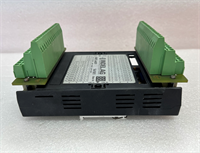
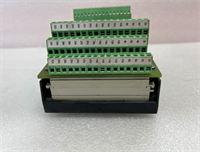
Operators in remote hydroelectric stations often rely on rugged, dedicated local panels like the INDEL AG INFO-4KP-94161 when the central SCADA system is offline or during maintenance isolation. Unlike modern touchscreens that can be glitchy in high-EMI environments near large generators, this unit features a physical keypad and a high-contrast text display designed for reliability over flashiness.We recently sourced this specific revision for a pumped-storage facility in the Alps where the original display had faded beyond readability due to 20 years of UV exposure and thermal cycling. The INFO-4KP connects directly to the INDEL PLC controller via a proprietary or standard serial link, displaying critical parameters like wicket gate position, generator voltage, and active alarms. To be frank, finding the exact “94161” revision is crucial because the pinout for the communication header or the mounting cutout dimensions often change slightly between revisions, making generic replacements incompatible without cabinet modification.
Key Technical Specifications
| Parameter | Value |
|---|---|
| Part Number | INFO-4KP-94161 |
| Manufacturer | INDEL AG (Switzerland) |
| Display Type | 4-Line Alphanumeric LCD (Backlit) |
| Input Method | Physical Membrane Keypad (Function keys + Navigation) |
| Communication Interface | RS-485 (Modbus RTU) or CAN Bus (Model Dependent) |
| Power Supply | 24 VDC (Typical for Industrial Control) |
| Front Bezel Rating | IP65 (Dust tight and protected against water jets) |
| Operating Temperature | -20 °C to +60 °C (Extended range for unheated plants) |
| Mounting | Panel Cut-out (Standard DIN or Custom INDEL footprint) |
| Alarm Handling | Visual flashing for new alarms, Acknowledge button |
| Data Logging | Local buffer for last 10-50 events (depending on firmware) |
| Certifications | CE, ISO 9001 (Swiss Manufacturing Standards) |
| Status | Legacy / Obsolete (Specific to older INDEL installations) |
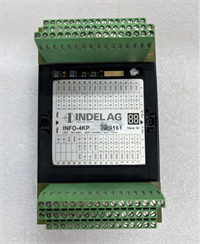
NFO-4KP-94161 INDEL AG
Application Scenarios & Pain Points
A run-of-river hydro plant experienced a communication failure with its central control room during a flood event. The operators had to rely entirely on the local INFO-4KP panel to manually trip the breaker and close the intake gate. The old unit failed to display the “Gate Closed” confirmation due to a segment failure in the LCD. Replacing it with the INFO-4KP-94161 restored full local visibility, allowing safe manual operation until the SCADA link was repaired. This highlights the critical role of these panels as the “last line of defense” in automated power generation.
- Hydroelectric Turbine Control: Need to monitor governor status and acknowledge overspeed alarms locally? The 4-line format is optimized to show “Status,” “Value,” “Alarm,” and “Command” simultaneously.
- Pump Storage Stations: What if the network goes down during a pumping cycle? The keypad allows operators to execute emergency stop sequences directly from the cabinet without a laptop.
- Sluice Gate Management: Remote gate houses often lack HVAC. The wide temperature rating of the INFO series ensures the display doesn’t freeze or become sluggish in winter conditions.
- Water Treatment Plants: Used as a local diagnostic tool for filter backwash cycles, showing step-by-step progress when the main HMI is being updated.
Case Study:
A municipal water authority in Switzerland manages 15 small hydro units installed in the 1990s using INDEL control systems. Over time, the backlight on several INFO panels failed, making them unreadable in low-light conditions. The engineering team decided to replace them proactively rather than wait for a failure during a storm. They located stock of the INFO-4KP-94161. During the replacement, they discovered that the wiring harness on the oldest units had brittle insulation. By replacing both the panel and the harness, they prevented potential short circuits. The project cost 15,000 but prevented an estimated 200,000 loss in potential downtime and environmental fines associated with uncontrolled gate operations.Lessons Learned: Installation Pitfalls
- Communication Parameter Mismatch — The INFO-4KP often requires specific baud rates, parity settings, or node addresses configured via DIP switches inside the unit or via a service menu. ❗ We once installed a replacement, but it showed “No Connection” because the default baud rate (9600) didn’t match the legacy PLC’s setting (19200). Always check the existing unit’s settings (if readable) or consult the original commissioning report before powering up.
- Pinout Variations — Even within the same “INFO” series, the connector pinout for the communication cable can change between revisions (e.g., 94161 vs. 94162). Swapping the cable without verifying continuity can send 24VDC into a data pin, frying the PLC port. Use a multimeter to verify pin-to-pin mapping between the old and new unit.
- Sealing Integrity — The IP65 rating relies on the gasket behind the bezel. If the old gasket is reused or the new one is pinched during installation, moisture ingress will fog the display or corrode the keypad contacts within months. Always use the new gasket provided and torque the mounting clips evenly.
- Power Polarity — Some older INDEL units use a non-standard polarity for the 24VDC terminal block (e.g., Terminal 1 is Negative instead of Positive). Connecting with standard assumptions can instantly destroy the display driver. Verify polarity with a voltmeter at the cable end before connecting.
- Firmware Compatibility — While rare for simple text displays, some INFO units have firmware tied to specific PLC logic versions. If the PLC was upgraded years ago but the HMI wasn’t, a new “stock” INFO unit with older firmware might not recognize newer data tags or alarm codes. Check with INDEL AG support if a firmware update is required for the specific 94161 hardware.