
 Tel:
Tel:  Email:
  WhatsApp:
 Description
Key Technical Specifications
| Parameter | Specification |
|---|---|
| Logic Execution Speed | 0.4 ms/K (typical boolean), ~10ms for complex mixed logic |
| User Memory | 240 KB (Configurable for Logic, Data, Tables) |
| Integrated Ports | 2 x Ethernet (10/100 Mbps), 1 x Serial (RS232/RS485 selectable) |
| Ethernet Protocol | SRTP (Service Request Transport Protocol), Modbus TCP/IP, EGD (Exchange Global Data) |
| Serial Protocol | Modbus RTU (Master/Slave), SNP (Serial Net Protocol), ASCII |
| Max I/O Capacity | Up to 12,288 discrete I/O points (depends on rack configuration) |
| Registers | %I, %Q, %M, %S, %T, %C, %R, %AI, %AQ, %G (Global) |
| Battery Backup | Optional Lithium Battery (IC693ACC302) for RAM retention |
| Mounting | Slot 1 or Slot 2 in 90-30 Universal Rack (requires specific slot positioning if using expansion) |
| Operating Temp | 0°C to 60°C (32°F to 140°F) |
| Power Consumption | ~3.5 Watts (5VDC from backplane) |
| Software | Proficy Machine Edition (Logic Developer – PLC) |
Product Introduction
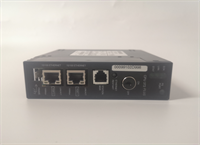
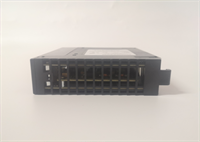
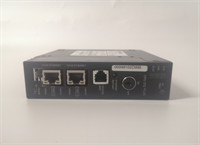
The IC693CPU372 is one of the most powerful processors in the GE Fanuc 90-30 family, designed for demanding applications requiring fast scan times and extensive communication capabilities. Unlike earlier CPUs, the CPU372 features dual integrated Ethernet ports, allowing for simultaneous connection to an HMI/SCADA network and a programming device or second controller without needing an additional network module (like the NIC301).It supports advanced features such as motion control coordination (when paired with DSM modules), redundancy (in specific configurations with a sync module), and large data handling. The 240KB memory provides ample space for complex logic, extensive data logging, and recipe management. (Note: This CPU replaced the CPU364 and CPU363 as the high-end standard before the migration to the RX3i platform.)
Installation & Configuration Guide
Preparation (10 min)
Ensure the 90-30 rack has a compatible power supply (e.g., IC693PWR321 or higher) capable of supporting the CPU and all I/O modules. Verify the backplane slot assignment; typically, the CPU goes in the slot immediately to the right of the power supply (Slot 2 in a standard setup, or Slot 1 if no separate PSU slot is designated, but check rack manual). Have the MAC address label ready for Ethernet configuration. Install Proficy Machine Edition.
Removal (5–10 min)
Critical: Place the PLC in STOP mode. If possible, backup the logic and configuration to a PC first. Power down the rack. Disconnect Ethernet and Serial cables. Release the locking tab on the CPU faceplate. Slide the module out carefully. If a battery is installed, remove it and store safely if reusing, or dispose of properly.
Installation (10 min)
Insert the IC693CPU372 into the designated slot. Align the guides and push firmly until the backplane connector seats. Secure the locking tab. Reconnect Ethernet cables to Port 1 (typically LAN) and/or Port 2 (Programming/Peer). Connect the serial device if needed. Install the backup battery (if required for data retention) into the socket on the faceplate or side.
Power-On & Test (10 min)
Apply power. Observe LEDs:
- OK: Should flash green during boot, then solid green when in RUN mode.
- RUN: Solid green if in RUN mode.
- FAULT: Must be OFF.
- ETH LINK/ACT: Should show link status on connected ports.
Connect via Ethernet using Proficy ME. Enter the IP address configured (default may be invalid, requires initial serial or DHCP config depending on setup). Verify online status. Check the “PLC Information” table for firmware version and memory usage. Perform a quick logic test (toggle an output).
Troubleshooting Quick Reference
| Symptom | Probability | Action |
|---|---|---|
| OK LED Flashing Red/Green | High | Fatal hardware fault or corrupted memory. Try clearing memory (loss of program) or replace CPU. |
| FAULT LED Solid Red | Medium | Logic error (e.g., watchdog timeout, math overflow) or I/O configuration mismatch. Check fault table in software. |
| Cannot Connect via Ethernet | Medium | IP address mismatch, subnet mask error, or firewall blocking SRTP (Port 18245). Verify cable integrity. |
| RAM Loss on Power Down | Low | Battery is dead or not seated correctly. Replace battery (IC693ACC302). Check date/time stamp in PLC. |
| Slow Scan Time | Low | Logic is too complex or excessive communication load. Optimize logic, reduce EGD exchanges, or check for infinite loops. |
Dimensions, Mounting & Wiring Notes
- Dimensions: Standard 90-30 single-slot width (approx. 3.5 cm W × 14 cm H × 15 cm D).
- Mounting: Must be mounted in a universal slot adjacent to the power supply (usually Slot 2). Cannot be placed in remote racks.
- Ethernet Ports: Two RJ45 ports. Port 1 is often used for SCADA/HMI, Port 2 for Engineering. Both support auto-crossing (MDI/MDIX).
- Serial Port: DB9 connector. Pinout is standard GE SNP/Modbus. Requires shielded cable for long distances.
- Battery: Essential for keeping RAM (logic and data) during power loss if no flash storage is used for retention.
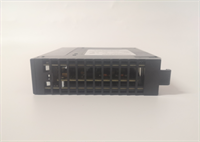
IC693CPU372 GE
FAQ
What is the difference between CPU372 and CPU364?
The CPU372 offers faster execution speed, larger memory (240KB vs 64KB/128KB), and crucially, dual integrated Ethernet ports. The CPU364 typically had only one serial port and required an add-on module (NIC301) for Ethernet.Can I use this CPU for Redundancy?
Yes, the IC693CPU372 supports hot standby redundancy when paired with a specific synchronization module (IC693ACC304 or similar depending on exact config) and a second identical CPU. This requires specific licensing and configuration in Proficy ME.Does it support Modbus TCP?
Yes, natively. You can configure the CPU as a Modbus TCP Client (Master) or Server (Slave) without extra modules. This is ideal for interfacing with modern drives, meters, and third-party controllers.How do I initialize the Ethernet IP address?
If the IP is unknown or needs resetting, you can use the “Hardware Configuration” in Proficy ME to download the new IP settings while online (if connected via Serial) or use the BOOTP/DHCP server method if the CPU is set to obtain IP dynamically (factory default is often DHCP or a specific fallback IP). Tip: Many users use the serial port for the initial IP setup to avoid network conflicts.What happens if the battery dies?
If the battery fails while power is off, the RAM content (Logic, Registers, Retentive Data) will be lost. Upon power-up, the PLC will likely go to FAULT mode with a “Memory Loss” error. You will need to re-download the logic from your backup. Always keep a current backup.Is this CPU compatible with the newer RX3i systems?
No. The 90-30 and RX3i are different architectures. While they share some software tools (Proficy ME), the hardware modules and backplanes are not interchangeable. Migration requires a full system redesign.Can I mix 90-30 and 90-70 modules in the same rack with this CPU?
No. The CPU372 is strictly for the 90-30 series backplane. 90-70 modules have different pinouts and physical keys.
Quality Transparency Strategy (SOP)
1. Incoming Inspection
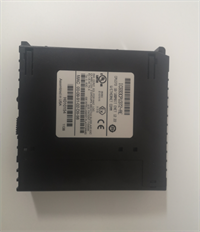
Verify model number “IC693CPU372” and revision letter. Inspect the Ethernet ports for bent pins (common damage). Check the battery compartment for corrosion. Verify the label includes a readable MAC address (critical for Ethernet config).2. Live Functional Testing
Install in a dedicated 90-30 test rack with power supply and a small I/O module.
- Boot Test: Verify successful POST (Power On Self Test).
- Memory Test: Write a test pattern to all user memory areas (%R, %M, etc.), power cycle, and verify retention (with battery installed).
- Comm Test: Establish connection via both Ethernet ports simultaneously. Transfer a 100KB logic file. Test SRTP and Modbus TCP read/write cycles.
- Serial Test: Connect a loopback plug or Modbus simulator to the serial port; verify data transmission at 9600, 19200, and 115200 baud.
- Stress Test: Run a complex math-intensive logic loop for 4 hours monitoring scan time stability.
3. Electrical Testing
Measure 5V backplane current draw; ensure it is within spec (no short circuits). Check isolation between communication ports and the backplane. Verify the battery voltage circuit detects low battery correctly (simulate by disconnecting battery while powered, then removing power).4. Firmware Verification
Read the firmware version. We maintain a database of known stable versions. If the firmware is extremely old (pre-2008) or a known buggy version, we flag it. We do not automatically flash unless requested, as some legacy sites rely on specific version behaviors. Photos taken of the PCB condition (capacitor leakage check).5. Final QC & Packaging
Sign off on the Communication and Memory Retention test report. Pack with a fresh battery (if included per sales agreement) or seal the battery compartment. Anti-static bag + heavy bubble wrap. Label includes tested Firmware Version, MAC Address, and Date Code.
Technical Pitfall Guide
Firmware Mismatch
Newer versions of Proficy Machine Edition (v8.0+) might warn about older CPU firmware. Conversely, very old software might not recognize a newer revision of the CPU372. Solution: Always check the “Compatibility Matrix” in the Proficy release notes. Sometimes a firmware update on the CPU is required to enable new instruction sets or fix communication bugs.DIP/Jumper Misconfiguration
The CPU372 generally has no user-accessible DIP switches for configuration (it’s all software), but some revisions have a small switch for “Write Protect” or “Force Enable”. Ensure these are set correctly for your operation mode. Incorrect settings can prevent downloading logic.Terminal/Port Incompatibility
Ethernet Cable Type: While auto-MDIX is supported, using damaged or non-standard cables (e.g., only 2 wires instead of 4) can cause intermittent drops, especially at 100Mbps. Use Cat5e or better.
Serial Handshaking: Confusion between RTS/CTS and DTR/DSR handshaking protocols often causes serial communication failures with third-party devices. Verify the device’s requirement and configure the CPU port parameters exactly.Power Supply Capacity Margin
The CPU372 itself is efficient, but systems using this high-end CPU often have many communication modules and complex I/O. Users sometimes underestimate the total backplane current required. If the power supply is marginal, the CPU may reset randomly or fail to boot. Calculate total slot load carefully.ESD Damage Risk
The Ethernet transformers and serial transceivers are sensitive. Static discharge from plugging/unplugging cables while the unit is ungrounded can damage the ports. Symptoms include one port working and the other dead, or total communication failure. Always ground yourself and the rack before connecting cables.




