 Tel:
Tel:  Email:
  WhatsApp:
 Description
Key Technical Specifications
| Parameter | Specification |
|---|---|
| Full model | CC-IP0101, P/N 51410056-175 |
| Manufacturer | Honeywell Process Solutions |
| Product type | PROFIBUS DP gateway / communication module |
| Protocol support | PROFIBUS DP V0 / V1 |
| Data rate | 9.6 kbps to 12 Mbps |
| Operating mode | Typically PROFIBUS DP master |
| Max slave nodes | Up to 127 PROFIBUS DP slaves |
| Field interface | RS-485 (PROFIBUS DP) |
| Compatible controller | Honeywell C300 controller, Experion PKS |
| Mounting | Series 8 IOTA / C-Series I/O chassis |
| Supply voltage | 24 V DC |
| Typical current | ~390 mA at 24 V DC |
| Operating temperature | -40 °C to +70 °C (verify with OEM datasheet) |
| Storage temperature | -40 °C to +85 °C |
| Approx. dimensions | 190 mm × 69 mm × 23 mm |
| Typical applications | Integrating PROFIBUS drives, valve positioners, remote I/O, and analyzers into Experion PKS |
Product Introduction
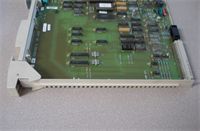
If your C300 rack needs to talk to a PROFIBUS drive, valve positioner, or remote I/O block, this is the module that usually ends up in the slot. The CC-IP0101 51410056-175 is a Honeywell Series 8 PROFIBUS DP gateway module for the Experion PKS / C300 platform. It sits in the IOTA, takes 24 V DC from the backplane or local supply depending on configuration, and presents a PROFIBUS DP master port to the field.Engineers keep this part in spares because it does one job and does it cleanly: it bridges C300 logic to PROFIBUS DP devices at up to 12 Mbps, supporting up to 127 slaves. That matters when a packaging line, boiler island, or compressor skid already has PROFIBUS hardware and you cannot rip it out. The module is not a universal “Ethernet-to-anything” box. It is a PROFIBUS DP interface for C300-based Experion systems. Get that wrong and you will spend an afternoon chasing the wrong cable.

Quality SOP & Tech Pitfalls
The Lab Report (SOP)
- Visual and counterfeit check — verify P/N 51410056-175, Honeywell labeling, PCB revision, connector condition, and IOTA mounting pins.
- Backplane / connector inspection — look for bent pins, corrosion, or burnt contacts on the Series 8 edge connector.
- Live test on test rack — install into a compatible C300 / Series 8 IOTA, apply 24 V DC, and verify module power-up LEDs.
- Configuration check — confirm PROFIBUS address, baud rate, and GSD file loading in the engineering station.
- Communications test — poll at least one known-good PROFIBUS DP slave and verify stable data exchange.
- Insulation and supply check — measure 24 V DC input with a Fluke 115 or equivalent; check for shorts before full insertion.
- Firmware / revision logging — record module revision and any firmware tag visible in the controller diagnostics.
- ESD-safe packaging — seal in anti-static bag with model, revision, and test result tag.
The Engineer’s Warning (Pitfalls)
- Wrong module identity kills projects. CC-IP0101 51410056-175 is widely listed as a PROFIBUS DP gateway for C300/Experion. It is not a generic digital I/O card, not a Modbus TCP-only module, and not a universal Ethernet adapter. If your vendor calls it a “digital I/O module” or “Modbus gateway,” ask for the nameplate photo.
- GSD file mismatches cause silent failures. A wrong GSD, wrong slave address, or wrong baud rate will make the bus look alive while individual devices drop in and out. I have seen a compressor skid blamed on a failing drive when the real issue was a duplicate PROFIBUS address.
- Do not hot-swap blindly. Series 8 modules can support controlled replacement in some configurations, but pulling a live PROFIBUS master without disabling the node map can trip alarms across the segment. Treat it as a planned change.
- Termination matters. Missing or double PROFIBUS termination resistors will create intermittent faults that look like module failure.
Installation & Configuration Guide
1. Pre-Installation
- ⚠️ Obtain approval for the change. This is a live control system component.
- ⚠️ Photograph the existing module, slot position, IOTA wiring, PROFIBUS connector, and termination settings.
- ⚠️ Back up the C300 controller configuration, node map, and alarm database.
- Record the existing PROFIBUS address, baud rate, GSD files, and slave list.
2. Removal
- Place the controller segment in a safe state if required by your operating procedure.
- Label the PROFIBUS cable and IOTA connections.
- Release the module from the IOTA according to the Honeywell removal procedure.
- Inspect the IOTA slot for debris or damaged pins before installing the replacement.
3. Installation
- Copy all settings from the old module: PROFIBUS address, baud rate, termination, and slot position. This prevents most startup failures.
- Seat the CC-IP0101 firmly into the correct Series 8 IOTA slot.
- Reconnect the PROFIBUS DP cable with correct polarity and termination.
- Verify the 24 V DC supply is within spec before enabling communications.
4. Power-On & Testing
- Power up the rack and verify module LED indicators.
- Check the C300 diagnostics for PROFIBUS bus status.
- Validate each slave device one by one, starting with the nearest node.
- Run a short stability test — at least 15 to 30 minutes — before returning the loop to automatic.
Compatible Replacement Models
| Compatibility Tier | Model | Notes |
|---|---|---|
| ✅ Drop-in Replacement | CC-IP0101 51410056-175 | Same P/N, Series 8 IOTA, PROFIBUS DP master for C300 |
| ⚠️ Software Compatible | CC-IP0101 (same family, different revision) | May require GSD review, firmware check, and controller download |
| ❌ Hardware Mod Required | Non-Series 8 or non-C300 PROFIBUS cards | Different backplane, IOTA, or controller platform — do not force fit |
Frequently Asked Questions (FAQ)
Q1: Is the CC-IP0101 51410056-175 a digital I/O module?
No. The most consistent field identification for 51410056-175 is a PROFIBUS DP gateway module for Honeywell C300/Experion PKS systems. Some third-party listings call it a digital I/O or Modbus module, but that does not match the P/N documentation reliably. Always verify with the nameplate.Q2: Can I use it with a C300 controller?
Yes. It is designed for Honeywell C300 controllers in the Experion PKS / Series 8 I/O environment.Q3: How many PROFIBUS devices can it handle?
Up to 127 PROFIBUS DP slaves, depending on baud rate, cable length, segmentation, and device diagnostics.Q4: Does it support Modbus TCP or EtherNet/IP directly?
Not as its primary function. This module’s main role is PROFIBUS DP integration into the C300 rack. If you need Modbus TCP or EtherNet/IP, confirm the correct Honeywell communication module for your controller generation.Q5: Can I hot-swap it?
Only if your site procedure and Honeywell documentation allow it for that specific IOTA and controller configuration. In practice, I treat it as a controlled replacement with backups and alarms acknowledged.Q6: What supply voltage does it need?
Typically 24 V DC, usually around 390 mA. Confirm the exact requirement from the module label and OEM manual before energizing.Q7: Is this module obsolete?
Availability varies by region and vendor. Many units circulate as new surplus or verified stock. For long-term projects, confirm spare-part support with Honeywell or an authorized distributor.